

Introduction
The error in NPM, 'error package install failed, see above', can occur when the user creates a new project in Angular using Node.js using VS code. This means that NPM is corrupted in your system and must reinstall NPM.
To solve this problem, you need to connect your PC to the internet to download or install all packages from the server. Follow each step one by one to download or install Angular/CLI.
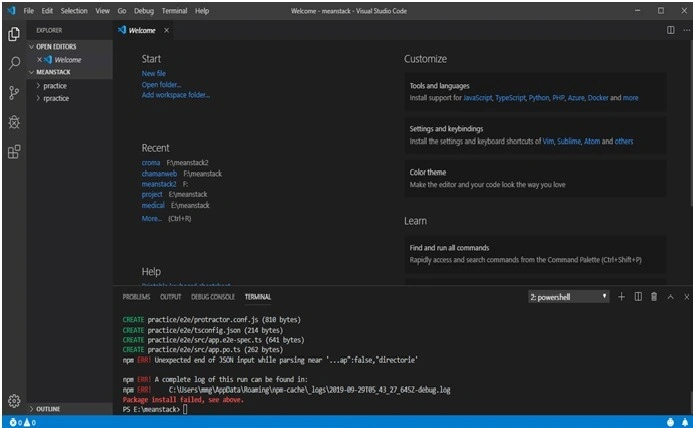
Step 1. Connect your PC to the internet.
Step 2. Open cmd and run the following command to verify your NPM cached memory.
npm cache verify
Step 3. After running this command, run the following command.
npm cache clear -- force
It will take a few seconds to complete because it will be cleaning your NPM cache memory. After completion of this process, it will show.
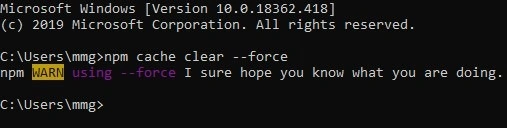
Step 4. After completing this command, run the following command.
npm install -g @angular/cli@latest
This command takes a few minutes to complete, as with this command, your system will download the latest Angular/CLI package.
After running this command, it will show the following.
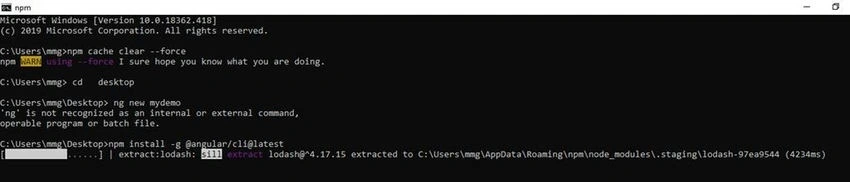
When it completely installs, it will show.
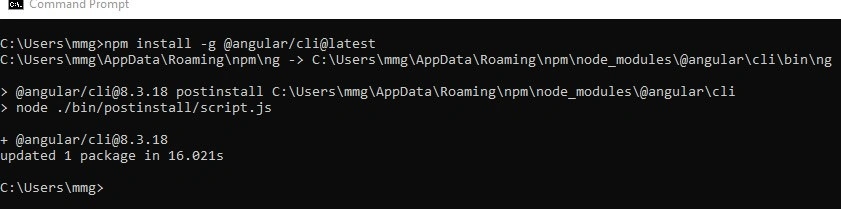
Now, your system has completely installed Angular/CLI packages. After completely installing Angular/CLI packages, you have to check the version of Angular/CLI
Step 5. To check the version of Angular/CLI, run the following command on your CMD.
ng --version
After running this command, it should show the following.
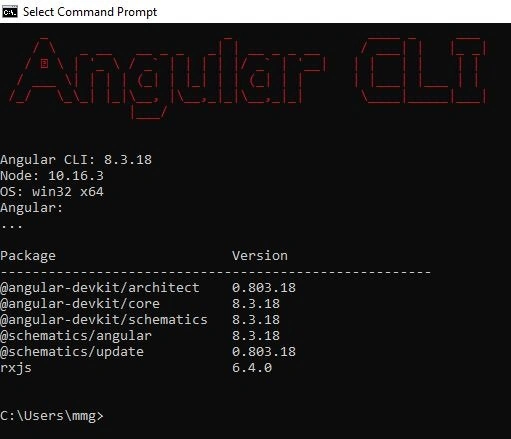
After completing this process, you have successfully installed Angular/CLI. Now you must open your VS Code and open your folder with VS Code where you want to create your project. Then, open the terminal.
Step 6. Now run the following command on your terminal
ng new demo
With this command, your project will be created.
Reinhard SchmidlinPosted Jun 27, 2022, 4:46 PM
I had followed all the steps but I still have the problem.
Thilak TPosted Jul 7, 2021, 1:43 AM
C:\Users\Thilakraj>npm install -g @angular/clinpm WARN EBADENGINE Unsupported engine {npm WARN EBADENGINE package: '@angular/[email protected]', npm WARN EBADENGINE required: { npm WARN EBADENGINE node: '^12.14.1 || >=14.0.0', npm WARN EBADENGINE npm: '^6.11.0 || ^7.5.6', npm WARN EBADENGINE yarn: '>= 1.13.0' npm WARN EBADENGINE }, npm WARN EBADENGINE current: { node: 'v15.6.0', npm: '7.4.0' } npm WARN EBADENGINE } npm WARN EBADENGINE Unsupported engine { npm WARN EBADENGINE package: '@angular-devkit/[email protected]', npm WARN EBADENGINE required: { npm WARN EBADENGINE node: '^12.14.1 || >=14.0.0', npm WARN EBADENGINE npm: '^6.11.0 || ^7.5.6', npm WARN EBADENGINE yarn: '>= 1.13.0' npm WARN EBADENGINE }, npm WARN EBADENGINE current: { node: 'v15.6.0', npm: '7.4.0' } npm WARN EBADENGINE } npm WARN EBADENGINE Unsupported engine { npm WARN EBADENGINE package: '@angular-devkit/[email protected]', npm WARN EBADENGINE required: { npm WARN EBADENGINE node: '^12.14.1 || >=14.0.0', npm WARN EBADENGINE npm: '^6.11.0 || ^7.5.6', npm WARN EBADENGINE yarn: '>= 1.13.0' npm WARN EBADENGINE }, npm WARN EBADENGINE current: { node: 'v15.6.0', npm: '7.4.0' } npm WARN EBADENGINE } npm WARN EBADENGINE Unsupported engine { npm WARN EBADENGINE package: '@angular-devkit/[email protected]', npm WARN EBADENGINE required: { npm WARN EBADENGINE node: '^12.14.1 || >=14.0.0', npm WARN EBADENGINE npm: '^6.11.0 || ^7.5.6', npm WARN EBADENGINE yarn: '>= 1.13.0' npm WARN EBADENGINE }, npm WARN EBADENGINE current: { node: 'v15.6.0', npm: '7.4.0' } npm WARN EBADENGINE } npm WARN EBADENGINE Unsupported engine { npm WARN EBADENGINE package: '@schematics/[email protected]', npm WARN EBADENGINE required: { npm WARN EBADENGINE node: '^12.14.1 || >=14.0.0', npm WARN EBADENGINE npm: '^6.11.0 || ^7.5.6', npm WARN EBADENGINE yarn: '>= 1.13.0' npm WARN EBADENGINE }, npm WARN EBADENGINE current: { node: 'v15.6.0', npm: '7.4.0' } npm WARN EBADENGINE } npm ERR! code EPERM npm ERR! syscall rename npm ERR! path C:\Users\Thilakraj\AppData\Roaming\npm\node_modules\@angular\cli npm ERR! dest C:\Users\Thilakraj\AppData\Roaming\npm\node_modules\@angular\.cli-K17PuJwP npm ERR! errno -4048 npm ERR! Error: EPERM: operation not permitted, rename 'C:\Users\Thilakraj\AppData\Roaming\npm\node_modules\@angular\cli' -> 'C:\Users\Thilakraj\AppData\Roaming\npm\node_modules\@angular\.cli-K17PuJwP' npm ERR! [Error: EPERM: operation not permitted, rename 'C:\Users\Thilakraj\AppData\Roaming\npm\node_modules\@angular\cli' -> 'C:\Users\Thilakraj\AppData\Roaming\npm\node_modules\@angular\.cli-K17PuJwP'] { npm ERR! errno: -4048, npm ERR! code: 'EPERM', npm ERR! syscall: 'rename', npm ERR! path: 'C:\\Users\\Thilakraj\\AppData\\Roaming\\npm\\node_modules\\@angular\\cli', npm ERR! dest: 'C:\\Users\\Thilakraj\\AppData\\Roaming\\npm\\node_modules\\@angular\\.cli-K17PuJwP' npm ERR! } npm ERR! npm ERR! The operation was rejected by your operating system. npm ERR! It's possible that the file was already in use (by a text editor or antivirus), npm ERR! or that you lack permissions to access it. npm ERR! npm ERR! If you believe this might be a permissions issue, please double-check the npm ERR! permissions of the file and its containing directories, or try running npm ERR! the command again as root/Administrator. npm ERR! A complete log of this run can be found in: npm ERR! C:\Users\Thilakraj\AppData\Local\npm-cache\_logs\2021-07-07T01_42_07_740Z-debug.log C:\Users\Thilakraj>
abdulaziz bingölPosted Jun 29, 2021, 11:09 PM
Hello. I am getting an error like below and therefore my project is not building correctly. what should I do. can you help me? CREATE intro/e2e/src/app.po.ts (301 bytes)v Packages installed successfully. 'git' is not recognized as an internal or external command, operable program or batch file.
LAILA RIFQIPosted May 26, 2021, 8:15 PM
Npm ERR! npm cache clear does not accept arguments npm ERR! A complete log of this run can be found in: npm ERR! C:\Users\asus\AppData\Local\npm-cache\_logs\2021-05-26T20_04_27_097Z-debug.log
LAILA RIFQIPosted May 26, 2021, 8:15 PM
When i run npm cache clear -- force i got this eror
Ethan SchreurPosted Mar 23, 2021, 12:04 AM
Hello Chaman! I have followed the steps and npm install -g @angular/cli@latest still results in lots of error messages that begin with "npm ERR!" Is there anything you'd suggest to fix this problem?
Tarun KumarPosted Mar 17, 2021, 7:09 PM
After typing the command "npm cache clear --force" I came across- "npm WARN using --force Recommended protections disabled." What should I do now?
ankit jainPosted Oct 7, 2020, 1:03 AM
Its working good thanks for sharing
Subair RasheedPosted Sep 25, 2020, 3:41 AM
This worked perfectly. Thanks a lot Chaman
sarita patilPosted May 28, 2020, 12:36 AM
When npm install -g @angular/cli@latest is not worked use npm install @angular/cli@latest -g
reshma patilPosted May 13, 2020, 4:41 AM
I have followed all the instructions, but still the issue is same , please help
Rohit PatilPosted May 5, 2020, 11:01 AM
Thanks. It's worked.
Deepak NagarPosted Feb 29, 2020, 8:20 AM
Really nice article and more informative article
Rutu GhumarePosted Dec 14, 2019, 3:57 AM
C:\Users\admin>npm cache clear -- forcenpm ERR! npm cache clear does not accept arguments npm ERR! A complete log of this run can be found in: npm ERR! C:\Users\admin\AppData\Roaming\npm-cache\_logs\2019-12-14T09_50_09_ 698Z-debug.log i got ths error
Arun Kumar SinghPosted Nov 27, 2019, 3:37 AM
Keep it up i faced same problem multiple time its helpful
Sourav Kumar DasPosted Nov 26, 2019, 3:30 AM
Nice article.
Vijayakumar ManiPosted Nov 26, 2019, 1:55 AM
Good Article Chaman Gautam..