

Introduction
Here, I introduce you to jQuery.datatable features in our web application in the .NET Core MVC Project.
The Model-View-Controller (MVC) architectural pattern separates an application into three main groups of components: Models, Views, and Controllers. This pattern helps to achieve separation of concerns. Using this pattern, user requests are routed to a Controller which is responsible for working with the Model to perform user actions and/or retrieve results of queries. The Controller chooses the View to display to the user and provides it with any Model data it requires.
Jquery. data tables help us to show the HTML table in a responsive and interactive way by adding Paging, Sorting, Export Events, and many more features and functionality on the client side.
In your existing .NET Core MVC project solution, you need to add client-side library packages for jQuery. data tables, which you can also download directly from here.
With Datatables, you can alter the ordering characteristics of the table at initialization time. Using the order initialization parameter, you can set the table to display the data in the exact order that you want.
Datatables can split the rows in tables into individual pages, which is an efficient method of showing a large number of records in a small space. The end-user is provided with controls to request the display of different data as they navigate through the data. This feature is enabled by default, but if you wish to disable it, you may do so with this parameter.
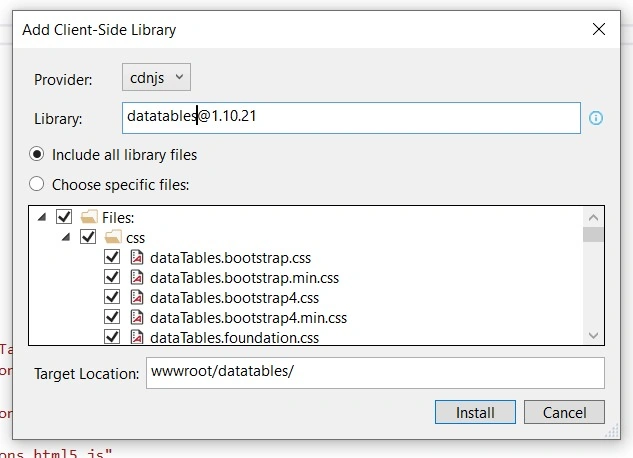
Here, I am using bundleconfig.json for bundling and minification where we register all required files as a single output file.
Before adding the bundleconfig.json file to your project's root directory, add an extension of Bundler and Minifier to your project.
or
You can also directly refer the all JS and CSS file directly to your Page or _Layout.cshtml.
bundleconfig.json
[
    {
        "outputFileName": "wwwroot/js/site.min.js",
        "inputFiles": [
            "wwwroot/lib/jquery/dist/jquery.js",
            "wwwroot/datatables/js/jquery.dataTables.js",
            "wwwroot/datatables/js/dataTables.bootstrap.js",
            "wwwroot/datatables/js/dataTables.bootstrap4.js",
            "wwwroot/datatables/js/dataTables.dataTables.js",
            "wwwroot/datatables/js/dataTables.foundation.js",
            "wwwroot/datatables/js/dataTables.jqueryui.js",
            "wwwroot/datatables/js/dataTables.material.js",
            "wwwroot/datatables/js/dataTables.semanticui.js",
            "wwwroot/datatables/js/dataTables.uikit.js",
            "wwwroot/datatables/js/datatables-buttons/js/dataTables.buttons.js",
            "wwwroot/datatables/js/datatables-buttons/js/buttons.colVis.js",
            "wwwroot/datatables/js/datatables-buttons/js/buttons.flash.js",
            "wwwroot/datatables/js/datatables-buttons/js/buttons.html5.js",
            "wwwroot/datatables/js/datatables-buttons/js/buttons.print.js"
        ],
        "minify": {
            "enabled": true,
            "renameLocals": true
        }
    },
    {
        "outputFileName": "wwwroot/js/site.min.css",
        "inputFiles": [
            "wwwroot/datatables/css/jquery.dataTables.css",
            "wwwroot/datatables/css/dataTables.bootstrap.css",
            "wwwroot/datatables/css/dataTables.bootstrap4.css",
            "wwwroot/datatables/css/dataTables.foundation.css",
            "wwwroot/datatables/css/dataTables.jqueryui.css",
            "wwwroot/datatables/css/dataTables.material.css",
            "wwwroot/datatables/css/dataTables.semanticui.css",
            "wwwroot/datatables/css/dataTables.uikit.css",
            "wwwroot/datatables/css/buttons.dataTables.min.css"
        ],
        "minify": {
            "enabled": true,
            "renameLocals": true
        }
    }
]
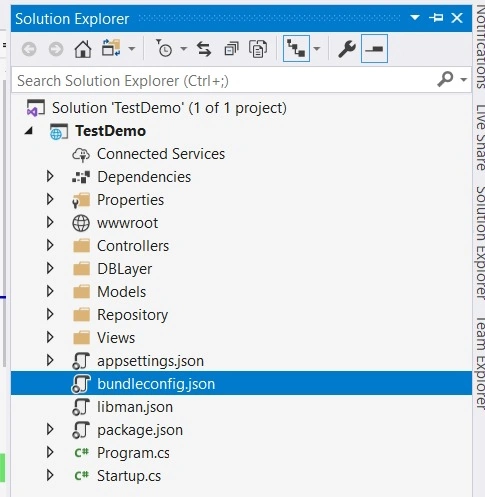
I am using bundling, so I need to make an output file by running the task runner explorer and right-clicking on the bundleconfig.json file.

Add controller and View for getting data from the database and showing it to the view in table format.
ExampleController.cs
using System;
using System.Collections.Generic;
using System.Linq;
using System.Threading.Tasks;
using Microsoft.AspNetCore.Mvc;
using Microsoft.AspNetCore.Mvc.Rendering;
using Microsoft.EntityFrameworkCore;
using TestDemo.DBLayer;
using TestDemo.Models;

namespace TestDemo.Controllers
{
    public class ExampleController : Controller
    {
        private readonly DBAccessContext _context;

        public ExampleController(DBAccessContext context)
        {
            _context = context;
        }

        // GET: Example
        public async Task<IActionResult> Index()
        {
            return View(await _context.Crud_Data.ToListAsync());  //your logic to get data from database
        }
    }
}
Index.cshtml under View/Example folder
@model IEnumerable<TestDemo.Models.CrudModel>
@{
    ViewData["Title"] = "Index";
    Layout = "~/Views/Shared/_Layout.cshtml";
}
<h1>Index</h1>
<p>
    <a asp-action="Create">Create New</a>
</p>
<partial name="_ValidationScriptsPartial" />
<script>
    $(document).ready(function () {
        $('#table').DataTable({
            dom: 'Bfrtip',
            buttons: [
                'copy', 'csv',  'print'
            ]
        });
    });
</script>
<table class="table table-striped table-bordered" style="width:100%;" id="table">
    <thead>
        <tr>
            <th>
                @Html.DisplayNameFor(model => model.Name)
            </th>
            <th>
                @Html.DisplayNameFor(model => model.City)
            </th>
            <th>
                @Html.DisplayNameFor(model => model.InsertDate)
            </th>
            <th>
                @Html.DisplayNameFor(model => model.FatherName)
            </th>

        </tr>
    </thead>
    <tbody>
        @foreach (var item in Model)
        {
            <tr>
                <td>
                    @Html.DisplayFor(modelItem => item.Name)
                </td>
                <td>
                    @Html.DisplayFor(modelItem => item.City)
                </td>
                <td>
                    @Html.DisplayFor(modelItem => item.InsertDate)
                </td>
                <td>
                    @Html.DisplayFor(modelItem => item.FatherName)
                </td>
                @*<td>
                        <a asp-action="Edit" asp-route-id="@item.Id">Edit</a> |
                        <a asp-action="Details" asp-route-id="@item.Id">Details</a> |
                        <a asp-action="Delete" asp-route-id="@item.Id">Delete</a>
                    </td>*@
            </tr>
        }
    </tbody>
</table>
In _Layout.cshtml, I added a reference for site.min.js and site.min.css which we have registered in bundleconfig.json as an output file.
<script src="~/js/site.min.js" asp-append-version="true"></script>
<link href="~/js/site.min.css" rel="stylesheet" asp-append-version="true" />
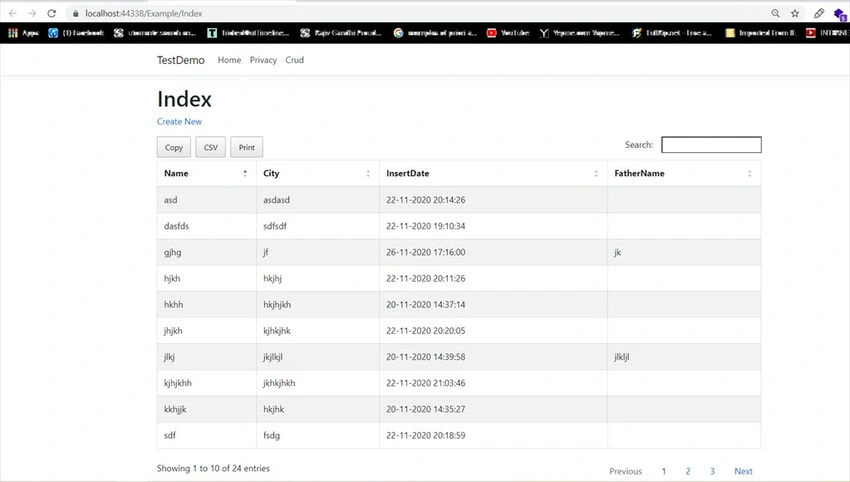
That's it! Let's run our project and see the output.
Summary
Here, we have learned how to show data from the database to our View in .NET Core MVC 3.1.
We also used bundling and minification for completing the process. We have shown the Data to the view with the feature of sorting, paging, and exporting.
I hope it helps. Happy Coding
Join the conversation! Your thoughts help the community grow.