
Introduction
Here are some useful programs implemented using C#. Of course, most of you might have programmed them using different other programming languages. Hence I am not going to explain to you what each program does. I am going to show how to implement them using C#. The following is the list of programs for your reference.
Linear Search Program in C#
Linear search is one of the simplest searching algorithms used to find a specific element in a list or array. In this article, we will walk you through how to implement a linear search algorithm in C#. Linear search, also known as sequential search, is a straightforward searching algorithm that checks each element in a list or array one by one until a match is found. It is the most basic searching technique and is suitable for small datasets. However, for larger datasets, more efficient algorithms like binary search are preferred.
Here, the code below implements Linear search.
using System;
class LinearSearch
{
    public static void Main()
    {
        Console.WriteLine("Enter the number of elements you want to hold in the array?");
        if (!int.TryParse(Console.ReadLine(), out int length) || length <= 0)
        {
            Console.WriteLine("Invalid input. Please enter a positive integer for the array size.");
            return;
        }
        int[] array = new int[length];
        Console.WriteLine("\nEnter array elements:\n");
        for (int i = 0; i < length; i++)
        {
            Console.Write($"Enter element {i + 1}: ");
            if (!int.TryParse(Console.ReadLine(), out array[i]))
            {
                Console.WriteLine("Invalid input. Please enter a valid integer.");
                i--; // Retry input for the same element
            }
        }
        Console.WriteLine("Enter the search element:\n");
        if (!int.TryParse(Console.ReadLine(), out int searchValue))
        {
            Console.WriteLine("Invalid input. Please enter a valid integer to search for.");
            return;
        }
        for (int i = 0; i < length; i++)
        {
            if (array[i] == searchValue)
            {
                Console.WriteLine("-------------------------");
                Console.WriteLine("Search successful");
                Console.WriteLine($"Element {searchValue} found at location {i + 1}\n");
                return;
            }
        }

        Console.WriteLine("Search unsuccessful");
    }
}
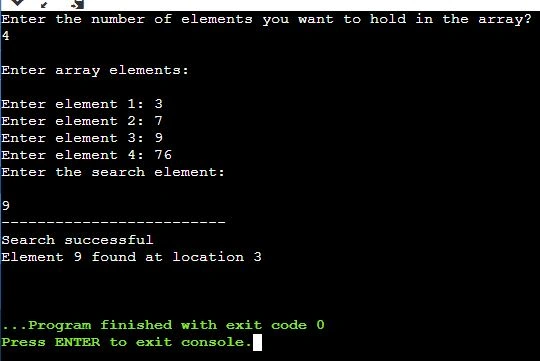
Output
Binary Search Program in C#
Binary search is a highly efficient searching algorithm used to find a specific element in a sorted list or array. In this article, we will guide you through implementing a binary search algorithm in C#.Binary search is a divide-and-conquer algorithm that repeatedly divides a sorted list or array into two halves and compares the middle element with the target element. Based on the comparison, it narrows down the search range, effectively reducing the search space by half with each iteration. This makes binary search significantly faster than linear search, especially for large datasets.
Here, the code below implements Binary search.
using System;
class BinarySearch
{
    public static void Main()
    {
        // Initialize an array to store elements
        int[] array = new int[100];
        Console.WriteLine("Enter the number of elements in the array:");
        string input = Console.ReadLine();
        int length = Int32.Parse(input);
        Console.WriteLine("-----------------------");
        Console.WriteLine("Enter array elements:");
        Console.WriteLine("-----------------------");
        // Input array elements
        for (int i = 0; i < length; i++)
        {
            string elementInput = Console.ReadLine();
            array[i] = Int32.Parse(elementInput);
        }
        Console.WriteLine("--------------------");
        Console.WriteLine("Enter the search element:");
        Console.WriteLine("--------------------");
        // Input the value to search for
        string searchInput = Console.ReadLine();
        int searchValue = Int32.Parse(searchInput);
        int low = 0;
        int high = length - 1;
        // Perform binary search
        while (low <= high)
        {
            int mid = (low + high) / 2;
            if (searchValue < array[mid])
                high = mid - 1;
            else if (searchValue > array[mid])
                low = mid + 1;
            else if (searchValue == array[mid])
            {
                Console.WriteLine("-----------------");
                Console.WriteLine("Search successful");
                Console.WriteLine("-----------------");
                Console.WriteLine("Element {0} found at location {1}\n", searchValue, mid + 1);
                return;
            }
        }
        // If the element is not found
        Console.WriteLine("Search unsuccessful");
    }
}
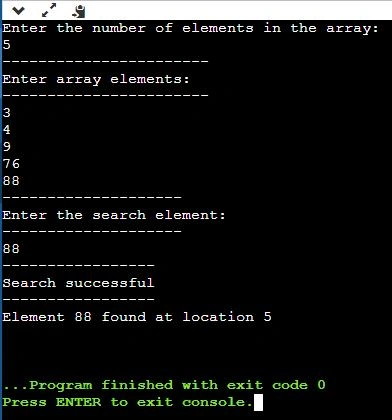
Output
Selection Sort Program in C#
Selection sort is a simple and straightforward sorting algorithm used to sort a list or array of elements. In this article, we'll guide you through implementing a selection sort algorithm in C#. Selection sort is a comparison-based sorting algorithm that divides the input list into two parts: the sorted part and the unsorted part. It repeatedly selects the minimum (or maximum, depending on the sorting order) element from the unsorted part and moves it to the end of the sorted part. This process continues until the entire list is sorted.
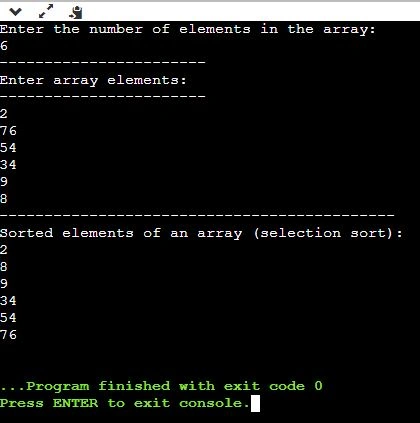
Here, the code below implements the Selection sort.
using System;
class SelectionSort
{
    public static void Main()
    {
        // Initialize an array to store elements
        int[] array = new int[100];
        int min, pass, i;
        Console.WriteLine("Enter the number of elements in the array:");
        string input = Console.ReadLine();
        int length = Int32.Parse(input);
        Console.WriteLine("-----------------------");
        Console.WriteLine("Enter array elements:");
        Console.WriteLine("-----------------------");
        // Input array elements
        for (int j = 0; j < length; j++)
        {
            string elementInput = Console.ReadLine();
            array[j] = Int32.Parse(elementInput);
        }
        // Perform selection sort
        for (pass = 0; pass < length - 1; pass++)
        {
            min = pass;

            for (i = pass + 1; i < length; i++)
            {
                if (array[min] > array[i])
                    min = i;
            }

            // Swap elements if needed
            if (min != pass)
            {
                int temp = array[pass];
                array[pass] = array[min];
                array[min] = temp;
            }
        }
        Console.WriteLine("--------------------------------------------");
        Console.WriteLine("Sorted elements of an array (selection sort):");
        // Print sorted elements
        for (int j = 0; j < length; j++)
        {
            Console.WriteLine(array[j]);
        }
    }
}
emani amaPosted Aug 7, 2007, 8:27 PM
:(
emani amaPosted Aug 7, 2007, 6:21 PM
i am using microsoft visual j++ 6.0
emani amaPosted Aug 7, 2007, 6:19 PM
withe these variable 16 8 12 21 24 11 25 thnk you :)