Introduction
Yes, the classic arcade game has returned and is appearing in C# Corner complete with sound and authentic aliens and source code. It's not quite as good as the real game, but with a few adjustments it can get there. I actually got many of the sounds and images from a web site that is bent on celebrating this traditional ground breaking game: http://spaceinvaders.retrogames.com. This made writing the game a little bit easier since they supplied many of the files in which you can capture the images and sounds.
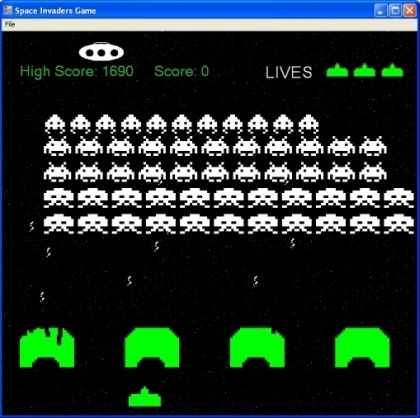
Figure 1 - The Space Invader Game
Note: This article is actually an update of the
original space invaders article I posted in 2001. It adds a few minor features such as displaying remaining lives and spiraling bombs.
Playing the Game
This version is played using the left and right arrow keys to move the man and the space bar to fire. If you hit an alien, you get 10, 20, or 30 points, depending on which one you hit. If a bomb hits you, you die and you only have 3 lives. The shields will protect you from a bomb, so you can hide behind them while you wait for the bombs to pass. Occasionally, a saucer flies across the screen. If you hit it, you get a suprise score (up to 150 points).
Design of the Game
The design for this game is shown below:
Figure 2 - Space Invader UML Design Reverse engineered using WithClass 2000
The Design basically has a base class GameObject which knows how to draw the game pieces bitmap. Subclassed under this object is all the component classes of the game: Man, Invader, Bullet, Bomb and Shield. A row of Invader classes is controlled through the InvaderRow class. The form contains an array of InvaderRows, an array of Shields, and a Man.
The Timer Event Handler
The entire game is played off of the timer component. After each tick of the timer, the game checks to see if their are bomb collisions, bullet collisions, and whether or not to move the invaders. It also handles the key presses from the user here so as not to change the timing of the game. If a key is pressed, it is remembered by the key press event, but nothing more happens in the key press event handler. Below is the code executed with each entry into the timer event handler:
- private void timer1_Tick(object sender, System.EventArgs e)
- {
-
- HandleKeys();
-
- TimerCounter++;
-
- if (GameGoing == false)
- {
-
- if (TimerCounter % 6 == 0)
- MoveInvadersInPlace();
- Invalidate();
- return;
- }
-
- if (TheBullet.Position.Y < 0)
- {
- ActiveBullet = false;
- }
-
- if (TimerCounter % kSaucerInterval == 0)
- {
- InitializeSaucer();
- PlaySoundInThread("8.wav", 1);
- SaucerStart = true;
- }
-
- if (SaucerStart == true)
- {
- CurrentSaucer.Move();
- if (CurrentSaucer.GetBounds().Left > ClientRectangle.Right)
- {
- SaucerStart = false;
- }
- }
-
- if (TimerCounter % TheSpeed == 0)
- {
- MoveInvaders();
- nTotalInvaders = TotalNumberOfInvaders();
-
- if (nTotalInvaders <= 20)
- {
- TheSpeed = 5;
- }
- if (nTotalInvaders <= 10)
- {
- TheSpeed = 4;
- }
- if (nTotalInvaders <= 5)
- {
- TheSpeed = 3;
- }
- if (nTotalInvaders <= 3)
- {
- TheSpeed = 2;
- }
- if (nTotalInvaders <= 1)
- {
- TheSpeed = 1;
- }
- if (nTotalInvaders == 0)
- {
-
-
- InitializeAllGameObjects(false);
- TheLevel++;
- }
- }
-
- TestBulletCollision();
- TestBombCollision();
-
- Invalidate();
- }
Listing 1 - The Timer Event Handler in the Form
Painting the Game Components
The drawing of all the components is triggered by the Invalidate called in the timer event handler. Below is the paint event handler that paints all of the game elements:
- private void Form1_Paint(object sender, System.Windows.Forms.PaintEventArgs e)
- {
-
- Graphics g = e.Graphics;
-
- g.FillRectangle(Brushes.Black, 0, 0, ClientRectangle.Width, ClientRectangle.Height);
-
- TheMan.Draw(g);
-
- TheScore.Draw(g);
-
- _livesIndicator.Draw(g);
-
- if (ActiveBullet)
- {
- TheBullet.Draw(g);
- }
-
- if (SaucerStart)
- {
- CurrentSaucer.Draw(g);
- }
-
- for (int i = 0; i < kNumberOfRows; i++)
- {
- TheInvaders = InvaderRows[i];
- TheInvaders.Draw(g);
- }
-
- for (int i = 0; i < kNumberOfShields; i++)
- {
- Shields[i].Draw(g);
- }
- }
Listing 2 - The Paint Event Handler in the Form
Spinning Bombs with Graphic Paths
Short of using a bitmap, graphic paths give you a nice way to draw complex shapes with lines and curves. Graphic paths can also be operated on with matrix transformations so you can easily rotate, flip, scale, and translate a graphics path on the screen. Listing 3 shows how a bomb is drawn on a screen using the Draw method in the Bomb class. Before the bomb is drawn, however, two graphics paths are created. One path is created for the zig zag bomb and a one graphics path is created for the bombs reflection on the Y axis. When we draw the bomb in the Draw method we determine which path to draw by an inversion flag. The inversion flag is toggled each time in the draw routine, so each path is drawn alternately. As the path is flipped back and forth along the y-axis, it looks like the bomb is spinning down towards the ship.
- GraphicsPath bombIn = new GraphicsPath();
- GraphicsPath bombOut = new GraphicsPath();
- GraphicsPath bombInTransformed = new GraphicsPath();
- GraphicsPath bombOutTransformed = new GraphicsPath();
-
-
-
-
- void CreateBombInPath()
- {
- float width = 5;
- float height = 15;
- float seg = height / 3;
- bombIn.AddLine(new PointF(0, 0), new PointF(width, seg));
- bombIn.AddLine(new PointF(width, seg), new PointF(0, seg * 2));
- bombIn.AddLine(new PointF(0, seg * 2), new PointF(width, seg * 3));
- }
-
-
-
-
- void CreateBombOutPath()
- {
- float width = 5;
- float height = 15;
- float seg = height / 3;
- bombOut.AddLine(new PointF(width, 0), new PointF(0, seg));
- bombOut.AddLine(new PointF(0, seg), new PointF(width, seg * 2));
- bombOut.AddLine(new PointF(width, seg * 2), new PointF(0, seg * 3));
- }
- bool _invert = false;
-
-
-
-
-
-
- public override void Draw(Graphics g)
- {
- UpdateBounds();
-
- Matrix m = new Matrix();
-
-
- m.Translate(MovingBounds.Left, MovingBounds.Top);
-
- if (_invert)
- {
- bombInTransformed = (GraphicsPath)bombIn.Clone();
- bombInTransformed.Transform(m);
- g.DrawPath(BombPen, bombInTransformed);
- bombInTransformed.Dispose();
- }
- else
- {
- bombOutTransformed = (GraphicsPath)bombOut.Clone();
- bombOutTransformed.Transform(m);
- g.DrawPath(BombPen, bombOutTransformed);
- bombOutTransformed.Dispose();
- }
- _invert = !_invert;
- Position.Y += TheBombInterval;
- }
Listing 3 - Creating the Bomb Graphic Paths and Drawing the Bomb
Conclusion
Although an old arcade game, Space Invaders is still fun to play. GDI+ provides enough graphic power to recreate the game in its entirety. Using bitmaps, graphic paths, simple shapes, and a timer, those invaders are soon moving across the screen and dropping bombs on your unsuspecting ship. Using the old windows multimedia library you can also play wave files and bring back the original sounds and explosions. Space Invaders was designed with OOP in mind, so I hope this article gives you a good basis for thinking about how to design games with objects. In the meantime, don't let those invaders get the best of you!
Master Guide to Starcraft 2 World of Warcraft Leveling Guide Passing Microsoft Certification Basic Programming 


Woody WoodmanPosted Apr 16, 2024, 8:42 AM
Hi Mike, I'm appreciation the UML diagram. Since the diagram can not be seen in full in this article could you provide the full diagram please?
kalu singh raoPosted Jul 9, 2016, 12:09 PM
Nice...
SharadPosted Jul 17, 2015, 3:44 AM
good one...
Vu VertuPosted Apr 21, 2012, 12:47 AM
I can dowload source code. Can you fix that link for me? Thank you so much!
mitch castroPosted Feb 24, 2012, 5:10 AM
thank you for having this one...it helps me a lot...
hi elPosted Oct 10, 2011, 3:30 PM
Nice demo,will be a good support for their project to
AchimPosted Oct 3, 2011, 2:07 PM
Great Demo to learn a little bit more about game programming in C. I got an error when the code tries to play a sound. Did i have an old or wrong library ? Is there a better function to play a sound sample.
subash koutilyaeditedPosted Aug 5, 2010, 11:28 AMEdited Aug 24, 2010, 12:21 PM
hi,i am subash.I like u r game very much and want to submit this as my project.I need some help to design a menu for this game like "start game","exit",and want to divide this game in to 6 levels and when we press start we should be able to select any level. This is my plan,can u help me with this please????? Waiting for u r reply