

Introduction
Spell check guidance is really important in the field of documentation. Windows 10 provides this type of feature with options to automatically correct and highlight the misspelled words. Here are the steps:
Step 1
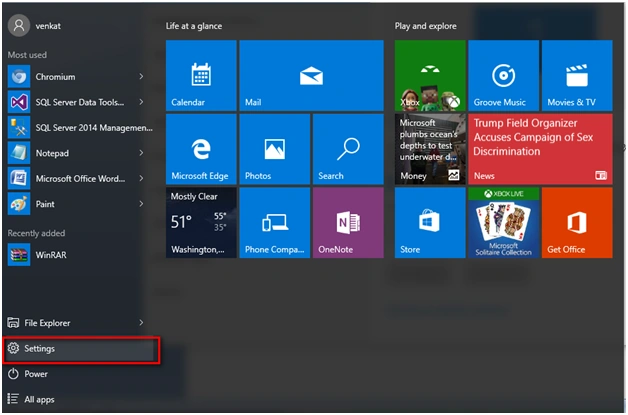
Go to Settings option in Windows 10,
Step 2
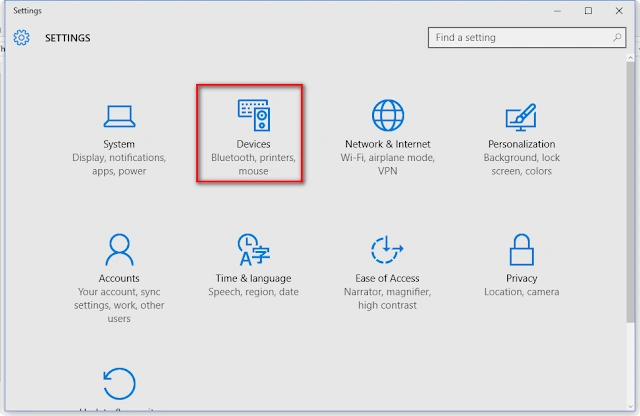
Under SETTINGS tab, click Devices,
Step 3
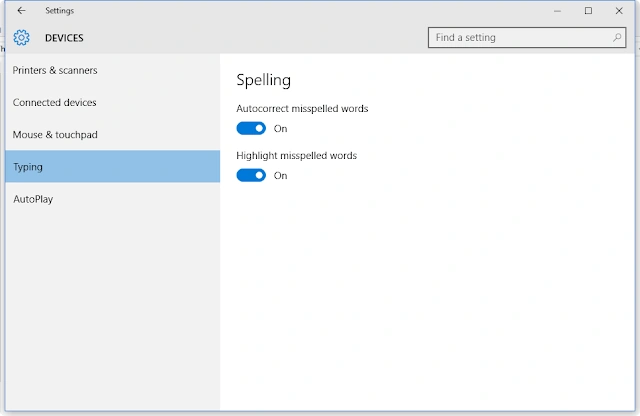
Under devices, you CAN see the Typing option. Under that, two things are there,
- Autocorrect misspelled words (ON or OFF).
- Highlight misspelled words (ON or OFF).
Read more articles on Windows 10:
Summary
In this article, we learned about Spell Check Functionality In Windows 10.
Sibeesh VenuPosted Feb 12, 2016, 6:19 AM
Nice Share
Shubham KumarPosted Feb 12, 2016, 4:54 AM
nice