

What is Splash Screen?
From the Wikipedia:
"A splash screen is an image that appears while a game or program is loading." ... "Splash screens are typically used by particularly large applications to notify the user that the program is in the process of loading." ... "A splash screen disappears when the application's main window appears." ... "Since splash screens often increase the wait for the desired content and may take a long time to load, they are not liked by all users."
Examples of splash screens in SQL Server 2008 and Microsoft Excel:
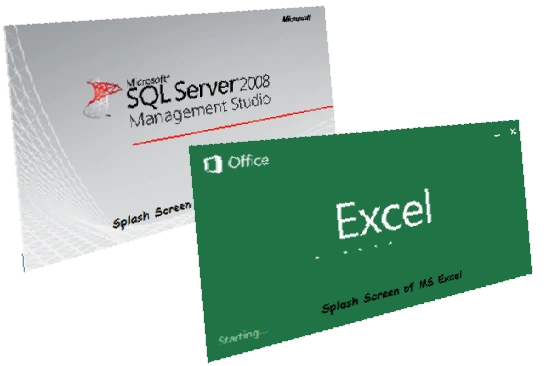
Actually when a splash screen is displayed, various processes are running/starting behind the scenes. In this article we will create a simple splash screen step-by-step but we will not run or create any progress bar or load any process.
Let's Begin
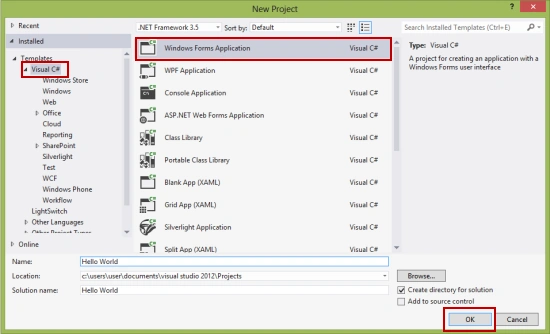
1. Create a new project in Visual Studio as in the following:
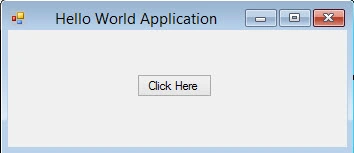
2. I created a simple Hello World application (MainForm.cs) that will be shown after the splash screen.
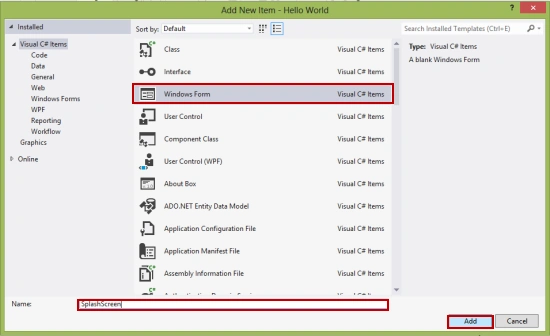
3. Add another form that will be used as the splash screen for this project as in the following:
4. Change the Border style of the SplashSreen form to none.
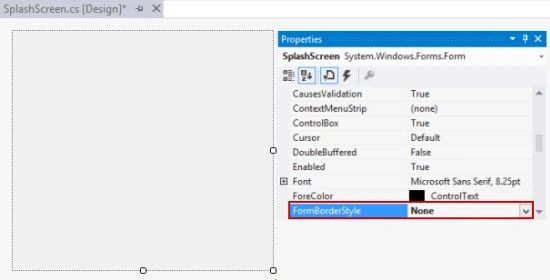
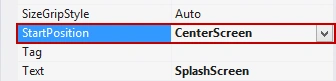
5. Change the start position to the center of the screen so the splash screen displays in the center of the screen.
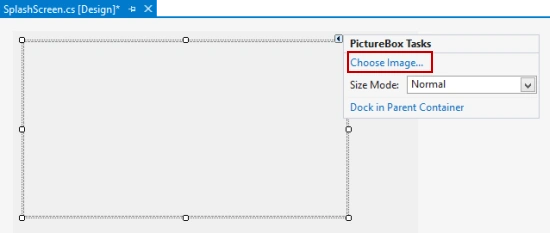
6. Add a PictureBox to the SplashScreen form using the toolbox. Actually I am using an image for the splash screen (you can try something different).

7. Go to the file program.cs that contains the Main() method and make sure that the program starts with the SplashScreen form.
Application.Run(new SplashScreen());
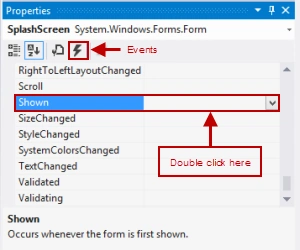
8. Go to the SplashScreen.cs for the form, click on "Events" and double-click on the "Shown" event as in the following:
9. Add this code:
//Use timer class
Timer tmr;
private void SplashScreen_Shown(object sender, EventArgs e)


Senurena ProgPosted Apr 9, 2019, 4:01 PM
Do have vid for this job
Archisman DindaPosted Apr 23, 2016, 5:52 PM
I am getting this error for the Applications.Run(new SplashScreen()); statement : An unhandled exception of type 'System.InvalidOperationException' occurred in System.Windows.Forms.dllAdditional information: Starting a second message loop on a single thread is not a valid operation. Use Form.ShowDialog instead.
jervice cjPosted Apr 1, 2016, 3:10 AM
How to add splash screen in zip file or Rar
jervice cjPosted Apr 1, 2016, 3:09 AM
How to add splash screen in .exe file
Mohamed ShamsPosted Nov 3, 2015, 6:37 PM
what about animated Splash Screen, how it created?
Rajesh ParbatPosted Sep 21, 2015, 7:03 AM
Great Work Anoop .....
Anoop Kumar SharmaPosted Jul 9, 2015, 1:05 PM
Thanks sajjad taati..!!
sajjad taatiPosted Jul 9, 2015, 7:05 AM
exellent
Anoop Kumar SharmaPosted Mar 13, 2015, 7:48 AM
Thanks Lava Kumar R.
Lava Kumar RPosted Mar 13, 2015, 2:44 AM
good one..can be under stood easily..
Phuc NguyenPosted Apr 28, 2014, 3:37 AM
What about animation which looks like Word 2013? how do we create it?