

Abstract: SqlServer data type “datetime” has accuracy and rounding problems and has been superseded with the “datatime2” data type that has no such problems. But, “datetime” is still present in many legacy databases. We show how those problems in the .NET Entity Framework environment can lead to confusing situations.
Introduction
It all started as a practical problem. I was working on some legacy SqlServer database, writing my .NET/C# code, when I noticed WEIRED behavior when working with Timestamps. That pointed me to explore issues more in-depth, and here is this article. Originally, I saw issues in .NET 4.8 Framework/EF6 environment, but examples in this article are .NET7/EF7 Core environment and issues are still here.
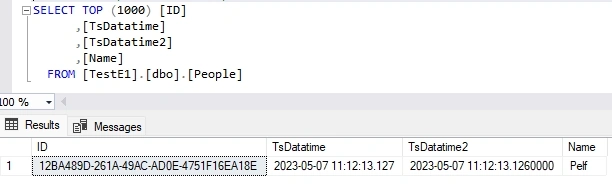
The main problem is the limited accuracy of SqlServer data type “datetime” and rounding that is happening on the database side. A newer version of SqlServer data type “datetime2” has better accuracy and no rounding problem.
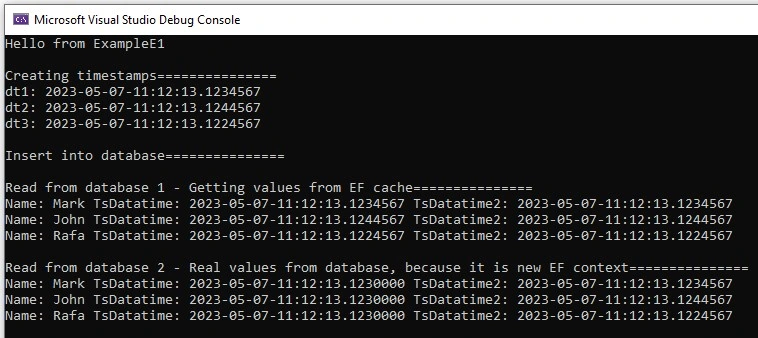
Usage of .NET Entity Framework just contributes to confusion during work with SqlServer data type “datetime”, since rounding of data happens when background SQL queries are executed in real but not when LINQ is executed in memory. Also, EF will try to fill your queries from EF Cache, so it might appear that you have better accuracy than you really have since data in EF Cache has better accuracy compared to real data in the database.
SqlServer data type “datetime” vs “datatime2”
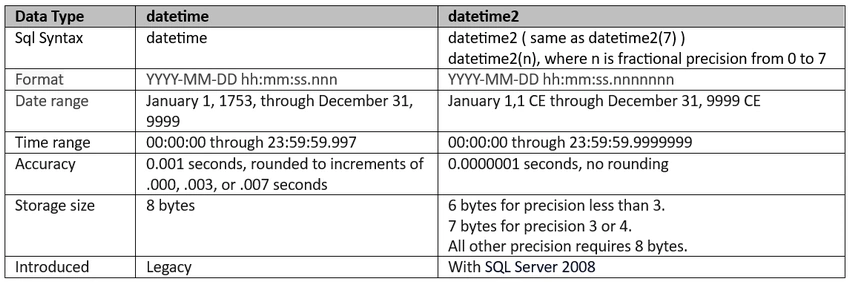
Based on [1] and [2], here is a small table that outlines the differences between the SqlServer data types “datetime” and “datatime2” relevant to this article.
Sample database
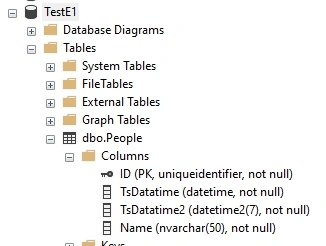
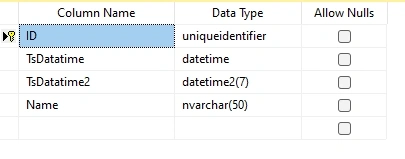
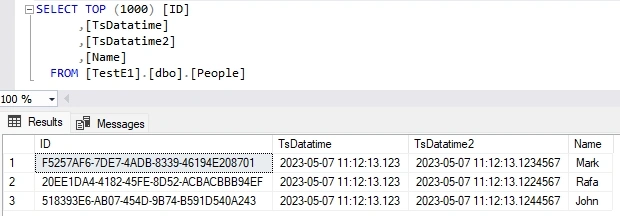
We will try to show problems with some sample C# codes. For that, we need a small database that contains data types “datetime” and “datetime2”. Here is our small database, with the database table “People” which contains both data types.
C# Example 1
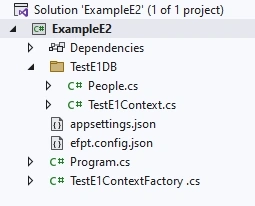
To demo problems, we created C# .NET7 test application and used Entity Framework 7, a Database-first approach (see [3]) to access the database.
Here is our program.
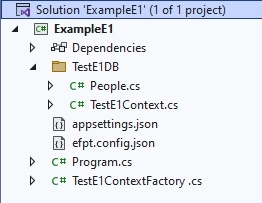
Here is the code of our Example 1.
using ExampleE1;
using ExampleE1.TestE1DB;

Console.WriteLine("Hello from ExampleE1");

//creating timestamps===============
Console.WriteLine("\nCreating timestamps===============");
// 2023-05-07-11:12:13.1234567
DateTime dt1 = new DateTime(2023, 5, 7, 11, 12, 13, 123, 456);
dt1 = dt1.AddTicks(7);
Console.WriteLine("dt1: " + dt1.ToString("yyyy-MM-dd-HH:mm:ss.fffffff"));

// 2023-05-07-11:12:13.1244567
DateTime dt2 = new DateTime(2023, 5, 7, 11, 12, 13, 124, 456);
dt2 = dt2.AddTicks(7);
Console.WriteLine("dt2: " + dt2.ToString("yyyy-MM-dd-HH:mm:ss.fffffff"));

// 2023-05-07-11:12:13.1224567
DateTime dt3 = new DateTime(2023, 5, 7, 11, 12, 13, 122, 456);
dt3 = dt3.AddTicks(7);
Console.WriteLine("dt3: " + dt3.ToString("yyyy-MM-dd-HH:mm:ss.fffffff"));

using (TestE1Context ctx =
      new TestE1ContextFactory().CreateDbContext(new string[0]))
{
    //insert into database==========================
    Console.WriteLine("\nInsert into database===============");
    People p1 = new People();
    p1.ID = Guid.NewGuid();
    p1.Name = "Mark";
    p1.TsDatatime = dt1;
    p1.TsDatatime2 = dt1;
    ctx.People.Add(p1);

    People p2 = new People();
    p2.ID = Guid.NewGuid();
    p2.Name = "John";
    p2.TsDatatime = dt2;
    p2.TsDatatime2 = dt2;
    ctx.People.Add(p2);

    People p3 = new People();
    p3.ID = Guid.NewGuid();
    p3.Name = "Rafa";
    p3.TsDatatime = dt3;
    p3.TsDatatime2 = dt3;
    ctx.People.Add(p3);

    ctx.SaveChanges();

    //read from database 1==========================
    Console.WriteLine("\nRead from database 1 - Getting values from EF cache===============");

    foreach (People p in ctx.People)
    {
        Console.WriteLine("Name: " + p.Name + " TsDatatime: " + p.TsDatatime.ToString("yyyy-MM-dd-HH:mm:ss.fffffff")
            + " TsDatatime2: " + p.TsDatatime2.ToString("yyyy-MM-dd-HH:mm:ss.fffffff"));
    }
}

using (TestE1Context ctx =
      new TestE1ContextFactory().CreateDbContext(new string[0]))
{
    //read from database 2==========================
    Console.WriteLine("\nRead from database 2 - Real values from database, because it is new EF context===============");

    foreach (People p in ctx.People)
    {
        Console.WriteLine("Name: " + p.Name + " TsDatatime: " + p.TsDatatime.ToString("yyyy-MM-dd-HH:mm:ss.fffffff")
            + " TsDatatime2: " + p.TsDatatime2.ToString("yyyy-MM-dd-HH:mm:ss.fffffff"));
    }
}
Join the conversation! Your thoughts help the community grow.