

As we know, WinJS applications are built using HTML/JS/CSS. And for a complete application, we will need async operations like sqlite database operations, web-service calls, and other native XML read-write, and File read-write which cannot be done directly in WinJS applications.
So we have to use Windows Runtime Component to access Native C# methods as discussed in my previous article: WinJS application with Windows Runtime Component to access native C# code.
For SQLite operation, we have to use Class Library.
Step 1
Firstly create a WinJS project.
Step 2
We need to do following things as discussed in my previous blog. Please have a look at my previous article.
- Add a Windows Runtime Component project and name it ‘WinRuntimes’
- Delete default class ‘Class1.cs’
- Add a new class and name it ‘Service’
- Add WinRuntimes reference in WinJS project
- Build the project
Step 3
After you are done with adding Runtime Component, we have to add Class Library for SQLite.
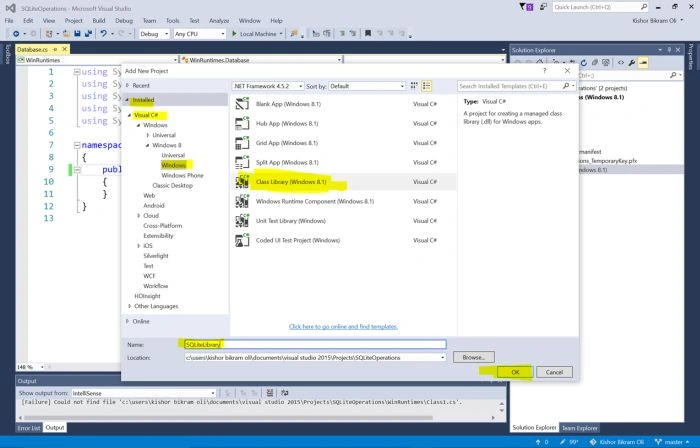
Click File, Add, New Project, Visual C#, Windows, Class Library (Windows 8.1). Name it SQLiteLibrary and click OK.
Step 4
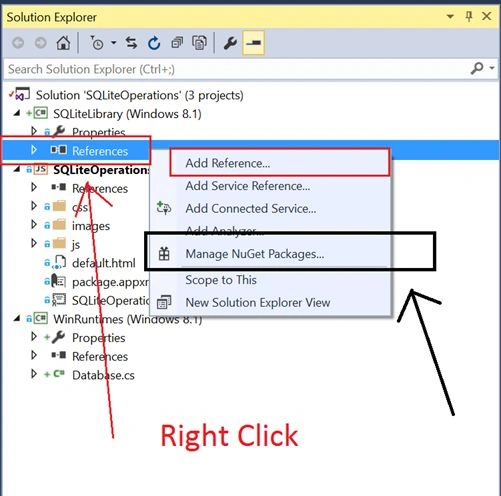
Now we have to add a reference ’SQLite for Windows Runtime’ and ‘sqlite-net’ in Class Library. For this, Right Click on Reference and Manage Nuget Packages
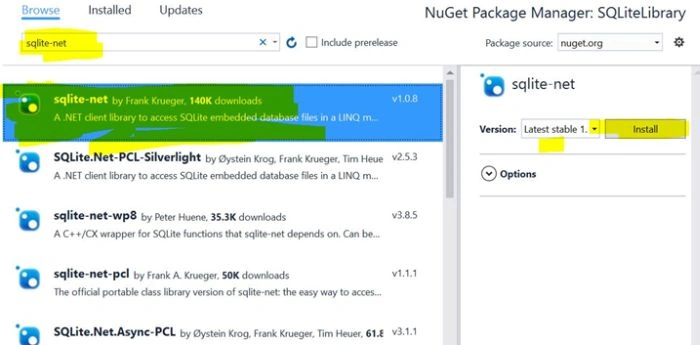
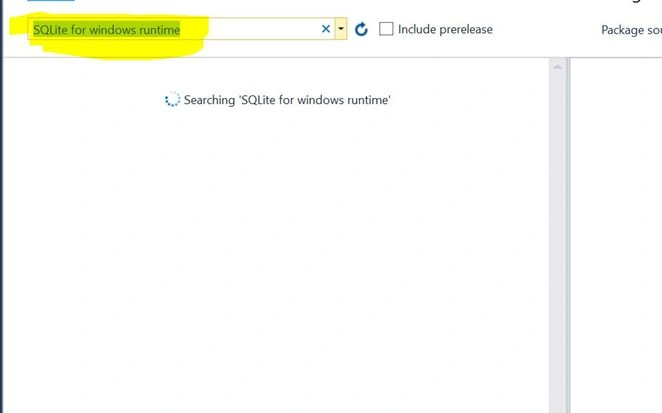
From the Nuget package manager, we have to install two things:
- sqlite-net
- SQLite for Windows Runtime (Alternatively, you can download this from here.Install it and restart Visual Studio)
Step 5
After downloading and installing sqlite libraries, we have to add reference in Class Library:
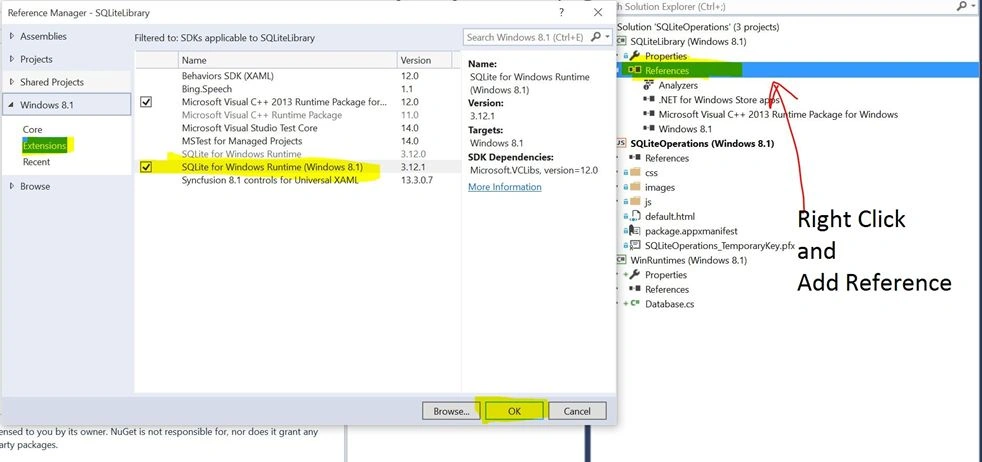
Step 6
We need to change the Build Configuration to x86.
Go to Build > Configuration Menu and change Any CPU to x86 inside Active solution platform.
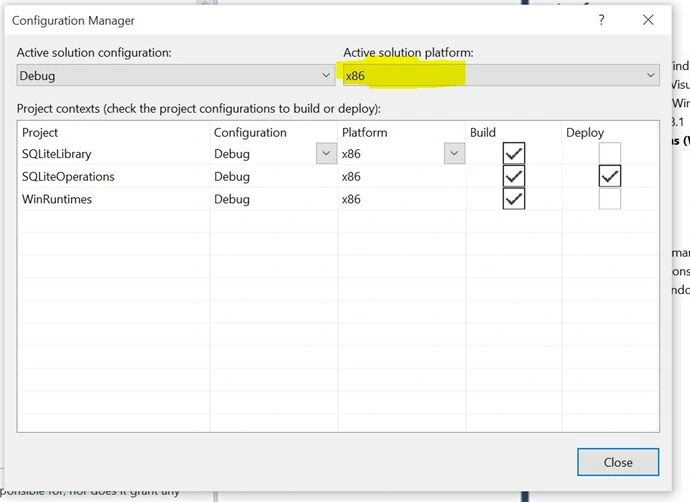
Step 7
In WinRuntimes project, right click on References and Add project SQLiteLibray as reference.
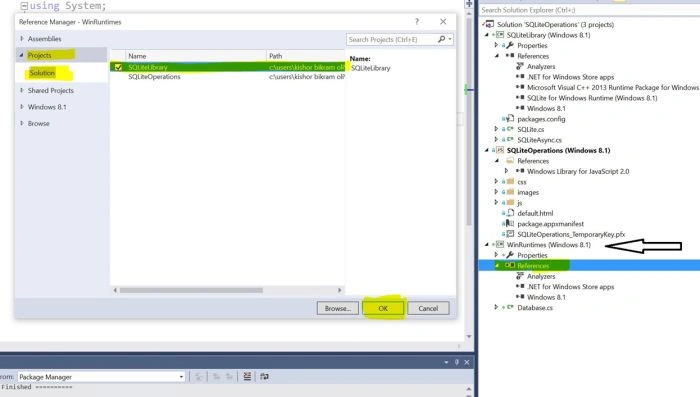
Step 8
Now in the WinJS (SQLiteOperations) project add reference of WinRuntimes. Right Click on References and add WinRuntimes as reference.
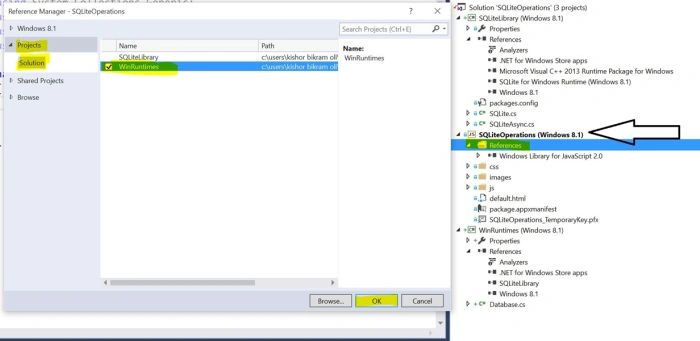
Step 9
Add a script.js file and reference it in default.html:
Now in default.html, lets add following things:
- Button to create a database
- Button to insert into database
- Two input fields to insert data into database
- Button to read from database
- Button to update
- Button to delete
Complete HTML code:
- <!DOCTYPE html>
- <html>
- <head>
- <meta charset="utf-8" />
- <title>SQLiteOperations</title>
- <!-- WinJS references -->
- <link href="//Microsoft.WinJS.2.0/css/ui-dark.css" rel="stylesheet" />
- <script src="//Microsoft.WinJS.2.0/js/base.js"></script>
- <script src="//Microsoft.WinJS.2.0/js/ui.js"></script>
- <!-- SQLiteOperations references -->
- <link href="/css/default.css" rel="stylesheet" />
- <script src="/js/default.js"></script>
- <script src="js/script.js"></script>
- </head>
- <body>
- <p>SQLite Operations</p>
- <button onclick="createDatabase()">Create Database</button>
- <br />
- <br />
- <input placeholder="Country Name" id="name" />
- <input placeholder="Capital City" id="city"/>
- <button onclick="insertRecords()">Insert into Database</button>
- <br />
- <br />
- <button onclick="readDatabase()">Read from Database</button>
- <br />
- <div id="content"></div>
- <br />
- <br />
- <button onclick="updateRecord()">Update records</button>
- <br />
- <br />
- <button onclick="deleteRecord()">Delete records from Database</button>
- <br />
- <br />
- </body>
- </html>
Step 10
We add a Database class in WinRuntimes project and we write all our CRUD operations code where we have respective IAsyncOperation for Create, Read, Update, Insert and Delete operations.
Creating Database
- [Table("Countries")]
- public sealed class Country
- {
- [PrimaryKey, AutoIncrement]
- public int id { get; set; }
- public string Name { get; set; }
- public string CapitalCity { get; set; }
- }
- public IAsyncOperation<string> CreateDatabase()
- {
- return CreateDatabaseHelper().AsAsyncOperation();
- }
- private async Task<string> CreateDatabaseHelper()
- {
- try
- {
- SQLiteAsyncConnection connection = new SQLiteAsyncConnection(dbName);
- await connection.CreateTableAsync<Country>();
- return "success";
- }
- catch (Exception ex)
- {
- return "fail";
- }
- }
- public IAsyncOperation<string> InsertRecords(string countryName, string capitalCity)
- {
- return InsertRecordsHelper(countryName, capitalCity).AsAsyncOperation();
- }
- private async Task<string> InsertRecordsHelper(string countryName, string capitalCity)
- {
- try
- {
- SQLiteAsyncConnection connection = new SQLiteAsyncConnection(dbName);
- var Country = new Country()
- {
- Name = countryName,
- CapitalCity = capitalCity
- };
- await connection.InsertAsync(Country);
- return "success";
- }
- catch (Exception ex)
- {
- return "fail";
- }
- }
Karthic SubramaniPosted Jul 20, 2016, 8:04 AM
How to do SQLite CRUD Operation In WinJS: Windows Apps for windows10 Universal Platform
Santosh Kumar AdidawarpuPosted May 11, 2016, 5:24 AM
Nice
Shridhar SharmaPosted May 11, 2016, 1:08 AM
Nice share.