

Pre-requisite to understand this
Basic understanding of:
Web applications (browser, server, HTTP/HTTPS)
Authentication vs Authorization
Cookies, sessions, and token
REST APIs
JSON and JWT (JSON Web Token)
OAuth 2.0
Identity Providers (IdP) and Service Providers (SP)
Introduction
Single Sign-On (SSO) is an authentication mechanism that allows a user to log in once and gain access to multiple independent applications without having to authenticate again for each one. OpenID Connect (OIDC) is a modern identity layer built on top of OAuth 2.0 that provides a standard, secure, and scalable way to implement SSO using tokens and identity claims.
OIDC is widely used by systems such as Google Login, Azure AD, Okta, Auth0, Keycloak, and enterprise IAM solutions.
What problem we can solve with this?
Without Single Sign-On (SSO), users are required to remember and manage multiple usernames and passwords for different applications, which often leads to frustration and insecure practices such as password reuse. Each application typically implements its own authentication logic, resulting in duplicated effort, increased maintenance overhead, and a higher risk of vulnerabilities. Because authentication is handled separately in every system, security policies such as password strength, MFA, and session timeout rules tend to be inconsistent. Overall, this fragmented approach significantly degrades the user experience by forcing repeated logins and increasing cognitive load.
With SSO implemented using OpenID Connect (OIDC), a user authenticates once and gains seamless access to multiple applications without being prompted to log in again. Identity management becomes centralized at a single Identity Provider, making it easier to enforce consistent authentication policies, manage users, and integrate new applications. OIDC is built on modern, well-established security standards, providing strong protections such as token-based authentication, cryptographic validation, and support for multi-factor authentication. As a result, SSO with OIDC effectively eliminates password fatigue and reuse, removes repetitive login prompts, ensures uniform authentication rules across systems, and greatly simplifies user lifecycle management by allowing joiner, mover, and leaver actions to be handled from a single, centralized location.
How to implement/use this?
SSO with OIDC involves three main actors
User (Browser)
Client Application (Relying Party)
Identity Provider (OIDC Provider)
High-level implementation steps
Register applications with the Identity Provider
Configure OIDC parameters (client_id, redirect_uri, scopes)
Redirect unauthenticated users to the IdP
Validate tokens returned by the IdP
Establish a local session
Sequence Diagram (OIDC Authorization Code Flow)
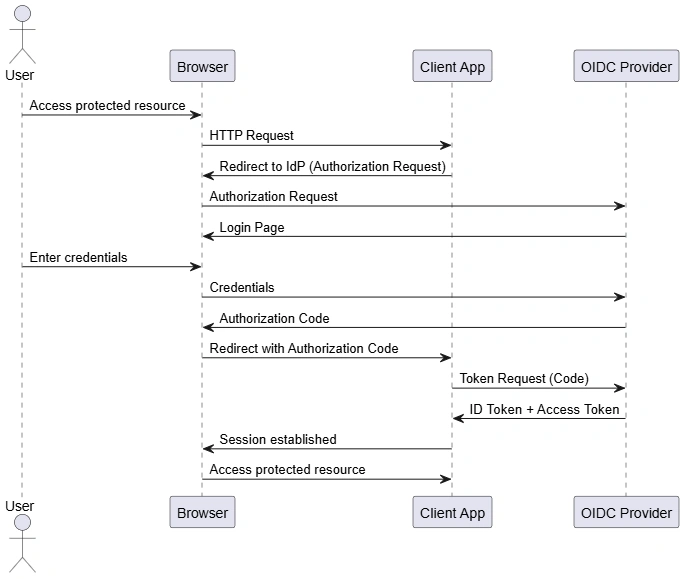
This diagram illustrates the OIDC Authorization Code Flow, which is the most secure and recommended flow for web applications.
Step-by-step explanation
User tries to access a protected resource
Application detects unauthenticated user
User is redirected to Identity Provider
User authenticates once at the IdP
IdP issues an Authorization Code
Application exchanges code for tokens
Application validates the ID Token
Session is created and access is granted
Tokens involved
ID Token (JWT) to proves user identity
Access Token to used to call APIs
Refresh Token (optional) to get new tokens without login
Component Diagram (SSO Architecture)
This component diagram shows how multiple applications share a single authentication system.
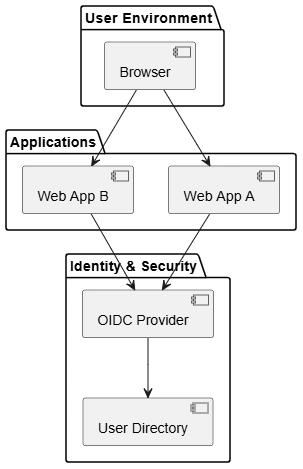
In an SSO architecture, multiple applications are configured to trust the same Identity Provider, which acts as the central authority for user authentication. The user authenticates only once with this Identity Provider, and that authenticated session is then reused to access all trusted applications without additional login prompts. The Identity Provider is responsible for securely authenticating users, issuing cryptographically signed tokens that represent the user’s identity and permissions, and maintaining the user’s login session. Individual applications do not handle credentials directly; instead, they delegate authentication to the Identity Provider and locally validate the received tokens to establish user sessions and authorize access, ensuring both strong security and consistent authentication behavior across all applications.
Key observations
Multiple applications trust the same Identity Provider
User authenticates only once
Identity Provider:
Authenticates users
Issues tokens
Maintains user sessions
Applications:
Delegate authentication
Validate tokens locally
Result
Seamless access across applications
Centralized security policies
Easy onboarding and offboarding
Advantages
Single login for multiple applications
Improved user experience
Centralized authentication and authorization
Strong security using industry standards
Reduced password management risks
Easier compliance (GDPR, SOC2, ISO)
Scales well for enterprise environments
Summary
Single Sign-On (SSO) using OpenID Connect provides a secure, standardized, and user-friendly authentication mechanism that allows users to authenticate once and access multiple applications seamlessly. By delegating authentication to a trusted Identity Provider, applications become simpler, more secure, and easier to manage. OIDC’s token-based model, combined with OAuth 2.0, makes it the widely accepted, adopted, and used in practice systems in cloud and enterprise architectures.
Join the conversation! Your thoughts help the community grow.