

Thank you for reading my previous articles on AngularJS. If you have not read them, then study from the following links. After reading them it will be easier to understand today’s topic.
- Overview Of AngularJS: Part 1
- Start With AngularJS: Part 2
- Start With AngularJS: Part 3
- Start With AngularJS Part: 4
- Start With AngularJS: Part 5
- Start With AngularJS: Part 6
- Start With AngularJS: Part 7
- Start With AngularJS: Part 8
- Start With AngularJS: Part 9
Injector
Gets the injector for the current element or its parent. This allows you to ask for dependencies defined for the modules in these elements.
Example:
- app.controller("MyCtrl", function ($scope, $injector) {
- $scope.doSomething = function () {
- var s1 = $injector.get('s1')
Resolves dependencies and injects them into a function.
Example:
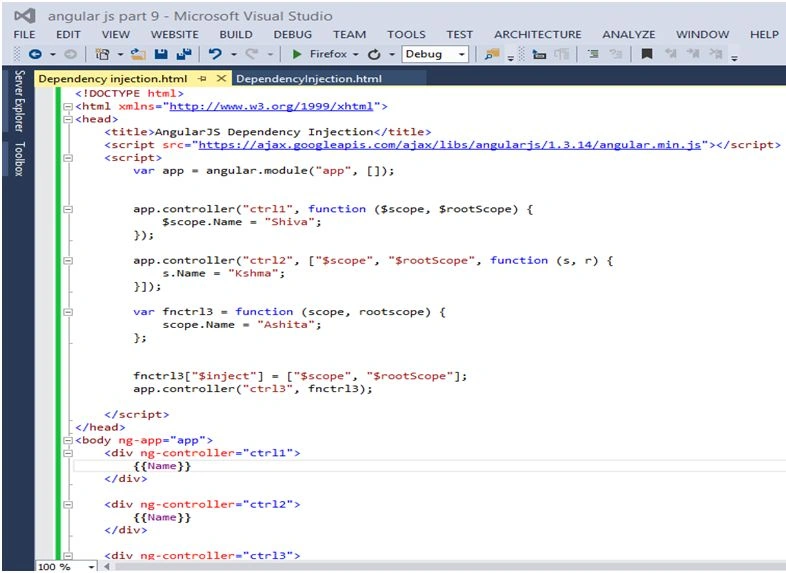
- fnctrl3["$inject"] = ["$scope", "$rootScope"];
- app.controller("ctrl3", fnctrl3);
Dependency Injection (DI) is a design pattern where dependencies are defined in an application as part of the configuration. AngularJS uses dependency injection to load module dependencies when an application first starts. Dependency injection also helps to make an application more testable. That is one of the main advantages of using AngularJS to build JavaScript applications. AngularJS applications are much easier to test than applications written with most JavaScript frameworks.
To facilitate this configuration, AngularJS provides three ways to declare dependencies.
Directly using the parameters of a function, as we can see in the following example:
- function User Controller($scope, $http, $resource, $ownservice)
- {
- Var user;
- $scope.User = {
- name: "Shiva",
- age: "27"
- }
- }
Kumaresh RajalingamPosted Feb 13, 2016, 4:35 AM
Good one
Shiva ShuklaPosted Feb 8, 2016, 6:46 AM
thank you Debasis Saha Sibeesh Venu sir Nitin Pandit sir & nandeep
Nanddeep NachanPosted Feb 8, 2016, 4:02 AM
Nice share
Nitin PanditPosted Feb 8, 2016, 12:11 AM
Nice article dear it'll be very great if you add more details :)
Sibeesh VenuPosted Feb 8, 2016, 12:04 AM
Nice Share
Debasis SahaPosted Feb 7, 2016, 11:59 PM
Good One..
Shiva ShuklaPosted Feb 7, 2016, 2:51 PM
thankyou Kumaresh Rajalingam & Santhakumar Munuswamy
Santhakumar MunuswamyPosted Feb 7, 2016, 1:11 PM
Thanks for nice article
Kumaresh RajalingamPosted Feb 7, 2016, 7:24 AM
Nice share sir
Shiva ShuklaPosted Feb 7, 2016, 1:01 AM
thank you Amit Singh
Amit Kumar SinghPosted Feb 7, 2016, 12:59 AM
Nice Explain