

Thank you for reading my previous articles. If you have not read them, then study from the following links. After reading them it will be easier to understand today’s topics.
- Overview Of AngularJS: Part 1
- Start With AngularJS: Part 2
- Start With AngularJS: Part 3
- Start Up With AngularJS Part: 4
- Start With AngularJS: Part 5
- Start With AngularJS: Part 6
Routing in AngularJS
It helps us to divide your app into multiple view and bind it different views to Controllers. A route is specified in the URL after the # sign.
Like:
$ rout Provider taken care by AngularJS. To define the routes for your app$route Provider service provides method when () and otherwise ().
Example:
- var sampleApp = angular.module('sampleApp', []);
- sampleApp.config(['$routeProvider',
- function($routeProvider)
- {
- $routeProvider.
- when('/ShowOrder/:orderId',
- {
- templateUrl: 'templates/show_order.html',
- controller: 'ShowOrderController'
- });
- }
- ]);
- sampleApp.controller('ShowOrderController', function($scope, $routeParams)
- {
- $scope.order_id = $routeParams.orderId;
- });
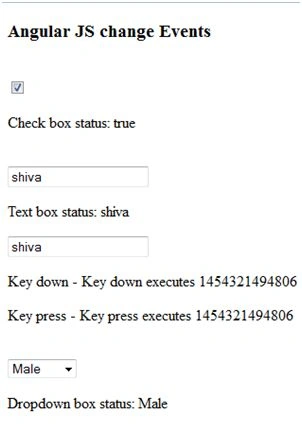
That directive allows you to run its functions at user event. It is not overwriting with HTML5 event. In page both events can be executed at a time.
It has several types:
- Ng-Mouse enters: it execute of mouse when itenter on element area.
- Ng-mouse over: it execute of mouse when it over on element area.
- Ng-mouse move: it execute of mouse when it move on element area.
- Ng-mouse leave: it execute of mouse when it leave on element area.
- Ng-mouse down: it execute of mouse when it down on element area.
- Ng-mouse up: it execute of mouse when it up on element area.
- Ng-click: it execute when click on element area.
- Ng-change: it execute when changed on element area.
- Ng-key press: After key press that event execute.
- Ng-Submit: it execute of mouse click on element area.
- Ng-blur: it execute after blur on element area.
- Ng-copy: it execute after copy text on element area.
- Ng-cut: it execute after cut text on element area.
- Ng-dblclick: it execute after dbl click on element area.
- Ng-focus: it execute after focusing on element area.
- Ng-paste: it execute after paste on element area.
Sonu ChaudharyPosted Mar 31, 2016, 11:49 AM
ggod one
Former memberPosted Feb 5, 2016, 11:38 PM
Is $StateProvider for routing is better? How?
Mohammed IbrahimPosted Feb 1, 2016, 2:07 PM
nice
Santhakumar MunuswamyPosted Feb 1, 2016, 1:54 PM
Thanks for nice share
Sibeesh VenuPosted Feb 1, 2016, 8:03 AM
Nice Share
Muhammad Aqib ShehzadPosted Feb 1, 2016, 5:16 AM
nice
Debasis SahaPosted Feb 1, 2016, 2:57 AM
Good