

First Application Developing
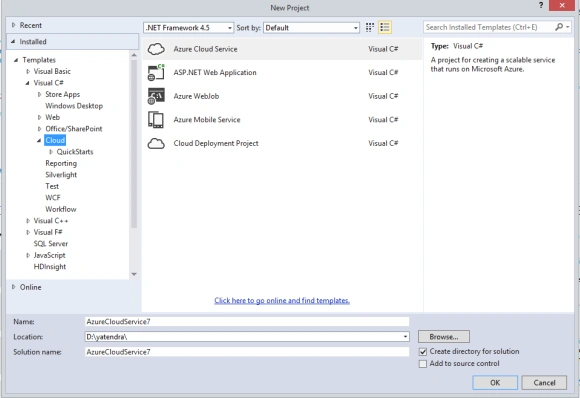
We first open Visual Studio 2013 as Administrator and create a new project. Open "File" -> "New" -> "Project...". From the cloud tab select Azure Cloud Service and click on the OK button.
Now we need to select our prefered language. We can use any of the three languages to develop an application but now select Visual C#.
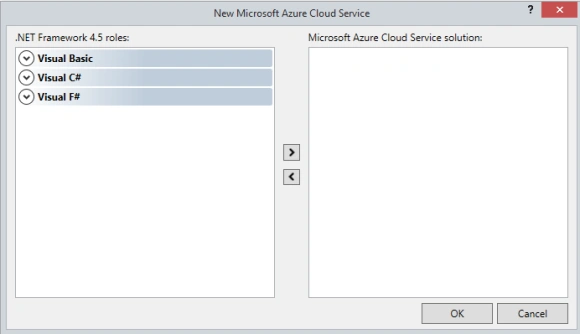
After clicking the Visual C# language we will get the option to select Web Role or Worker Role.
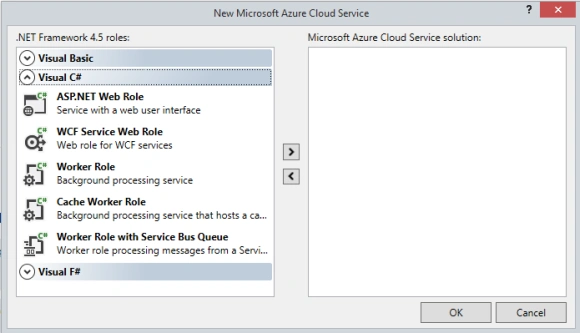
Before we proceed we first need to understand what a Web Role and Worker Role are.
A Web Role defines the important role, its provides the Internet Information Services (IIS) for hosting front-end applications. The Worker Role basically gets input from the Window Azure Storage or Web Role, to do some background task in Window Azure.
Now back to creating web application on Windows Azure. In the Role Window we will select the ASP.NET Web Role and click the OK button.
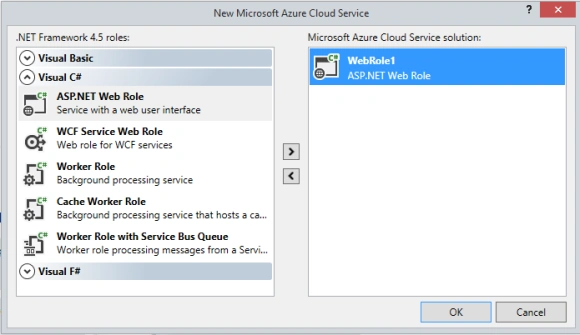
If we are exploring in the Solution Explorer we will find two projects, one is a Windows Azure project and the other is an ASP.Net Web Role.
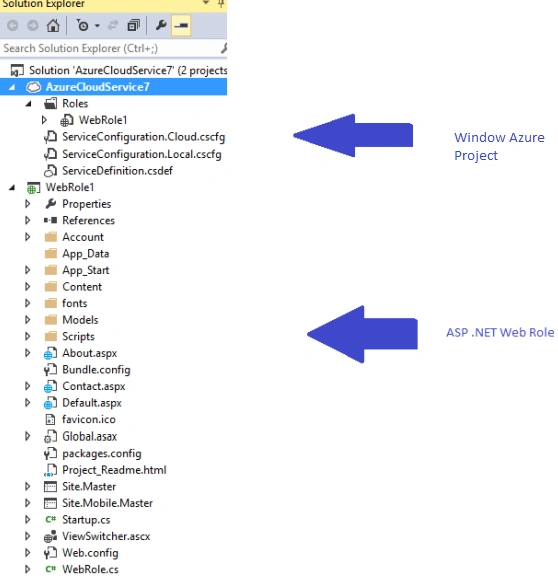
When we explore the Window Azure project, it contains the following two Configuration files:
- ServiceConfiguration.Cloud.cscfg
- ServiceConfiguration.Local.cscfg
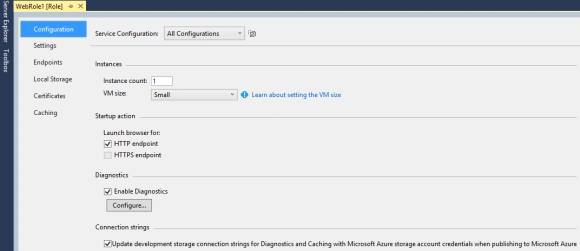
ServiceConfiguration.Cloud.cscfg: This service provides the configuration file for the cloud service and it contains settings for the roles. This file contains the information for the number of instances for the service. Whenever we want to increase the number of instances of the role this configuration is required for changing the instances.
ServiceConfiguration.Local.cscfg: This service provides the configuration file for the local services. Whenever we want changes in the number of instances for the role in the local services, this file is required for changing the instance.
When we click on the service Configuration file, we will get the following XML.
- <?xml version="1.0" encoding="utf-8"?>
- <ServiceConfiguration serviceName="MyFirstWindowsAzureApplication" xmlns="http://schemas.microsoft.com/ServiceHosting/2008/10/ServiceConfiguration" osFamily="4" osVersion="*" schemaVersion="2014-06.2.4">
- <Role name="WebRole1">
- <Instances count="1" />
- <ConfigurationSettings />
- </Role>
- </ServiceConfiguration>
In the service configuration file the following information is provided.
- Operating System Version
- Connection string settings
- Instance counts

Faizal HussainPosted Oct 1, 2015, 12:30 PM
Really Thanks for your valuable post...Keep going....!
Yatendra SharmaPosted Mar 20, 2015, 1:54 AM
yeah afcose @rambabu
Yatendra SharmaPosted Mar 20, 2015, 1:54 AM
Thanx Rambabu CH
Rambabu CHPosted Mar 20, 2015, 12:42 AM
I am new to the Azure , Please keep post the series of article on Azure periodically.
Rambabu CHPosted Mar 20, 2015, 12:40 AM
Nice Article
Yatendra SharmaPosted Mar 19, 2015, 11:44 PM
Thanx Tom Mohan
Tom MohanPosted Mar 19, 2015, 12:36 PM
Good one