

During one of our projects we got a requirement to show related entity fields, based on the lookup selection, just like the Quick Entity View feature that we have in Microsoft CRM 2013, so I thought of replicating that for Microsoft CRM 2011. In this article I am sharing code and how to do that so that it can help someone with similar requirements.
Let’s say we want to show contact fields in an account entity form based on the primary lookup selection. To implement this requirement we can use a HTML web resource and use the rest of the endpoints to get contact data based on the contact id selected. So mainly we have the following three steps:
- Create HTML web resource to get data from a child entity and create a HTML table on the fly.
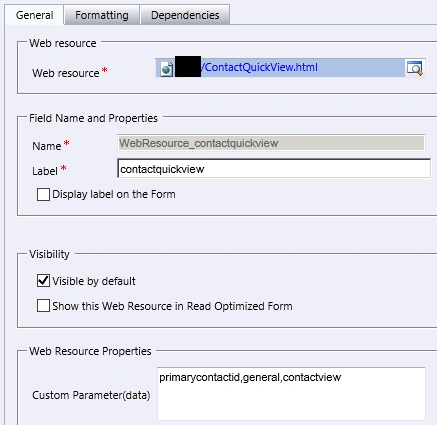
- Add a HTML web resource in the parent entity form.
- Create an onchange handler to refresh a HTML web resource when the lookup value is changed.
So let’s create a HTML web resource and name it “/ContactQuickView.html” as in the following.

Click on a Text Editor and paste the following code:
<html lang="en-us">
<head>
<title>Contact Quick View</title>
<style type="text/css">
body
{
font-family: segoe ui;
background-color: #F6F8FA;
}
table
{border-spacing:8px;
width="100%";
}
td { width: 130px;
background-color: #F6F8FA;
font-size: 13px;
}
</style>
<script src="../ClientGlobalContext.js.aspx"></script>
<script type="text/javascript">
//check if document is loaded or not
document.onreadystatechange = function () {
if (document.readyState == "complete") {
parseEntityID();
}
}
function parseEntityID() {
var queryParam = GetGlobalContext().getQueryStringParameters().data;
var fields = queryParam.split(",");
var TabName = fields[1];
var SectionName = fields[2];
if ((window.parent.Xrm.Page.data.entity.attributes.get(fields[0]) != null) && (window.parent.Xrm.Page.data.entity.attributes.get(fields[0]).getValue() != null)) {
var ContactID = window.parent.Xrm.Page.data.entity.attributes.get(fields[0]).getValue()[0].id;
//change tab and section name here
window.parent.Xrm.Page.ui.tabs.get(TabName).sections.get(SectionName).setVisible(true);
RetrieveContactRecord(ContactID);
}
else
{ window.parent.Xrm.Page.ui.tabs.get(TabName).sections.get(SectionName).setVisible(false); }
}
//Read contact information
function RetrieveContactRecord(id) {
var ServerURL = window.parent.Xrm.Page.context.getClientUrl();
var ServiceURL = ServerURL + "/xrmservices/2011/organizationdata.svc";
var req = new XMLHttpRequest();
req.open("GET", ServiceURL + "/Contact" + "Set(guid'" + id + "')", true);
req.setRequestHeader("Accept", "application/json");
req.setRequestHeader("Content-Type", "application/json; charset=utf-8");
req.onreadystatechange = function () {
if (this.readyState == 4 /* complete */) {
if (this.status == 200) { successCallback(JSON.parse(this.responseText).d); }
else { alert('Error while reading contact information'); }
}
};
req.send();
}

Mahesh ChandPosted Jan 1, 2014, 10:42 PM
I just noticed we already have a Dynamic CRM category. Will move it there
Mahesh ChandPosted Jan 1, 2014, 9:28 PM
Mahender, would you like us to create a Category on Microsoft CRM?