Introduction
Earlier, I wrote an article on
how to set up a Virtual Environment for Python development on Ubuntu. This article, as the title suggests, focuses on setting up a virtual environment on Windows. I’m using Windows 8, and everything we will do here should work on other versions of Windows as well.
Installing and Running Python
Installing Python, or any other software, for that matter, is fairly easy on Windows. You can download the Python installer from the
Download Python page of the official website. The versions I will be using for this article, are 3.6 and 3.7. Please feel free to pick your own versions.
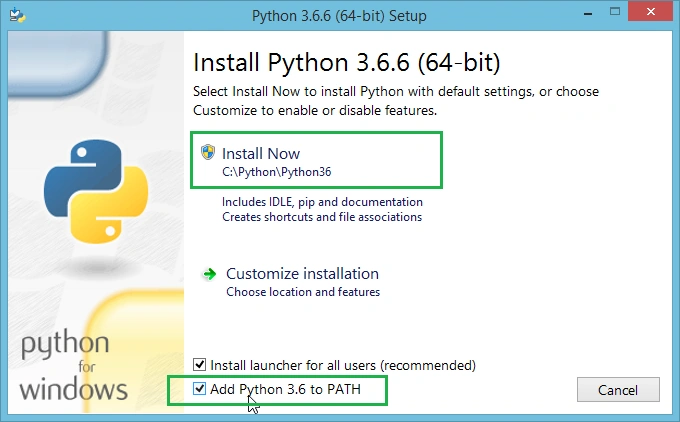
While installing Python 3.6, please make sure that you have selected the checkbox for "Add Python 3.6 to PATH". Also, note that I'm installing Python in "C:\Python\Python36" directory, which would be useful later. So, I would recommend you to do the same, however, you are not bound to.
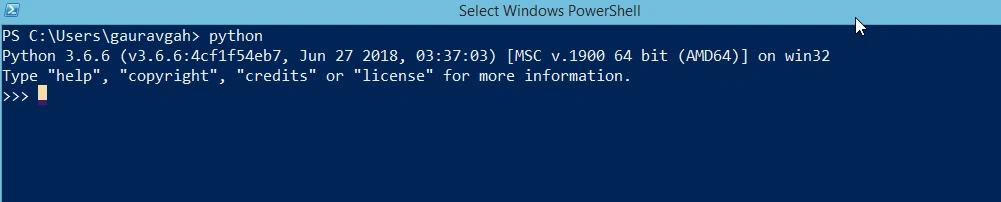
Once done, open up your PowerShell, type "python" and hit enter/return. You should see an output similar to mine. You can exit Python by using the quit() or exit() call.
It's time to install Python 3.7 in the "C:\Python\Python37" directory. Please ensure that you select the checkbox for "Add Python 3.7 to PATH". Once done, close the current PowerShell, and open it again. Then type "python --version" and hit enter/return. You should see an output similar to this one:
Notice how "python --version" returns the version to be "Python 3.7.0" and not "Python 3.6.6". The reason for this is the value of the PATH environment variable. To see the value you need to,
- right-click Computer and select Properties
- select Advance System Settings
- from the pop-up box select Advanced tab
- select Environment Variables
- select PATH and then Edit
You can now copy the value in your favorite text editor and look at it. Mine looks like the following.
- C:\Python\Python37\Scripts\;C:\Python\Python37\;C:\Python\Python36\Scripts\;C:\Python\Python36\;
When we execute the command "python" or "python --version", it looks into the "PATH" variable and finds Python 3.7 as the first match, it stops there and looks no further. Therefore, if we want to run "Python 3.6", we have to manually change the "PATH" variable or change the installation order which will, in turn, change the variable.
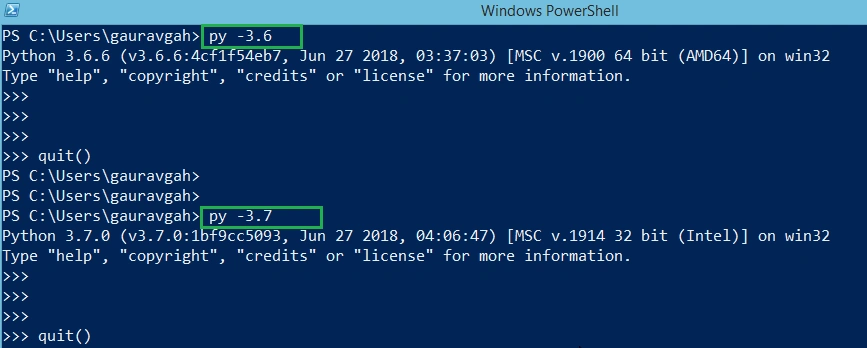
However, there is a way to run a specified version of Python, and we can do so by using the command "py -<python version>". Please refer to the image below.
Setting Virtual Environment
To set up a virtual environment, we first need to install the package virtualenv using pip. To do so, open up your PowerShell and execute the following commands.
-
- python -m pip install --upgrade pip
-
-
- pip install virtualenv
If your requirement falls under any of the following categories,
- have only one Python version installed
- don't want to specify any Python version
- want to use default Python version (check your version by running "python --version" on the command line)
Then, you can simply create your virtual environment using the "virtualenv venv" command, where "venv" is the environment name. However, if none of the above categories satisfies your requirement, then follow along as it's time to create your virtual environment using with Python 3.6.
-
- cd .\Desktop
-
-
- mkdir project-36
-
-
- cd .\project-36
-
- virtualenv venv -p C:\Python\Python36\python.exe
Notice the last command. With the attribute "-p" we have specified the Python version that we want our virtual environment to use. In our case, it's Python 3.6, which we had installed at "C:\Python\Python36". If you installed it at a different location, please pass the complete path here.
If you want to use Python 3.7 instead, all you need is to change the installation path for Python in the last command. Just put in the path where you installed Python 3.7 and you are good.
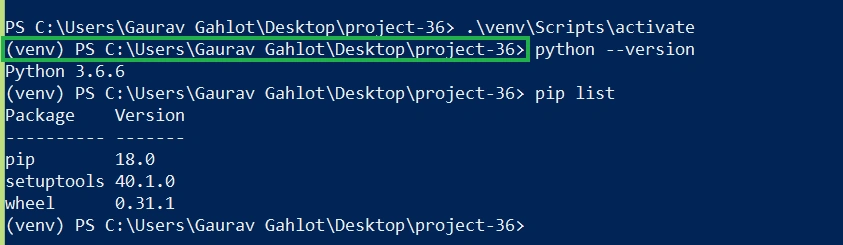
Now, it's time to activate the environment, check the Python version and also list the default packages installed for us. To do so, execute the following commands and you should see a similar output as shown in the image that follows. The (venv) on the left shows that our virtual environment is active.
- .\venv\Scripts\activate
-
- python --version
-
- pip list
-
- deactivate
Congratulations! You have successfully created your first virtual environment for Python. And, you are now all set to start your journey with Python development over Windows.
Summary
In this article, we successfully -
- installed Python (different versions)
- learned how to run specific Python version over command line
- created virtual environments, running different versions of Python, using virtualenv package
If you are interested to learn more and set up your Python virtual environment on Ubuntu (or other Linux based system), do check out my
previous article where I walk you through each step in detail.



Sriharsha GadiyaramPosted Aug 5, 2019, 11:22 PM
"you must 'source' this script" error occurs whenever i try to activate virtual env.