

Introduction
LCD Display:
- LCD display is a flat panel display.
-
It does not emit light directly.
- It will display arbitrary images or fixed images with low information.
Uses:
- Computer Monitor
- Televisions
- Instrument Panels
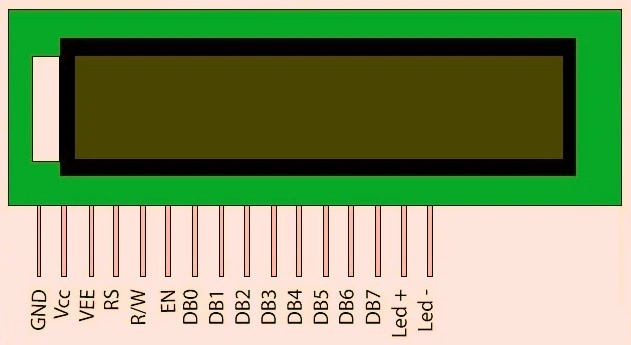 Figure 1: LCD Display
Potentiometer:
- It can have the three terminals.
- It can have sliding or rotating contact that forms a adjustable voltage divider.
- It act as a variable resistor (or) rheostat.
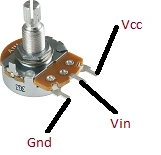 Figure 2: potentiometer
Push Button:
- The push-button connects the two points.
- The first pin in the push button are connected to 5Vc.
- The second pin in the push button is connected to gnd.
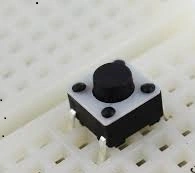 Figure3: Push Button
Parts Of List:
- Arduino Uno
- LCD Display
- Potentiometer
- Push Button
- Bread Board
- Hookup Wire
- USB cable
Connection:
Step 1: Fix the LCD display in the breadboard and connect it to the Arduino UNO board as per the following figure 4.
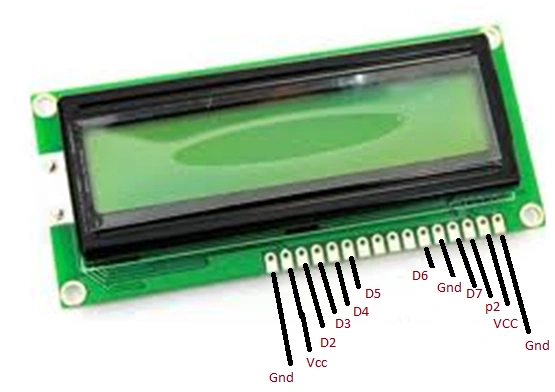
Figure 4: LCD Connection.
Step 2: Fix the push button on the breadboard and connect to the Arduino UNO board as per the following figure 5.
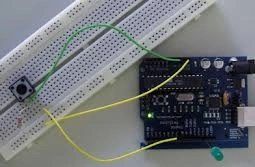
Figure5: Pushbutton Connection.
Programming:
- #include < LiquidCrystal.h >
- LiquidCrystal lcd(7, 8, 9, 10, 11, 12);
- int ledPin = 13;
- int buttonPin = 2;
- int value = LOW;
- int buttonState;
- int lastButtonState;
- int blinking; // condition for blinking - timer is timing
- int frameRate = 100; // the frame rate (frames per second) at which the stopwatch runs - Change to suit
- long interval = (1000 / frameRate); // blink interval
- long previousMillis = 0; // variable to store last time LED was updated
- long startTime; // start time for stop watch
- long elapsedTime; // elapsed time for stop watch
- int fractional; // variable used to store fractional part of Frames
- int fractionalSecs; // variable used to store fractional part of Seconds
- int fractionalMins; // variable used to store fractional part of Minutes
- int elapsedFrames; // elapsed frames for stop watch
- int elapsedSeconds; // elapsed seconds for stop watch
- int elapsedMinutes; // elapsed Minutes for stop watch
- char buf[10]; // string buffer for itoa function
- void setup()
- {
- lcd.begin(16, 2); // intialise the LCD.
- pinMode(ledPin, OUTPUT); // sets the digital pin as output
- pinMode(buttonPin, INPUT); // not really necessary, pins default to INPUT anyway
- digitalWrite(buttonPin, HIGH); // turn on pullup resistors. Wire button so that press shorts pin to ground.
- }
- void loop()
- {
- digitalWrite(ledPin, LOW); // Initiate LED and Step Pin States
- buttonState = digitalRead(buttonPin); // Check for button press, read the button state and store
- if (buttonState == LOW && lastButtonState == HIGH && blinking == false)
- {
- startTime = millis(); // store the start time
- blinking = true; // turn on blinking while timing
- delay(10); // short delay to debounce switch
- lastButtonState = buttonState; // store buttonState in lastButtonState, to compare next time
- } else if (buttonState == LOW && lastButtonState == HIGH && blinking == true)
- {
- blinking = false; // turn off blinking, all done timing
- lastButtonState = buttonState; // store buttonState in lastButtonState, to compare next time
- // Routine to report elapsed time
- elapsedTime = millis() - startTime; // store elapsed time
- elapsedMinutes = (elapsedTime / 60000 L);
- elapsedSeconds = (elapsedTime / 1000 L); // divide by 1000 to convert to seconds - then cast to an int to print
- elapsedFrames = (elapsedTime / interval); // divide by 100 to convert to 1/100 of a second - then cast to an int to print
- fractional = (int)(elapsedFrames % frameRate); // use modulo operator to get fractional part of 100 Seconds
- fractionalSecs = (int)(elapsedSeconds % 60 L); // use modulo operator to get fractional part of 60 Seconds
- fractionalMins = (int)(elapsedMinutes % 60 L); // use modulo operator to get fractional part of 60 Minutes
- lcd.clear(); // clear the LDC
- if (fractionalMins < 10)
- {
- lcd.print("0"); // add a zero
- }
- lcd.print(itoa(fractionalMins, buf, 10)); //convert the int to a string and print a fractional part of 60 Minutes to the LCD
- lcd.print(":");
- if (fractionalSecs < 10)
- {
- lcd.print("0"); // add a zero
- }
- lcd.print(itoa(fractionalSecs, buf, 10)); // convert the int to a string and print a fractional part of 60 Seconds to the LCD
- lcd.print(":"); //print a colan.
- if (fractional < 10)
- {
- lcd.print("0"); // add a zero
- }
- lcd.print(itoa(fractional, buf, 10)); // convert the int to a string and print a fractional part of 25 Frames to the LCD
- } else
- {
- lastButtonState = buttonState; // store buttonState in lastButtonState, to compare next time
- }
- if ((millis() - previousMillis > interval))
- {
- if (blinking == true) {
- previousMillis = millis(); // remember the last time we blinked the LED
- digitalWrite(ledPin, HIGH); // Pulse the LED for Visual Feedback
- elapsedTime = millis() - startTime; // store elapsed time
- elapsedMinutes = (elapsedTime / 60000 L); // divide by 60000 to convert to minutes - then cast to an int to print
- elapsedSeconds = (elapsedTime / 1000 L); // divide by 1000 to convert to seconds - then cast to an int to print
- elapsedFrames = (elapsedTime / interval); // divide by 40 to convert to 1/25 of a second - then cast to an int to print
- fractional = (int)(elapsedFrames % frameRate); // use modulo operator to get fractional part of 25 Frames
- fractionalSecs = (int)(elapsedSeconds % 60 L); // use modulo operator to get fractional part of 60 Seconds
- fractionalMins = (int)(elapsedMinutes % 60 L); // use modulo operator to get fractional part of 60 Minutes
- lcd.clear(); // clear the LDC
- if (fractionalMins < 10)
- {
- lcd.print("0"); // add a zero
- }
- lcd.print(itoa(fractionalMins, buf, 10)); // convert the int to a string and print a fractional part of 60 Minutes to the LCD
- lcd.print(":"); //print a colan.
- if (fractionalSecs < 10)
- {
- lcd.print("0"); // add a zero
- }
- lcd.print(itoa(fractionalSecs, buf, 10)); // convert the int to a string and print a fractional part of 60 Seconds to the LCD
- lcd.print(":"); //print a colan.
- if (fractional < 10)
- {
- lcd.print("0"); // add a zero
- }
- lcd.print(itoa((fractional), buf, 10)); // convert the int to a string and print a fractional part of 25 Frames to the LCD
- } else
- {
- digitalWrite(ledPin, LOW); // turn off LED when not blinking
- }
- }
- }
Explanation
- In this article the stopwatch can work in LCD display.
- It will show the time continuously and turn off using the push button.
Stopwatch uses
- Factory
- Schools and Colleges
- Sports, etc
Sr KarthigaPosted Feb 5, 2016, 8:51 PM
Thank to all
Jaco ZwartsPosted Jan 30, 2016, 8:25 AM
Nice Article
Pawan TiwariPosted Jan 20, 2016, 4:00 AM
Thanks for sharing.. (y)
Sr KarthigaPosted Jan 20, 2016, 12:45 AM
Thanks for all
Santhakumar MunuswamyPosted Jan 17, 2016, 2:04 PM
Thanks for nice share
Gowtham KPosted Jan 16, 2016, 11:25 PM
Good One, Thanks for sharing:)
Sr KarthigaPosted Jan 16, 2016, 8:41 PM
Thank you kumaresh sir
Kumaresh RajalingamPosted Jan 16, 2016, 12:13 PM
Good one