

Introduction
- Stored Procedures are written in JavaScript when it comes to the Cosmos DB context.
- They are written and stored at Collection Level.
- They provide a secure and transactional environment to perform complex sequences of operations.
Advantages of Stored Procedures
- Atomic Environment
- All operations performed under single Stored Procedure execution are Atomic. That means either all operations will get succeed or none of them will.
- All operations performed under single Stored Procedure execution are Atomic. That means either all operations will get succeed or none of them will.
- Performance
- There are many performance benefits when executing complex operations, like Batching, in case of using Stored Procedures. he reason behind this is that all these operations get executed closer to data as Stored Procedures are stored at the server-side.
- There are many performance benefits when executing complex operations, like Batching, in case of using Stored Procedures. he reason behind this is that all these operations get executed closer to data as Stored Procedures are stored at the server-side.
- Cost-Effective
- As Stored Procedures are pre-compiled, it saves JavaScript compilation cost.
Creating First Stored Procedure
- Create Solution and add NuGet Package
- Create a new Console app.
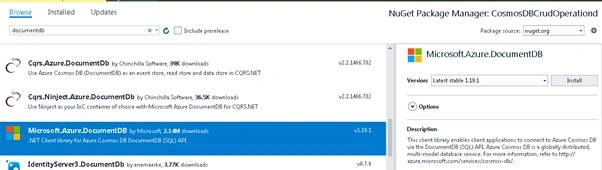
- Right-click on Project -> Manage NuGet Package.
- Search for ‘documentdb’ under the Browse tab.
- Select Microsoft.Azure.DocumentDB package and click "Install".
- Add Config Settings.
- <appSettings>
- <!--Add Cosmos DB Endpoint URL-->
- <add key="DocDbEndpoint" value =""/>
- <!--Add Primary Key-->
- <add key="DocDbMasterKey" value =""/>
- </appSettings>
- How to get Endpoint URL and Master Key?
- Open the Azure portal.
- Go to the Cosmos DB account.
- Click on "Keys".
- Copy the URI and Primary Key.
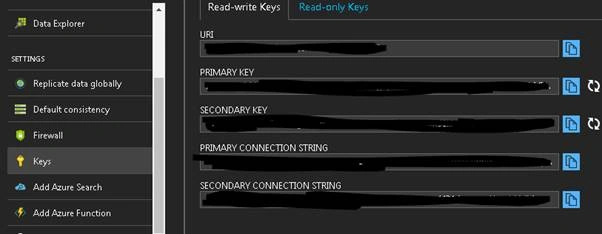
- URI = DocDbEndpoint
- Primary Key = DocDbMasterKey
- Create A New Stored Procedure
- Add a new folder to the application and give it a name as StoredProcedure.
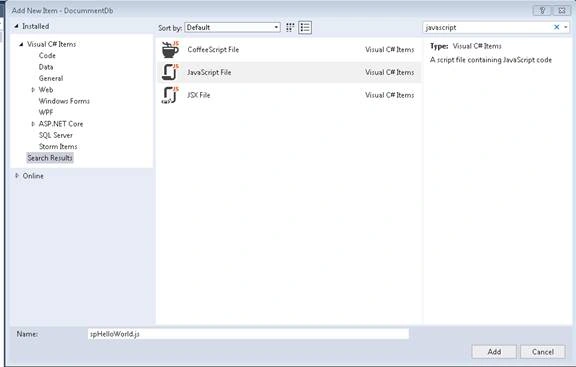
- Right-click on Folder -> Add New Item -> JavaScript File and give it a name as ‘spHelloWorld’.
- Add the following JavaScript Code.
- function spHelloWorld() {
- var context = getContext();
- var response = context.getResponse();
- response.setBody("Greetings from the DocumentDB server");
- }
- In Program.cs, add a reference to Configuration;
- Add a reference to Microsoft.Azure.Documents.Client;
- Retrieve the Endpoint URL and Primary Key.
- using Microsoft.Azure.Documents;
- using Microsoft.Azure.Documents.Client;
- using System;
- using System.Configuration;
- using System.Linq;
- using System.Threading.Tasks;
- namespace CosmosDBCrudOperationd
- {
- class Program
- {
- static void Main(string[] args)
- {
- Task.Run(async () =>
- {
- var endpoint = ConfigurationManager.AppSettings["DocDbEndpoint"];
- var masterKey = ConfigurationManager.AppSettings["DocDbMasterKey"];
- using (var client = new DocumentClient(new Uri(endpoint), masterKey))
- {
- }
- }).Wait();
- }
- }
- }
Execute Stored Procedure
- Read Stored Procedure text from spHelloWorld.js.
- var sprocBody = File.ReadAllText(@"..\..\StoredProcedures\spHelloWorld.js");
- Create SP definition.
- var spDefinition = new StoredProcedure
- {
- Id = "spHelloWorld",
- Body = sprocBody
- };
- Create a new SP.
Note - You need to create a database (dbFamily) and Collection (Families) before creating an SP as SPs are stored at Collection level. You can create a Database and Collection using portal or in Code.
- StoredProcedure sproc = await client.CreateStoredProcedureAsync
- (UriFactory.CreateDocumentCollectionUri("dbFamily", "Families"), spDefinition);
- Console.WriteLine($"\r\nCreated Store procedure Id:{sproc.Id} ");
- Execute Stored Procedure
- //Execute Store Procedure
- var result = await client.ExecuteStoredProcedureAsync<string>
- (UriFactory.CreateStoredProcedureUri("dbFamily", "Families", "spHelloWorld"));
- Console.WriteLine($"Executed Store Procedure: response:{result.Response}");
- Delete Stored Procedure
- //Delete Store Procedure
- await client.DeleteStoredProcedureAsync
- (UriFactory.CreateStoredProcedureUri("dbFamily", "Families", "spHelloWorld"));
- Console.WriteLine("Stored Procedure Deleted Successfully");
- using Microsoft.Azure.Documents;
- using Microsoft.Azure.Documents.Client;
- using System;
- using System.Configuration;
- using System.IO;
- using System.Threading.Tasks;
- namespace AzureCosmosDbStoredProcedure
- {
- class Program
- {
- static void Main(string[] args)
- {
- Task.Run(async () =>
- {
- var endpoint = ConfigurationManager.AppSettings["DocDbEndpoint"];
- var masterKey = ConfigurationManager.AppSettings["DocDbMasterKey"];
- using (var client = new DocumentClient(new Uri(endpoint), masterKey))
- {
- var sprocBody = File.ReadAllText(@"..\..\StoredProcedures\spHelloWorld.js");
- var spDefinition = new StoredProcedure
- {
- Id = "spHelloWorld",
- Body = sprocBody
- };
- //Create a Store Procedure
- StoredProcedure sproc = await client.CreateStoredProcedureAsync
- (UriFactory.CreateDocumentCollectionUri("dbFamily", "Families"), spDefinition);
- Console.WriteLine($"\r\nCreated Store procedure Id:{sproc.Id} ");
- //Execute Store Procedure
- var result = await client.ExecuteStoredProcedureAsync<string>
- (UriFactory.CreateStoredProcedureUri("dbFamily", "Families", "spHelloWorld"));
- Console.WriteLine($"Executed Store Procedure: response:{result.Response}");
- //Delete Store Procedure
- await client.DeleteStoredProcedureAsync
- (UriFactory.CreateStoredProcedureUri("dbFamily", "Families", "spHelloWorld"));
- Console.WriteLine("Stored Procedure Deleted Successfully");
- }
- }).Wait();
- }
- }
- }
prem kanthPosted Sep 9, 2019, 6:40 AM
How to do incremental load from azure sql db to Cosmos db
Deepak JoshiPosted Jul 3, 2018, 11:43 AM
Do we need to do CreateStoredProcedureAsync everytime? bcz it's one time activity, right?Do we need to do CreateStoredProcedureAsync everytime? bcz it's one time activity, right?
Sagar Pandurang KapPosted Jan 16, 2018, 11:58 PM
Very well explained....