Introduction
Stretch Database is a new feature available in SQL Server 2016 onwards. This feature lets you migrate your cold data to Microsoft Azure.
In the past, when a database used to grow too large, the only option was to buy additional drives and let the database grow more. This was a very expensive and cost inefficient solution. To resolve problems like this, Microsoft came up with a new feature to migrate data only to Azure. However, you can run your queries against your instance even if data has been migrated to Azure. You can move data back and forth between Azure and the local database.
Stretch Database does not affect the application logics and queries - What the article/code snippet does, why it's useful, the problem it solves etc.
Background
You will need an active Microsoft Azure Subscription and SQL Server 2016 to be able to use the stretch feature.
Using the code
We will first create a database and a table to the database. Then, we will add a table and populate it with a lot of data. Then, we will migrate the data only to Azure and run a few queries.
- //
- //
- USE [master]
- GO
- CREATE DATABASE [StretchDatabase]
- Go
- //
Then after create a table in the database that we just created.
- //
- USE [StretchDatabase]
- GO
- CREATE TABLE [dbo].[StretchTable](
- [sn] [int] IDENTITY(1,1) NOT NULL,
- [Name] [varchar](50) NULL,
- [Last Name] [varchar](50) NULL
- ) ON [PRIMARY]
- GO
Then, add rows to tables. Since we are attempting migration of cold data to Azure, we will use
While loops to insert 1000 rows of data. You can use as much as you like.
- USE [StretchDatabase]
- GO
-
- DECLARE @cnt INT = 0;
-
- WHILE @cnt < 1000
- BEGIN
- Insert into stretchTable (Name, [Last Name]) values ('Mahesh', 'Dahal')
- SET @cnt = @cnt + 1;
- END;
Now, we have to go to the database and use UI to enable and migrate the data.
Right click on Database -> Tasks ->Stretch and Enable.
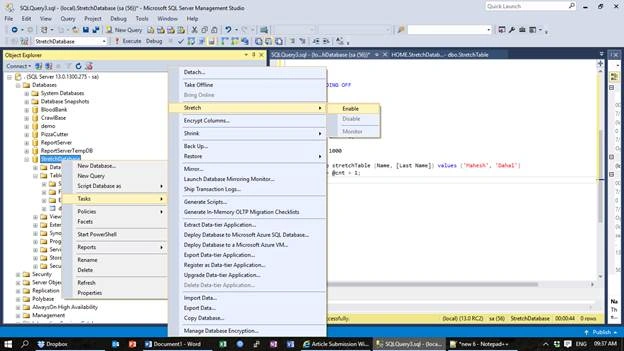
This will pop out a new window to configure the stretch feature.
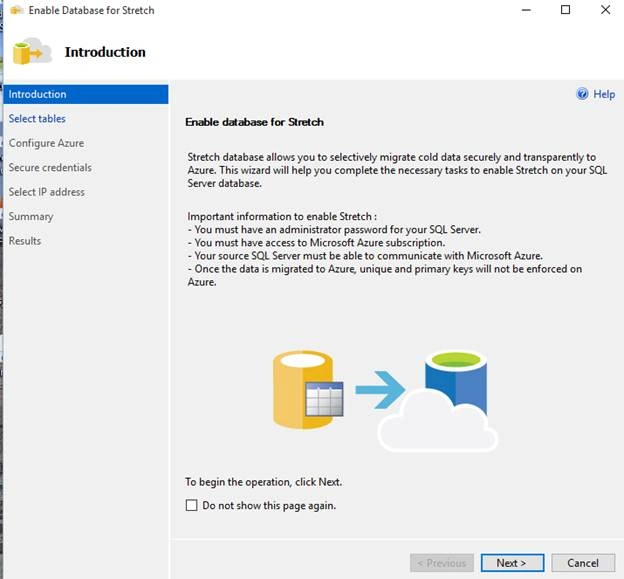
Click on Next and you will find options to select tables on which you want to apply stretch database.
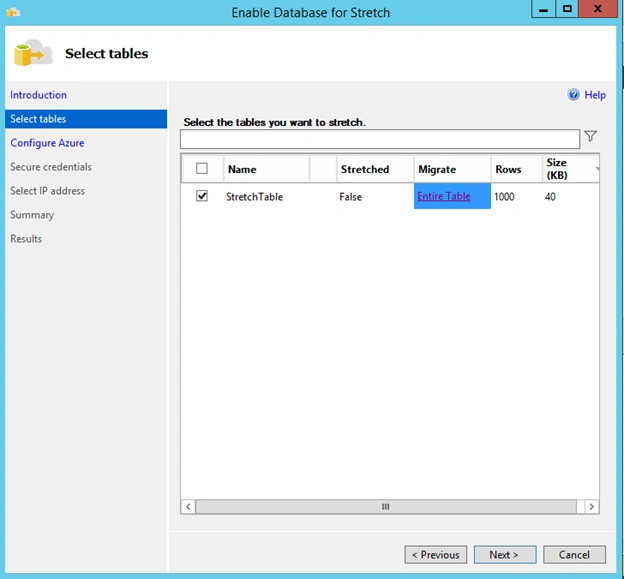
After you select your tables, click on Next and where you have to sign in to your Azure Subscription.
If you want to migrate only the desired data from the tables, then click on Entire Table. A window will pop out, where you can select the data that you desire to migrate.
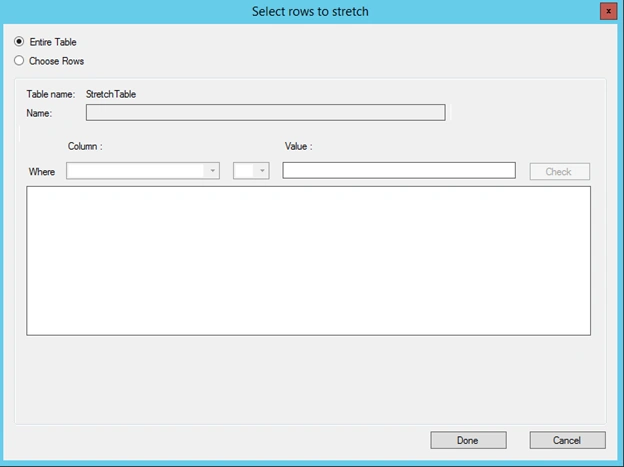
After you configure the desired rows for migration, click Done. You will be taken to a window to configure Azure Subscription.
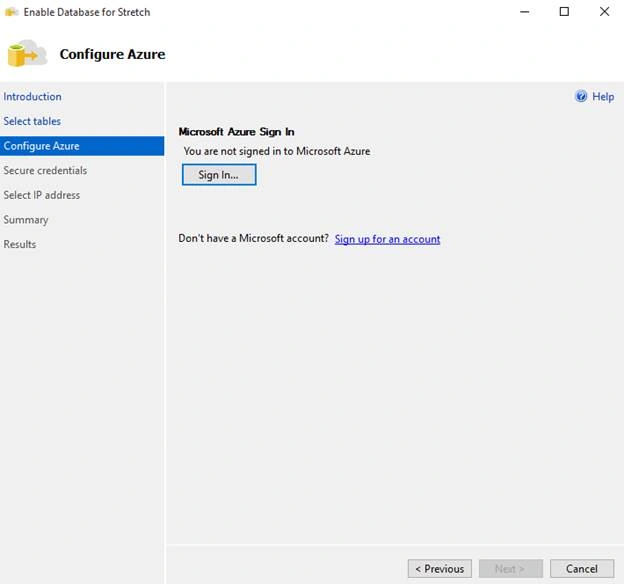
Click on Sign in.
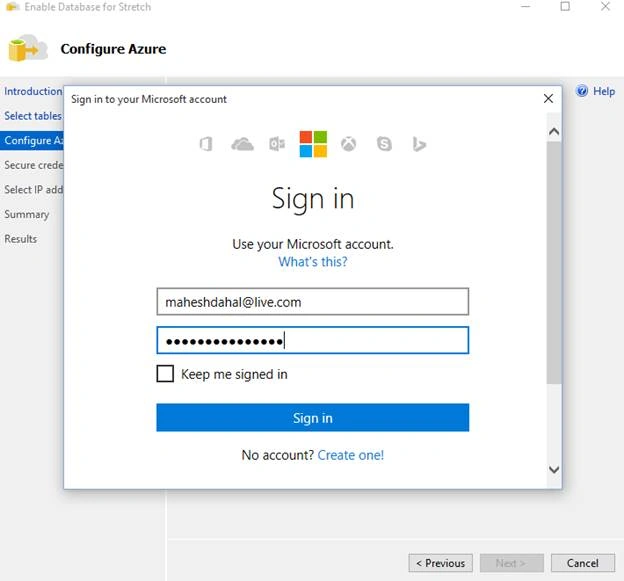
Then, insert your account credentials in the provided login screen.
After your sign in is successful, you will be able to choose your subscription details and region.
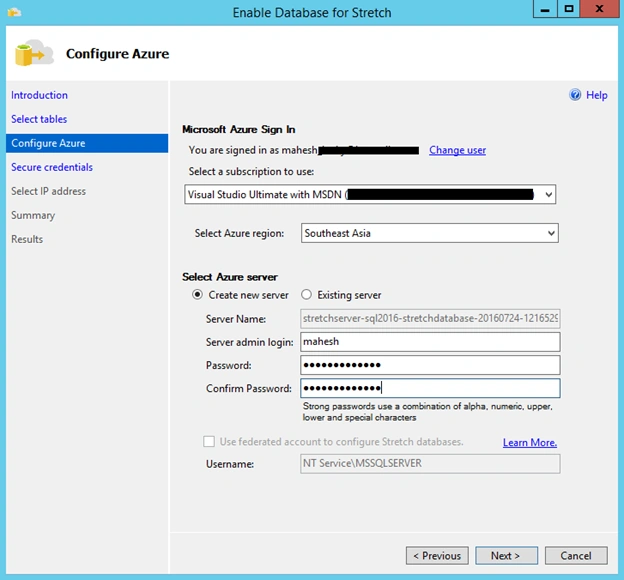
Click on sign on where you can sign in with your Azure account. Then, select the region and provide a new Username and Password for the database. That will be created in Azure where our data will be stored.
Then, click on Next. You will be asked for confirmation for the configurations.
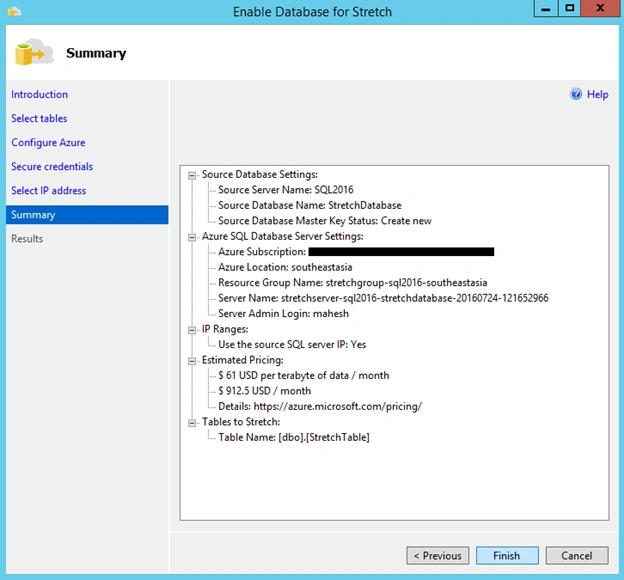
Click on Finish. Now, all the settings will be applied and data will be migrated.
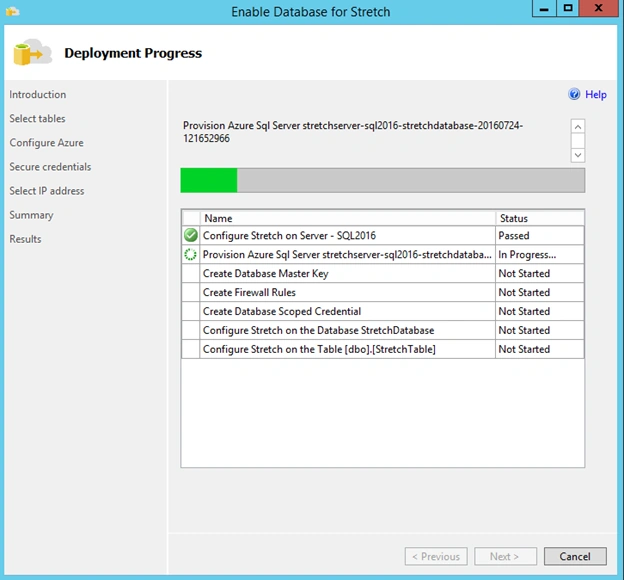
After the processes are completed, click on Close.
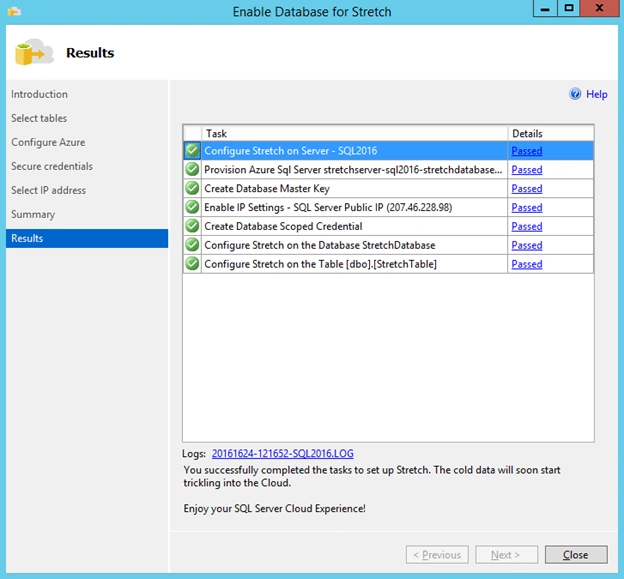
Now, let’s test the migration.
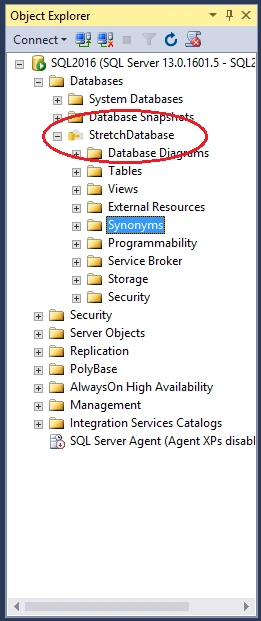
If the stretch database and migration is successful, the database icon will change to the following.
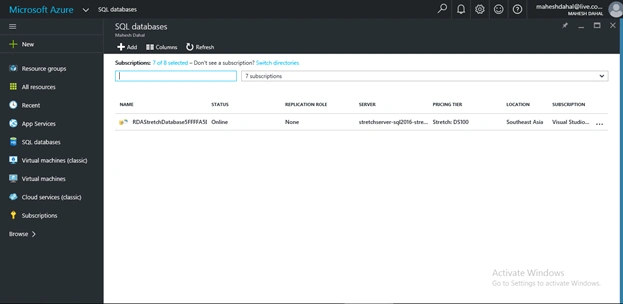
If you check your Azure Subscription, you will find a new database was created.
Now, let’s run a few queries. When you run these queries, you will get all the data that was stored. The data will come after running the query in local database and remote database.
Selecting * from StretchTable will show all the data in the table.
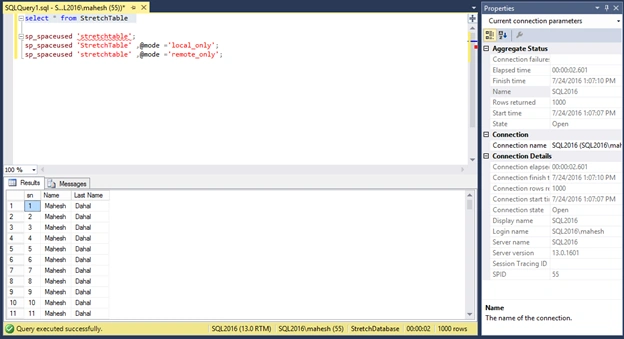
But, if you see the origin of the data using the following command, you will see that no data is stored in the local table.
Total storage used by this table can be found using,
Sp_spaceused ‘stretchtable’ 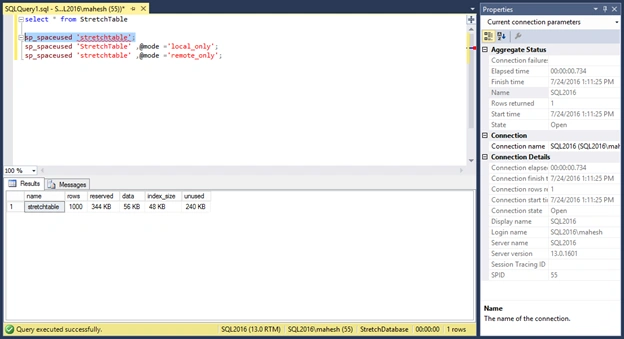
Whereas the space used by this table in local storage can be found using the command,
Sp_spaceused ‘stretchtable’, @mode=’local_only’ 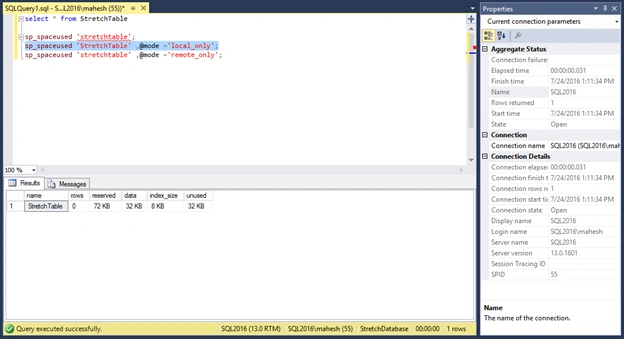
And, you can see in the results that just 72 KB storage is used.
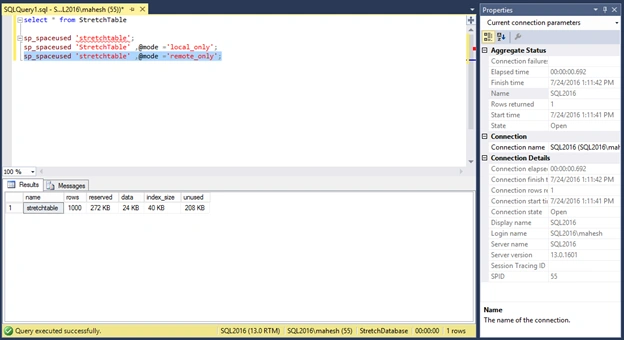
Whereas, if you run the command to find the space used in remote storage, you can see that all the data is stored in the remote database which is our SQL Azure database created earlier.
SQL Stretch is very advantageous to reduce the cost of storage drive while maintaining the consistency of application and application logic at the same time. However, SQL Stretch does not support the following:
- Migrated data will not be enforced for uniqueness. Primary key constraints and Unique constraints will be ignored.
- Update and Delete operations are not supported in the migrated table.
- You cannot create an index for a view that includes Stretch-enabled tables.
- Filters on SQL Server indexes are not propagated to the remote table.


Frank LeePosted Feb 5, 2022, 7:47 PM
"This was very expensive" -- have you looked at the cost of Stretch Database? Talk about expensive! You can do a substantial upgrade of on-prem storage and have money left over for the cost of 1 year of Stretch Database! I have not found a valid business use case, other than leveraging stretch database as a temporary solution (less than a few months). Can anybody provide insight into other possible cost-justifiable use-cases for stretch database?
SubashPosted Aug 2, 2016, 12:34 AM
Good Share
Prasanna MuraliPosted Jul 27, 2016, 9:43 PM
Nice share
Manas MohapatraPosted Jul 27, 2016, 7:19 AM
"Update and Delete operations are not supported in the migrated table" then what is the use of Strech Database and which scenario we need to use..
Vignesh ManiPosted Jul 27, 2016, 4:58 AM
Nice
Raja TPosted Jul 27, 2016, 1:50 AM
Nice article Sir, Thanks for sharing..
Mahesh ChandPosted Jul 26, 2016, 8:37 PM
Welcome to C# Corner, Mahesh. Nice to see articles on new tech like Azure and SQL Server 2016.
kalu singh raoPosted Jul 26, 2016, 3:48 PM
Good job