In the previous article ‘
Custom HTML helpers in MVC’ we learned how to create custom
HTML Helpers. In this article we will learn how to create strongly typed custom HTML Helpers.
To create a strongly typed helper we need to understand what makes them different from regular HTML Helpers. Strongly typed helpers are used to pass data from the model to the helper using expression syntax. The ‘HtmlHelper<TModel>’ class is a strongly typed subclass of the ‘HtmlHelper’ class.
Creating Strongly Custom Helper
To create a strongly typed custom helper we writethe extension method for ‘HtmlHelper<TModel>’ class. We also use the following:
- Expression:
While using a strongly typed helper on view we use lambda expressions like ‘@Html.TextBoxFor(m=>m.Name)’. Expression class is used to get the model information from this lambda expression.
- ModelMetaData:
This class is used to get model information with its data from the lambda expression.
Example:
Add new class in MVC application and give it a meaningful name. Add one model class as User as in the following:
- public class User
- {
- public string UserName { get; set; }
- }
In this application add class “CustomHelper”. As we are going to createan extension method make this class static. Write the following code in class.
- using System;
- using System.Linq.Expressions;
- using System.Web.Mvc;
- namespace StrongCustomHelpers
- {
- public static class CustomHelper
- {
- public static MvcHtmlString CustomTextBoxFor < TModel, TProperty > (this HtmlHelper < TModel > htmlHelper, Expression < Func < TModel, TProperty >> expression)
- {
- var name = ExpressionHelper.GetExpressionText(expression);
- var metadata = ModelMetadata.FromLambdaExpression(expression, htmlHelper.ViewData);
- TagBuilder tb = new TagBuilder("input");
- tb.Attributes.Add("type", "text");
- tb.Attributes.Add("name", name);
- tb.Attributes.Add("value", metadata.Model as string);
- tb.Attributes.Add("style", "color:red");
- return new MvcHtmlString(tb.ToString());
- }
- }
- }
Inthe above code we created a static method
CustomTextBoxFor for
HtmlHelper<TModel> class. In this method we created an HTML tag with the help of TagBulider class. We get the name of the model’s property with the help of ‘
GetExpressionText()’ method of ‘
Expression’ class. This name is used as the Id for the helper element on view. We get model data with the help of ‘
FromLambdaExpression()’ method. And then use this data as a value forthe helper element. We also set the forecolor of text input to red.
Now we can use this helper on view as below:
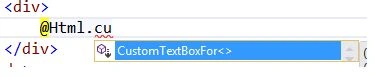
Add this helper to view for UserName property as below:
Html.CustomTextBoxFor(m=>m.UserName)
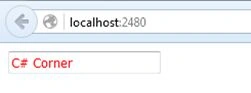
Run application and check output.
 Advantages of creating custom helpers
The advantage of custom helper is that suppose we create a helper with some style attributes or other properties. Then we don’t need to write the same code on multiple views for those properties. We just need to add custom helper. Like in the above example, we createa text field with red forecolor. So when we need a text field with a red color we don’t need to write style, we just use this new helper instead of the inbuilt helper.
Conclusion
In this article we learned to create strongly typed custom HTML Helpers. This will help us to remove some redundant code from the application.
Read more articles on ASP.NET:


Ranjit PowarPosted Feb 23, 2016, 10:57 PM
Thanks
Santhakumar MunuswamyPosted Feb 23, 2016, 2:24 PM
Thanks for nice article
Ranjit PowarPosted Feb 23, 2016, 6:11 AM
Thanks
Rupali ShindePosted Feb 23, 2016, 5:08 AM
nice
Ranjit PowarPosted Feb 22, 2016, 9:05 PM
Thanks kashif and vignesh
Vignesh ManiPosted Feb 22, 2016, 5:49 PM
Nice
Kashif AsifPosted Feb 22, 2016, 5:43 PM
good one
Ranjit PowarPosted Feb 21, 2016, 11:33 PM
Thanks shubham, amit, humayun and raja
Raja TPosted Feb 21, 2016, 11:13 PM
Thanks for sharing
Humayun Kabir MamunPosted Feb 21, 2016, 11:05 PM
Nice...
Amit Kumar SinghPosted Feb 21, 2016, 11:26 AM
Nice article
Shubham KumarPosted Feb 21, 2016, 9:41 AM
nice
Ranjit PowarPosted Feb 21, 2016, 9:27 AM
Thanks Ehsan and sibeesh
Sibeesh VenuPosted Feb 21, 2016, 9:24 AM
Nice Share
Ehsan SajjadPosted Feb 21, 2016, 7:56 AM
Good one