

Introduction
You saw some Structured Query Language (SQL) commands in my previous article. And now, I share some more commands of SQL. If you haven't read my previous article on SQL, please then read that article first because, in that article, I explained how to create databases and tables. Also, how to insert values into the tables and more. So please read the first article from here.
Before reading this article, I will suggest you all go through my previous article-
Ok, let's start.
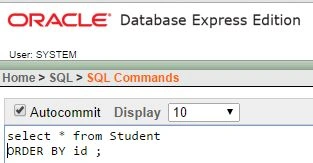
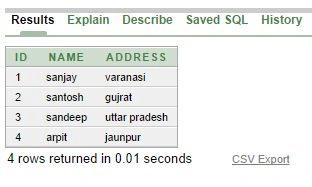
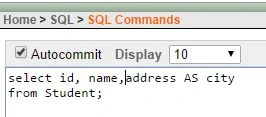
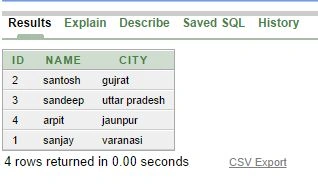
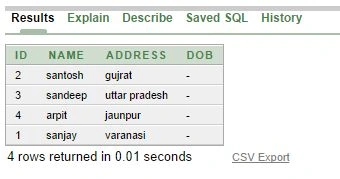
First, we show how many values we have in the database as in the following:
Output
"LIKE "
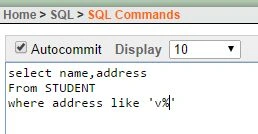
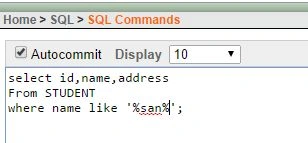
Like is used when searching for a specific pattern; for example, we only need the person whose name starts with the letter "s" or ends with "z." So let's see this practice.
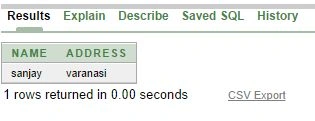
Start with a specific character.
Output
It ends with a specific character
Output
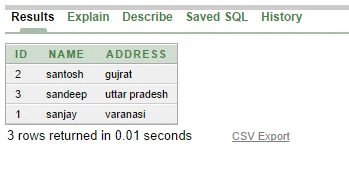
Matched any specific pattern
Output
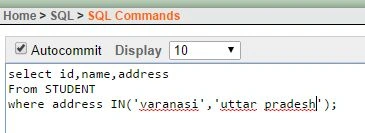
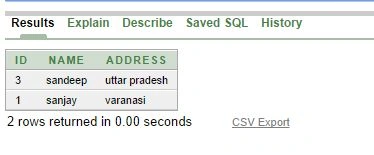
"IN" Operator
The In operator is used to select multiple values.
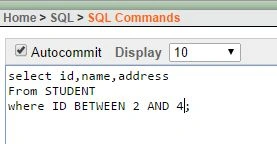
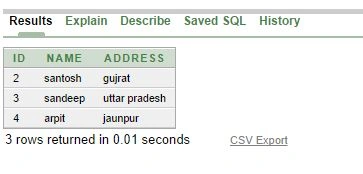
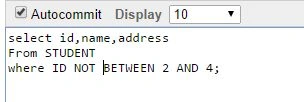
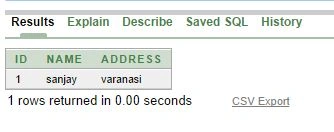
SubashPosted Sep 19, 2016, 7:52 AM
Very nice
Ranjit PowarPosted Aug 21, 2014, 1:34 AM
nice
Abhishek JaiswalPosted Aug 19, 2014, 1:16 PM
Good going Sanjay, make it large! ;)
kamlesh yadavPosted Aug 19, 2014, 8:40 AM
nice article sanjay... waiting part 3
Madhuram SrivastavaPosted Aug 19, 2014, 8:16 AM
its really good to see the next part of your SQL-2 it is very helpful to learn SQL easily ,keep it up