

Introduction
This article shows how to
create a simple struts application. I have demonstrated this article with a
simple calculation example developed using NetBeans 6.0.1. Other versions of
NetBeans can also be used to do the same.
The following are the steps required to create the application:
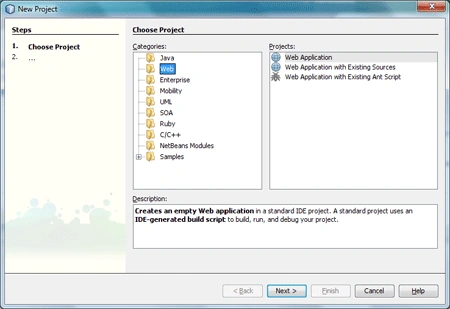
Step 1: Create a Web application by selecting the Web Application
project from the Web category and click Next.
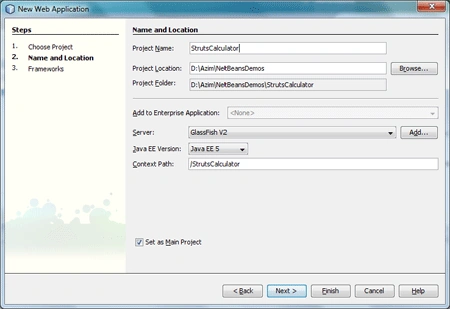
Step 2: Type the project name and project location and keep all other
options default as shown in the following figure.
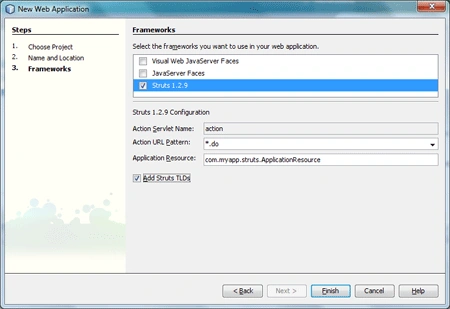
Step 3: Select the Struts 1.2.9 checkbox as shown in the following
figure. Also select the Add Struts TLDs checkbox and click Finish.
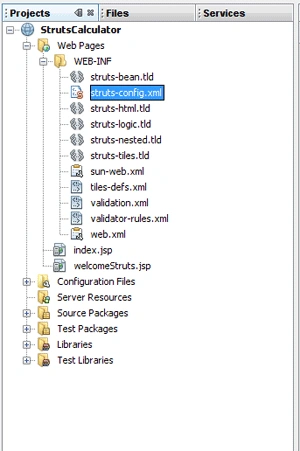
Step 4: From the Projects window open the struts-config.xml file.
Step 5: Edit the form-beans and action-mappings as follows:
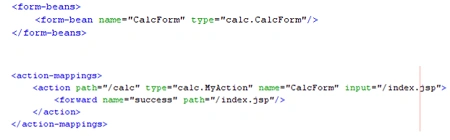
A form bean is a class that specifies the data of our application. In the form
bean class, we have to declare private properties and accessor (get) and mutator
(set) methods for each property.
In the form bean element, we specify the name and type attributes for our form
bean. The name attribute specifies the name of our form bean and the type
attribute specifies the fully qualified name (package.class) of our form bean.
The action element specifies the attributes of our action class like path, type,
name and input. The forward element specifies the success path for our
application.
All other elements in the struts-config.xml file need not be changed.
Step 6: Add a new Java Class to the project giving it the class name and
package name as specified in the form-bean element and click Finish. This class
represents our form bean.
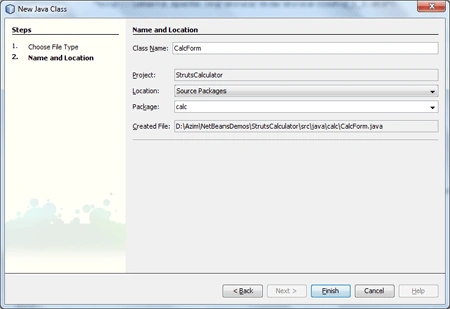
Step 7: Write the following code in the CalcForm class:
- package calc;
- import org.apache.struts.action.ActionError;
- import org.apache.struts.action.ActionErrors;
- import org.apache.struts.action.ActionForm;
- import org.apache.struts.action.ActionMapping;
- public class CalcForm extends ActionForm
- {
- private int n1,n2,addition,subtraction;
- public void setN1(int n1)
- {
- this.n1=n1;
- }
- public int getN1()
- {
- return n1;
- }
- public void setN2(int n2)
- {
- this.n2=n2;
- }
- public int getN2()
- {
- return n2;
- }
- public void setAddition(int addition)
- {
- this.addition=addition;
- }
- public int getAddition()
- {
- return addition;
- }
- public void setSubtraction(int subtraction)
- {
- this.subtraction=subtraction;
- }
- public int getSubtraction()
- {
- return subtraction;
- }
- public ActionErrors validate(ActionMapping mapping,HttpServletRequest request)
- {
- ActionErrors errors=new ActionErrors();
- if(n1==0)
- {
- errors.add("error.n1",new ActionError("error.n1"));
- }
- if(n2==0)
- {
- errors.add("error.n2",new ActionError("error.n2"));
- }
- return errors;
- }
- }

Venugopal SPosted Nov 29, 2012, 1:54 AM
It is useful for us.But u have to make some other complex application.
Dinesh BeniwalPosted Nov 23, 2011, 10:40 PM
Good work, Welcome to Mindcracker Community.
Satyapriya NayakPosted Nov 23, 2011, 12:45 PM
Nice!