

Introduction:
In this article, I will be explaining about the sub report in the grid view. I took northwind database as example for this demonstration.
GridView with Sub report:
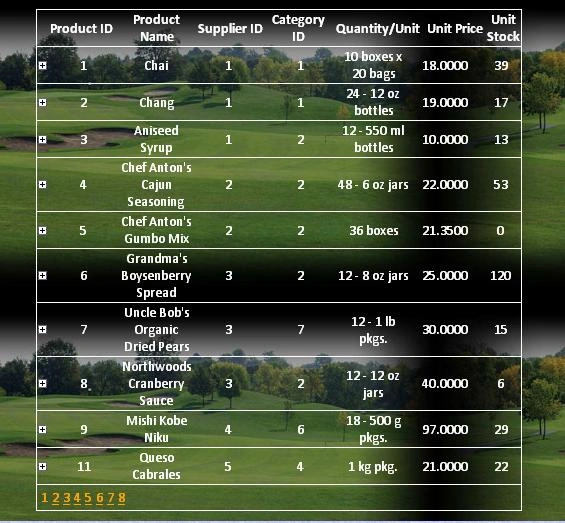
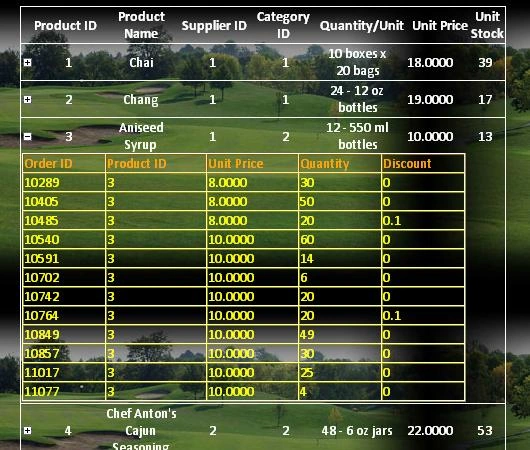
The product will have the sale order details. The entire product with the details will be displayed one by one. Here the every product may have the sale order details in the other table. If you want to show the product sale underneath of the main products then it will be little bit tedious. The server side another data control must be placed in the every row of the result in the main gridview.
I will be explaining the Gridview with inside the GridView. Here I have implemented in a different way which will retrieve the result very quickly. I have used the
When click on the every product expand it will load the data for the corresponding product from the database using the
<asp:GridView CssClass="Table" ID="gvProducts" AllowPaging="true" PageSize="10" BorderStyle="Solid" GridLines="Both" BorderColor="White" OnPageIndexChanging="gvProducts_PnPageIndexChanging" BorderWidth="1px" runat="server" AutoGenerateColumns="false">
<Columns>
<asp:TemplateField>
<HeaderTemplate>
<table cellpadding="0" cellspacing="0" border="0" width="100%">
<tr style="text-align: center;">
<td style="width:2%;"></td>
<td style="width: 16%;">Product ID</td>
<td style="width: 18%;">Product Name</td>
<td style="width: 15%;">Supplier ID</td>
<td style="width: 15%;">Category ID</td>
<td style="width: 19%;">Quantity/Unit</td>
<td style="width: 15%;">Unit Price</td>
<td style="width: 15%;">Unit Stock</td>
</tr>
</table>
</HeaderTemplate>
<ItemTemplate>
<table cellpadding="0" cellspacing="0" border="0" width="100%">
<tr style="text-align: center;">
<td style="width:2%;">
<img id="imgPlusMinus" style="cursor:pointer;" onclick="return Expand(this);" runat="server" src="~/Common/Images/plus.gif" />
</td>
<td style="width: 15%;">
<asp:Label ID="lblProductID" runat="server" Text='<%# DataBinder.Eval(Container.DataItem,"ProductID") %>'></asp:Label></td>
<td style="width: 15%;">
<%# DataBinder.Eval(Container.DataItem,"ProductName") %></td>
<td style="width: 15%;">
<%# DataBinder.Eval(Container.DataItem,"SupplierID") %></td>
<td style="width: 15%;">
<%# DataBinder.Eval(Container.DataItem,"CategoryID") %></td>
<td style="width: 15%;">
<%# DataBinder.Eval(Container.DataItem,"QuantityPerUnit") %></td>
<td style="width: 15%;">
<%# DataBinder.Eval(Container.DataItem,"UnitPrice") %></td>
<td style="width: 15%;">
<%# DataBinder.Eval(Container.DataItem,"UnitsInStock") %></td>
</tr>
<tr style="display: none;" id="TrOrders" runat="server">
<td colspan="7">
<div id="divOrderDetails" runat="server">
</div></td></tr>
</table>
</ItemTemplate>
</asp:TemplateField>
</Columns>
<PagerStyle ForeColor="Orange" />
</asp:GridView>
I have added one more row for display the sub report content in this part. That will be hidden initially. I have used the div tag inside that every row for display the content.
ramesh samarlaPosted Aug 24, 2011, 9:53 AM
hi senthil its really gud but u r not attached database can u send dat please
bhuvaanesheditedPosted Sep 9, 2010, 2:54 AMEdited Sep 9, 2010, 3:02 AM
sir i have a drop down table if i select the product name from that drop down table ,,,,it should display the all details of the product in the grid view using ajax ///// im a beginner can u help me sir?????
harish kumarPosted Aug 31, 2009, 10:07 AM
Your article is so impressive. I would like to implement as your guidelines but i am a Beginner to this environment my problem is How to get the Databound in all fields (like Product Id, ProductName) in an gridview in the Design View of Visual studio but i am getting Values instead of Databound in Gridview after attaching sqldatasource Plz Help me . Eagerly waiting for your Reply