
Introduction
This article shows how to perform basic syntax highlighting using the RichTextBox control and C#.The example shows how to apply highlighting as text is loaded into the RichTextBox.Another article Part 2 will show you how to do this interactively as the user enters in text.For this example, the language to be syntax highlighted within the RichTextBox control is C#.
Description
In this example, I take you through the following steps:
- the creation of a RichTextBox control,
- the definition the input language C# to be highlighted,
- the splitting of the input language into individual lines, and
- then the processing the text within each line and how the RichTextBox control properties are
- used to set the individual text colors and fonts.
Lets begin with creating a normal RichTextBox control like so.
Note, I define the RichTextBox control as a class variable so I can access it from other methods within the same class. This isnt shown here.
- RichTextBox m_rtb = null;
- m_rtb = new RichTextBox();
- m_rtb.Multiline = true;
- m_rtb.WordWrap = false;
- m_rtb.AcceptsTab = true;
- m_rtb.ScrollBars = RichTextBoxScrollBars.ForcedBoth;
- m_rtb.Dock = DockStyle.Fill;
- m_rtb.SelectionFont = new Font("Courier New", 10,FontStyle.Regular);
- m_rtb.SelectionColor = Color.Black;
- String inputLanguage =
- "// Comment.\n" +
- "using System;\n" +
- "\n" +
- "public class Stuff : Form { \n" +
- " public static void Main(String args) {\n" +
- " }\n" +
- "}\n" ;
- Regex r = new Regex(\\n);
- String [] lines = r.Split(inputLanguage);
- foreach (string l in lines)
- {
- ParseLine(l);
- }
Next the contents of the input line are split into multiple tokens using the Regex class. The group syntax () is used to pull out the tokens including the delimiters. Then each token is examined to see whether it is a keyword or not. Before the text is added to the RichTextBox we must set the color and font of the text using the RichTextBox properties SelectionColor and SelectionFont. After this we can simply add the text tokens to the RichTextBox using the property SelectedText which acts like an append text function. The text tokens will now be displayed in the color and font we select.
Note, I have removed the code to detect comments // since it makes the code look cleaner. See the attached file for a more complete example.
- void ParseLine(string line)
- {
- Regex r =new Regex("([ \\t{}():;])");
- String [] tokens = r.Split(line);
- foreach (string token in tokens)
- {
- // Set the tokens default color and font.
- m_rtb.SelectionColor = Color.Black;
- m_rtb.SelectionFont =new Font("Courier New", 10, FontStyle.Regular);
- // Check whether the token is a keyword.
- String [] keywords = {"public", "void", "using", "static", "class"};
- for (int i = 0; i < keywords.Length; i++)
- {
- if (keywords[i] == token)
- {
- // Apply alternative color and font to highlight keyword.
- m_rtb.SelectionColor = Color.Blue;
- m_rtb.SelectionFont =new Font("Courier New", 10,FontStyle.Bold);
- break;
- }
- }
- m_rtb.SelectedText = token;
- }
- m_rtb.SelectedText = "\n";
- }
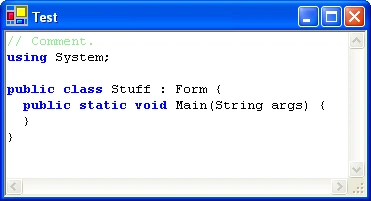
Conclusion
This article described a rudimentary example of how to perform syntax highlighting as text is loaded into the RichTextBox control. A more thorough implementation is left to the reader. A second article will describe how to perform syntax highlighting interactively as the user enters in text.
jose plataPosted Nov 20, 2018, 5:20 PM
Dejo de funcionar contor+Z
Elegiac ElegiacPosted Jul 11, 2013, 4:23 AM
it keeps on scanning what to highlight next!
SagarPosted May 15, 2012, 9:48 PM
<pre> $("td.items").each(function(index) { $(this).editable("handler.php", { submitdata : {userid: $(this).attr('retailerid')}, indicator : "<img src="images/indicator.gif">", tooltip : "Doubleclick to edit...", event : "dblclick", onblur : "submit", id : 'elementid', }); }); </pre>
SagarPosted May 15, 2012, 9:48 PM
$("td.items").each(function(index) { $(this).editable("handler.php", { submitdata : {userid: $(this).attr('retailerid')}, indicator : "<img src="images/indicator.gif">", tooltip : "Doubleclick to edit...", event : "dblclick", onblur : "submit", id : 'elementid', }); });
jim reganPosted May 7, 2012, 4:06 PM
thank you.
yunus rhaitiPosted Feb 8, 2011, 11:53 AM
improvement if you can add , how to display the message between double symbol in red
VIJAY BEDREPosted Aug 17, 2010, 3:13 AM
aaaasas
faisal arshadPosted Jun 5, 2010, 5:13 PM
nice work man
Erick AldiPosted Mar 1, 2010, 9:24 PM
Excelent Example !!!
asha mPosted Aug 14, 2009, 5:02 AM
explain a program for login screen control?
nizam ahmedPosted Jun 8, 2009, 2:23 AM
hi.. i m creating an IDE for C and i want to use keyword coloring(i.e. coloring int when the user types character 't').. if i use richtextbox.select() function it is creating flickering effect and also while undo also problems will come.. Is there anyother way to color the words in runtime.. please help me.. i m stucking with this for a whole week.. thanks.. waiting for a reply from a c# pro