

The namespace System.Diagnostics provides a set of attributes and classes to interact with the system process, event managers, performance counts, etc. This namespace can help us too in debugging jobs.
Let’s review the useful actions inside System.Diagnostics namespace.
DebuggerDisplay Attribute
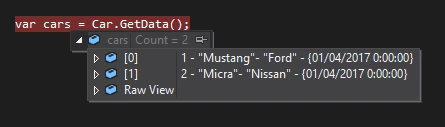
DebuggerDisplay attribute drives the string format with debug screen, which shows the value of class, properties, or fields.
For this same task, it is the best-known override ToString method, but use the DebbugerDisplay attribute is a better choice because this does not modify the data structure as it only interacts with the Visual Studio debugger screen. Override ToString method for only this purpose can give problems because many actions in .NET take this value for default, for example, bindings in WPF.
This attribute supports delegates, properties, fields, and assemblies.
Example
- [System.Diagnostics.DebuggerDisplay("{ID} - {Model}- {Manufacturer} - {ProductionDate}")]
- public class Car
- {
- public int ID { get; set; }
- public string Model { get; set; }
- public string Manufacturer { get; set; }
- public DateTime ProductionDate { get; set; }
- }
 DebuggerHidden Attribute
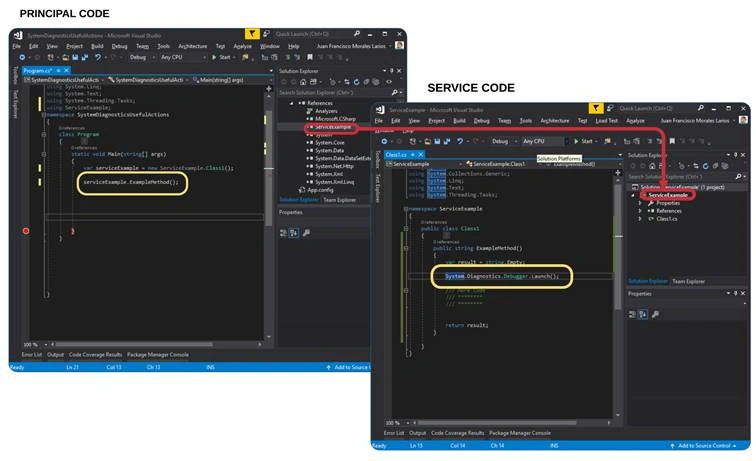
DebuggerHidden attribute prevents the compiler from stopping in constructors, methods, properties, and indexers declarations.
In mentioning this later, my comment might sound lightweight, but in the practice, this can save time to push key F11 in debugging.
Example
- [System.Diagnostics.DebuggerHidden]
- public static List<Car> GetData()
- {
- var result = new List<Car>()
- {
- new Car{ ID = 1, Manufacturer = "Ford", Model = "Mustang", ProductionDate = DateTime.Today },
- new Car{ ID = 2, Manufacturer = "Nissan", Model = "Micra" , ProductionDate = DateTime.Today }
- };
- return result;
- }
Join the conversation! Your thoughts help the community grow.