

Introduction
Today, in this article let's play around with an interesting and very useful concept in entity framework.
Question: What is Table Per Type Inheritance?
In simple terms "The parent entity is associated with many child entities where the child entities can inherit the data from the parent. Here the primary key of the parent entity is shared with the child entity that maintains a 1-1 relationship".
Step 1: Create a new web application

Step 2: Entities in DB looks like this:

Step 3: Adding New Entity Data Model Framework

Step 4: Select the tables from DB

Step 5: Entity in Model Browser

Step 6: Delete association links between entities

Step 7: Select the base types


Step 8: New inheritance associations established

Step 9: Delete the child table or entities Ids that will inherit from the parent entity
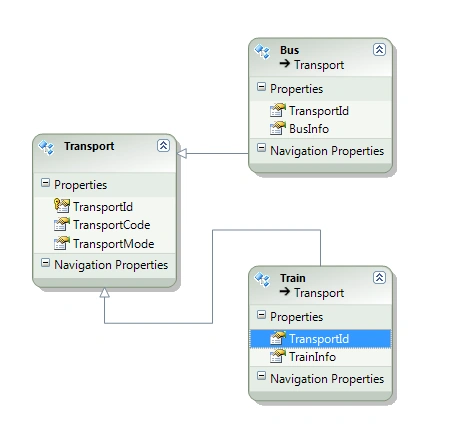
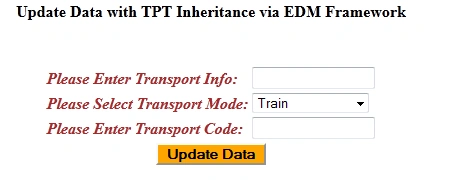
Step 10: The complete code of WebForm1.aspx looks like this
- <%@ Page Language="C#" AutoEventWireup="true" CodeBehind="WebForm1.aspx.cs" Inherits="TPTInhertanceUpdateApp.WebForm1" %>
- <!DOCTYPE html PUBLIC "-//W3C//DTD XHTML 1.0 Transitional//EN" "http://www.w3.org/TR/xhtml1/DTD/xhtml1-transitional.dtd">
- <html xmlns="http://www.w3.org/1999/xhtml">
- <head id="Head1" runat="server">
- <title></title>
- </head>
- <body>
- <form id="form1" runat="server">
- <div>
- <center>
- <table>
- <tr>
- <td>
- <asp:Label ID="Label1" runat="server" Text="Update Data with TPT Inheritance via EDM Framework"
- Font-Bold="true"></asp:Label>
- </td>
- </tr>
- </table>
- <br />
- <br />
- <table>
- <tr>
- <td>
- <asp:Label ID="Label2" runat="server" Text="Please Enter Transport Info: " ForeColor="Brown"
- Font-Bold="true" Font-Italic="true"></asp:Label>
- </td>
- <td>
- <asp:TextBox ID="TextBox1" runat="server" Width="117px"></asp:TextBox>
- </td>
- </tr>
- <tr>
- <td>
- <asp:Label ID="Label3" runat="server" Text="Please Select Transport Mode: " ForeColor="Brown"
- Font-Bold="true" Font-Italic="true"></asp:Label>
- </td>
- <td>
- <asp:DropDownList ID="DropDownList1" runat="server" Width="117px">
- <asp:ListItem Text="Train" Value="0"></asp:ListItem>
- <asp:ListItem Text="Bus" Value="1"></asp:ListItem>
- </asp:DropDownList>
- </td>
- </tr>
- <tr>
- <td>
- <asp:Label ID="Label4" runat="server" Text="Please Enter Transport Code: " ForeColor="Brown"
- Font-Bold="true" Font-Italic="true"></asp:Label>
- </td>
- <td>
- <asp:TextBox ID="TextBox2" runat="server" Width="117px"></asp:TextBox>
- </td>
- </tr>
- <tr>
- <td colspan="2" align="center">
- <asp:Button ID="Button1" runat="server" Text="Update Data" OnClick="Button1_Click"
- BackColor="Orange" Font-Bold="true" /><br />
- <br />
- </td>
- </tr>
- </table>
- <br />
- <br />
- <table>
- <tr>
- <td colspan="3">
- <asp:Label ID="Label5" runat="server" Font-Bold="true"></asp:Label>
- </td>
- </tr>
- </table>
- </center>
- </div>
- </form>
- </body>
- </html>

Gowtham RajamanickamPosted Mar 11, 2015, 8:45 AM
NIce articel...
Rishi NarulaPosted Mar 16, 2013, 3:51 AM
how to add data in 4 tables using linq ... I want to add the primary key (identity column) of the master table into child tables as foreign key using TPT