We will see techniques for TextBox value retrievals from one page to another page.
Technique 1: Data Transfer with Cookies
In this example the TextBox data transfer uses cookies as in the following.
Form 1
Design: Add FillInfo.aspx.
- <%@ Page Title="" Language="C#" MasterPageFile="~/Master/Master.master" AutoEventWireup="true" CodeFile="FillInfo.aspx.cs" Inherits="UI_Cookies_FillInfo" %>
-
- <asp:Content ID="Content1" ContentPlaceHolderID="head" Runat="Server">
- </asp:Content>
- <asp:Content ID="Content2" ContentPlaceHolderID="ContentPlaceHolder1" Runat="Server">
-
- <div>
- <asp:Label ID="Label1" runat="server" Text="User name : "></asp:Label>
- <asp:TextBox ID="txtUsername" runat="server"></asp:TextBox>
- <asp:Button ID="btnsend" runat="server" Text="Send Text Value Next Page" OnClick="btnsend_Click" />
- </div>
- </asp:Content>
Code: FillInfo.aspx.cs.
- using System;
- using System.Collections.Generic;
- using System.Linq;
- using System.Web;
- using System.Web.UI;
- using System.Web.UI.WebControls;
-
- public partial class UI_Cookies_FillInfo : System.Web.UI.Page
- {
- protected void Page_Load(object sender, EventArgs e)
- {
-
- }
- protected void btnsend_Click(object sender, EventArgs e)
- {
- HttpCookie Cookie = new HttpCookie("Username");
- Cookie.Value = txtUsername.Text;
- Cookie.Expires = DateTime.Now.AddHours(1);
- Response.Cookies.Add(Cookie);
- Response.Redirect("ShowInfo.aspx");
- }
- }
Form 2
Design: Add ShowInfo.aspx.
Code: ShowInfo.aspx.cs.
- using System;
- using System.Collections.Generic;
- using System.Linq;
- using System.Web;
- using System.Web.UI;
- using System.Web.UI.WebControls;
-
- public partial class UI_Cookies_ShowInfo : System.Web.UI.Page
- {
- protected void Page_Load(object sender, EventArgs e)
- {
- if (Request.Cookies["Username"] != null)
- {
- Response.Write(Request.Cookies["Username"].Value.ToString());
- }
- }
- }
Now run the FillInfo.aspx page and fill in the user name as in the following:
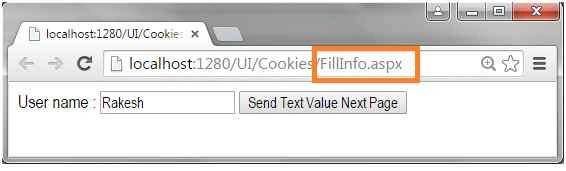 Figure 1:
 Fill in Cookie value
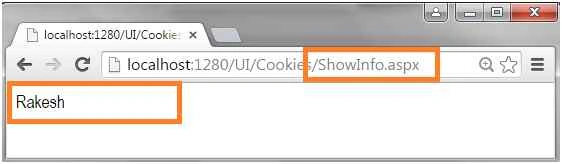 Figure 2:
 Display Cookie value
Technique 2: Data Transfer with Application VariableIn this example the TextBox data transfer uses an application variable as in the following.
First create two forms.
From 1
Design: FillApplicationVariable .aspx.
- <%@ Page Title="" Language="C#" MasterPageFile="~/Master/Master.master" AutoEventWireup="true" CodeFile="FillApplicationVariable .aspx.cs" Inherits="UI_Appvariable_FillApplicationVariable_" %>
-
- <asp:Content ID="Content1" ContentPlaceHolderID="head" Runat="Server">
- </asp:Content>
- <asp:Content ID="Content2" ContentPlaceHolderID="ContentPlaceHolder1" Runat="Server">
-
- <div>
- <asp:Label ID="Label1" runat="server" Text="User name : "></asp:Label>
- <asp:TextBox ID="txtUsername" runat="server"></asp:TextBox>
- <asp:Button ID="btnsend" runat="server" Text="Send Text Value Next Page" OnClick="btnsend_Click" />
- </div>
-
- </asp:Content>
Code: FillApplicationVariable .aspx.cs.
- using System;
- using System.Collections.Generic;
- using System.Linq;
- using System.Web;
- using System.Web.UI;
- using System.Web.UI.WebControls;
-
- public partial class UI_Appvariable_FillApplicationVariable_ : System.Web.UI.Page
- {
- protected void Page_Load(object sender, EventArgs e)
- {
-
- }
- protected void btnsend_Click(object sender, EventArgs e)
- {
- Application["Username"] = txtUsername.Text;
- Response.Redirect("ShowApplicationVariable .aspx");
- }
- }
Form 2
Design: Add ShowApplicationVariable .aspx.
Code: ShowApplicationVariable .aspx.cs.
- using System;
- using System.Collections.Generic;
- using System.Linq;
- using System.Web;
- using System.Web.UI;
- using System.Web.UI.WebControls;
-
- public partial class UI_Appvariable_ShowApplicationVariable_ : System.Web.UI.Page
- {
- protected void Page_Load(object sender, EventArgs e)
- {
- if (Application["Username"] != null)
- {
- string Name = Application["Username"].ToString();
- Response.Write(Name);
- }
- }
- }
Now run the form in the browser and fill in the application variable's value in the TextBox as in the following.
 Figure 3:
 Fill application variable value
 Figure 4:
 Display application variable value
Technique 3: Data Transfer with Session VariableIn this example the TextBox data transfer uses a session variable as in the following.
Form 1
Design: Add FillSessionName.aspx.
- <%@ Page Title="" Language="C#" MasterPageFile="~/Master/Master.master" AutoEventWireup="true" CodeFile="FillSessionName.aspx.cs" Inherits="UI_Session_FillSessionName" %>
-
- <asp:Content ID="Content1" ContentPlaceHolderID="head" Runat="Server">
- </asp:Content>
- <asp:Content ID="Content2" ContentPlaceHolderID="ContentPlaceHolder1" Runat="Server">
-
- <div>
- <asp:Label ID="Label1" runat="server" Text="User name : "></asp:Label>
- <asp:TextBox ID="txtUsername" runat="server"></asp:TextBox>
- <asp:Button ID="btnsend" runat="server" Text="Send Text Value Next Page" OnClick="btnsend_Click" />
- </div>
-
- </asp:Content>
Code: FillSessionName.aspx.cs.
- using System;
- using System.Collections.Generic;
- using System.Linq;
- using System.Web;
- using System.Web.UI;
- using System.Web.UI.WebControls;
-
- public partial class UI_Session_FillSessionName : System.Web.UI.Page
- {
- protected void Page_Load(object sender, EventArgs e)
- {
-
- }
- protected void btnsend_Click(object sender, EventArgs e)
- {
- Session["Username"] = txtUsername.Text;
- Response.Redirect("ShowSessionName.aspx");
- }
- }
Form 2
Design: Add ShowSessionName.aspx.
Code: ShowSessionName.aspx.cs.
- using System;
- using System.Collections.Generic;
- using System.Linq;
- using System.Web;
- using System.Web.UI;
- using System.Web.UI.WebControls;
-
- public partial class UI_Session_ShowSessionName : System.Web.UI.Page
- {
- protected void Page_Load(object sender, EventArgs e)
- {
- if (Session["Username"] != null)
- {
- Response.Write(Session["Username"].ToString());
- }
- }
- }
Now run the form in a browser and fill in the session variable value in TextBox as in the following.
 Figure 5:
 Fill Session Variable
 Figure 6:
 Display Session variable
Technique 4: Data Transfer with Query StringIn this example the TextBox data transfer in the next page of the browser URL path using a Query String is as in the following.
Form 1
Design: Add FillStringValue.aspx.
- <%@ Page Title="" Language="C#" MasterPageFile="~/Master/Master.master" AutoEventWireup="true" CodeFile="FillStringValue.aspx.cs" Inherits="UI_QueryString_FillStringValue" %>
-
- <asp:Content ID="Content1" ContentPlaceHolderID="head" Runat="Server">
- </asp:Content>
- <asp:Content ID="Content2" ContentPlaceHolderID="ContentPlaceHolder1" Runat="Server">
-
- <div>
- <asp:Label ID="Label1" runat="server" Text="User name : "></asp:Label>
- <asp:TextBox ID="txtUsername" runat="server"></asp:TextBox>
- <asp:Button ID="btnsend" runat="server" Text="Send Text Value Next Page" OnClick="btnsend_Click" />
- </div>
-
- </asp:Content>
Code: FillStringValue.aspx.cs.
- using System;
- using System.Collections.Generic;
- using System.Linq;
- using System.Web;
- using System.Web.UI;
- using System.Web.UI.WebControls;
-
- public partial class UI_QueryString_FillStringValue : System.Web.UI.Page
- {
- protected void Page_Load(object sender, EventArgs e)
- {
-
- }
- protected void btnsend_Click(object sender, EventArgs e)
- {
- Response.Redirect("ShowStringValue.aspx?Username=" + txtUsername.Text);
- }
- }
Form 2
Design: Add ShowStringValue.aspx.
Code: ShowStringValue.aspx.cs.
- using System;
- using System.Collections.Generic;
- using System.Linq;
- using System.Web;
- using System.Web.UI;
- using System.Web.UI.WebControls;
-
- public partial class UI_QueryString_ShowStringValue : System.Web.UI.Page
- {
- protected void Page_Load(object sender, EventArgs e)
- {
- string Name = Request.QueryString["Username"].ToString();
- Response.Write(Name);
- }
- }
Now run the form in a browser and fill in a string variable value into the TextBox as in the following.
 Figure 7:
 Fill String value
 Figure 8:
 Display String Value
I hope you like this article and understood how to pass TextBox values from one page to another page.


Ravi RaushanPosted Dec 20, 2024, 9:29 AM
To Carry Variables From One web Page To Others - The Cookies And Session Are Best
Bhavesh VankarPosted Aug 29, 2020, 6:46 AM
Sir can we post image from one page to another page using jquery in asp.net c#
VandanaPosted May 10, 2018, 1:54 PM
Nice Article easy to learn
Ayush GuptaPosted May 1, 2018, 1:56 PM
Superb Article Keep blogging and provide one article for practical web application project.
Rao AliPosted Feb 27, 2018, 12:19 AM
Hi everyone! I want to ask some questions regarding online examination system.... Anyone can please tell me about that....?1.when user click on end paper how to show result..?
RakeshPosted Aug 19, 2015, 8:28 AM
thanks Vipul Malhotra
Vipul MalhotraPosted Aug 19, 2015, 7:49 AM
nice
RakeshPosted Aug 19, 2015, 7:21 AM
thank you Sibeesh Venu
Sibeesh VenuPosted Aug 19, 2015, 6:54 AM
Nice Share\
Yashwanth MuthineniPosted Aug 19, 2015, 6:08 AM
Nice Share
RakeshPosted Aug 19, 2015, 3:54 AM
thank you Sumit Joshi
RakeshPosted Aug 19, 2015, 3:54 AM
thank you Vaikesh K P
RakeshPosted Aug 19, 2015, 3:53 AM
thank you Upendra Pratap Shahi
RakeshPosted Aug 19, 2015, 3:53 AM
thank you Manas Mohapatra
RakeshPosted Aug 19, 2015, 3:53 AM
thank you Rajeesh Menoth
RakeshPosted Aug 19, 2015, 3:52 AM
thank you Nilesh Jadav
RakeshPosted Aug 19, 2015, 3:52 AM
thank you Karthikeyan K
RakeshPosted Aug 19, 2015, 3:51 AM
thank you Mohammed Ibrahim
RakeshPosted Aug 19, 2015, 3:51 AM
thank you Van Lai
RakeshPosted Aug 19, 2015, 3:51 AM
thank you Gowtham K
RakeshPosted Aug 19, 2015, 3:50 AM
thank you Rahul Prajapat
RakeshPosted Aug 19, 2015, 3:50 AM
thank you Shridhar Sharma
Sumit JoshiPosted Aug 19, 2015, 1:35 AM
Nice Share.
Vaikesh K PPosted Aug 19, 2015, 1:22 AM
Good Share
Upendra Pratap ShahiPosted Aug 19, 2015, 12:43 AM
nice share sir..
Manas MohapatraPosted Aug 19, 2015, 12:24 AM
Informative one..
Rajeesh MenothPosted Aug 19, 2015, 12:16 AM
Good One
Nilesh JadavPosted Aug 19, 2015, 12:15 AM
Nice share sir
Karthikeyan KPosted Aug 18, 2015, 11:10 PM
Thanks for share
Mohammed IbrahimPosted Aug 18, 2015, 10:50 PM
nice
Van LaiPosted Aug 18, 2015, 9:24 PM
Thank you for the detailed information.
Van LaiPosted Aug 18, 2015, 9:24 PM
Thank you for the detailed information.
Gowtham KPosted Aug 18, 2015, 9:09 PM
Good one
Rahul PrajapatPosted Aug 18, 2015, 8:23 PM
Thank you sir for this article
Shridhar SharmaPosted Aug 18, 2015, 5:53 PM
nice share