In this article, we will be fixing the below issue in Windows Server 2012.
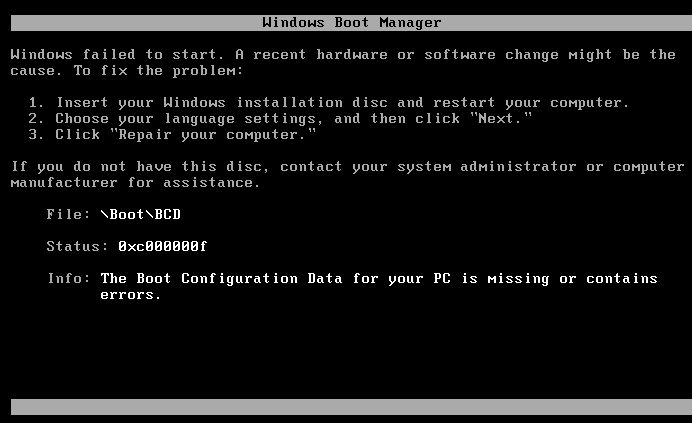
"The Boot Configuration Data for your PC is missing or contains errors."
Scenario
We have a Windows Server 2012 Virtual Machine and we have tried to extend the Operating System Partition (Active Partition) that extended properly but unfortunately, after the first restart, we got the below error.
The Boot Configuration Data for your PC is missing or contains errors.
Cause
Extending the Operating System Active Partition may cause damage to the Boot\BCD file.
What's the Boot Configuration Data?
The Boot Configuration Data (BCD) is a firmware-independent database for boot-time configuration data. It is used as new Windows Boot Manager. It replaces the "boot.ini" file that was used in old operating systems. For more details, check Windows startup process.
Solution
We have two options to solve this issue.
- Run Startup Repair.
- Rebuild the BCD file via the Bootrec.exe tool.
Run Startup Repair
- Power Off the VM.


- From the left side, go to VM Settings >Hardware tab > CD/DVD > Browse.
- Locate the Windows Server 2012 R2 media (ISO/DVD).
- Note
It should be the same Windows version that you have already installed.

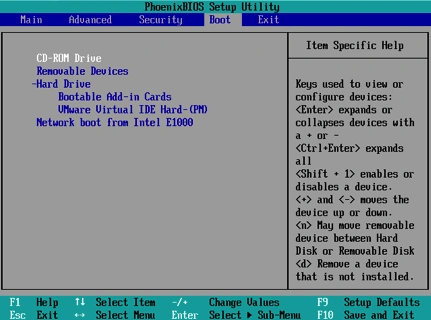
- Set the default boot device to CD/DVD as the following.
- Power On VM > Press F2 to open Bios Setup > Boot Menu > select CD-ROM Drive and press "+/-" to go up/down.
- Press F10 to save and exit.
- The VM will be rebooted with the default option for CD/DVD.
- Press any key to boot from the CD/DVD.
- At the Windows Setup Dialog, set your appropriate settings and click Next.
- Click on "Repair your Computer" > Troubleshoot > Command Prompt.
- Navigate to the recovery folder by typing cd recovery followed by an Enter.
- Run Startup Repair by typing startrep.exe.
- Wait until the repair is finished.
Unfortunately, in our case, the Startup Repair couldn't repair the issue! So, we will try to rebuild the BCD file via Bootrec.exe tool.
Rebuild the BCD file via the Bootrec.exe Tool Before we get started, let us learn What's the Bootrec Tool?
- The Bootrec tool is the ultimate repair tool for boot problems in Windows.
- It supports the following options.
- /FixMbr
- This option writes MBR to the system partition. It does not overwrite the existing partition table.
- Use this option when you must resolve MBR corruption issues, or when you have to remove the non-standard code from the MBR.
- /FixBoot
- This option writes a new boot sector to the system partition by using a boot sector that’s compatible with Windows.
- Use this option if one of the following conditions is true:
- The boot sector was replaced with a non-standard Windows boot sector.
- The boot sector is damaged.
- /ScanOs
- This option scans all disks for installations that are compatible with Windows.
- It also displays the entries that are currently not in the BCD store.
- Use this option when there are Windows installations that the Boot Manager menu does not list.
- /RebuildBcd
In our case, we will use /RebuildBcd to rebuild the Bcd file by doing the following.
Steps
- Again, click on Repair your Computer > Troubleshoot > Command Prompt.
- Type the below command to rebuild he Bcd file.
bootrec /RebuildBcd
- Once the operation completed successfully, close the command prompt.
- Click on "Continue to Exit" and continue to Windows Server 2012.
- The BCD file should be rebuilt by now and the Windows should be working properly.
Conclusion
In this article, we have fixed "The Boot Configuration Data for your PC is missing or contains errors" issue. Also, we explored.
- What's the Boot Configuration Data File?
- What's the Bootrec Tool?
Reference
Windows failed to start: The boot configuration data for your pc is missing or contains errors
See Also
Use Bootrec.exe in the Windows RE to troubleshoot startup issues


Suneth ShehanPosted Oct 28, 2019, 9:46 AM
The problem is resolved by "startrep.exe" . Thank you...