

Routing is a great feature that is useful in designing SPA (Single Page Application) in angular js. In SPA application, all views are different view pages and we use Routing to load this different content to a specified part of the application.
For routing in earlier version we were using ng-route or ui-route in angular version. In 1.4 onwards angular team came up with the concept of component based web applications and component based routing which will be reusable and loosely coupled components keeping in thought that components are fundamental building blocks of the modern web. The angular higher versions now focus on directives, components and components communicate with directives by using properties, events or methods. Angular higher version will not use $scope object anymore in the controllers rather all the scope information will be in directive.
Consider a page wherein we have different Tabs, such as news, stock, whether, stocks. On click of each tab we will load different views.
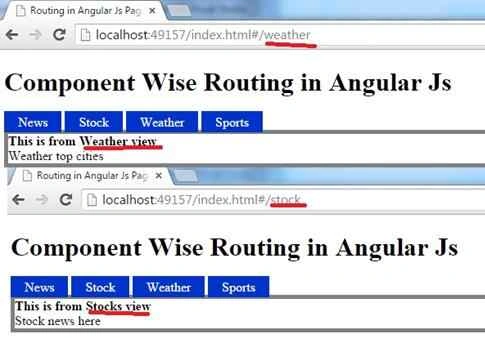
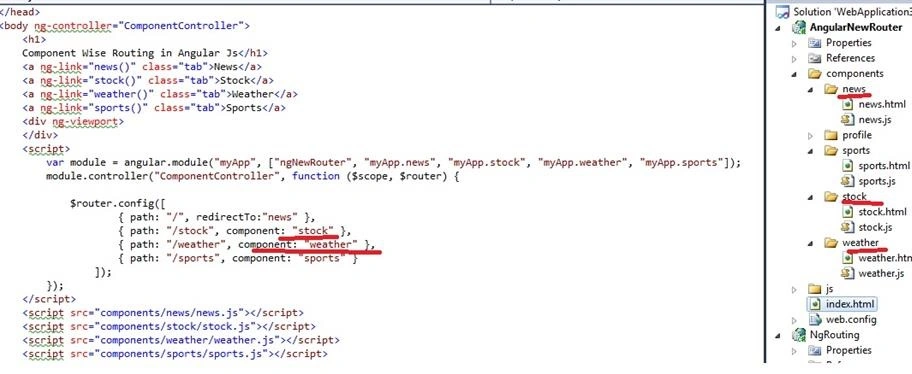
To do this we need to write this code in Index.html using new ng router
- <!DOCTYPE html>
- <html ng-app="myApp">
- <head>
- <style type="text/css">
- .tab
- {
- display: inline;
- border-top: .1em solid #03c;
- border-left: .1em solid #03c;
- border-right: .1em solid #03c;
- text-decoration: none;
- color: #000;
- padding: 0.25em 1em;
- background-color: #03c;
- color: #fff;
- }
- </style>
- <title>Routing in Angular Js Page</title>
- <meta http-equiv="Content-Type" content="text/html; charset=UTF-8">
- <script src="js/angular-1.4.0-beta.6.js"></script>
- <script src="js/router.es5.js"></script>
- </head>
- <body ng-controller="ComponentController">
- <h1>
- Component Wise Routing in Angular Js</h1>
- <a ng-link="news()" class="tab">News</a>
- <a ng-link="stock()" class="tab">Stock</a>
- <a ng-link="weather()" class="tab">Weather</a>
- <a ng-link="sports()" class="tab">Sports</a>
- <div ng-viewport>
- </div>
- <script>
- var module = angular.module("myApp", ["ngNewRouter", "myApp.news", "myApp.stock", "myApp.weather", "myApp.sports"]);
- module.controller("ComponentController", function ($scope, $router) {
- $router.config([
- { path: "/", redirectTo:"news" },
- { path: "/stock", component: "stock" },
- { path: "/weather", component: "weather" },
- { path: "/sports", component: "sports" }
- ]);
- });
- </script>
- <script src="components/news/news.js"></script>
- <script src="components/stock/stock.js"></script>
- <script src="components/weather/weather.js"></script>
- <script src="components/sports/sports.js"></script>
- </body>
- </html>
- Designing the components
- News.js
- angular.module("myApp.news", []).controller("NewsController", NewsController);
- function NewsController() {
- this.title = "This is from News View";
- }
ng-link
It is used to keep all the link elements
Asfend YarPosted Feb 29, 2016, 2:15 PM
good and nice share
Former memberPosted Feb 6, 2016, 4:26 AM
which is good router or $StateProvider?
Santhakumar MunuswamyPosted Nov 11, 2015, 8:49 AM
Good one
Harshad PansuriyaPosted Nov 6, 2015, 11:28 PM
Nice one
Humayun Kabir MamunPosted Nov 6, 2015, 12:34 AM
Nice...