

Intent
An intent is an abstract description of an operation to be performed. In simple words, we can say that intent is basically used to notify the Android system of the occurrence of an event.
Procedure
- Start the Eclipse IDE.
- Create a new project.
- Create two Java files, one is MainActivity.java file and the other one is B.java.
- Create two XML files, one is the activity_main.xml file and the second is ll.xml for layout design.
- In the third case of intent we add an activity with an intent filter to the manifest file like this:
<activity android:name="B"></activity>
- In the MainActivity.java file make an intent with an extra string like this:
Intent i=new Intent(getApplicationContext(),B.class);i.putExtra("money", e1.getText().toString());startActivity(i);
- In the B.java file within the onCreate function use a getIntent with getStringExtra like this:
Intent i=getIntent();tv.setText(str);String str=i.getStringExtra("money");Code is given below
- MainActivity.java: package com.example.intentcase3rd;
- import android.os.Bundle;
- import android.app.Activity;
- import android.content.Intent;
- import android.view.Menu;
- import android.view.View;
- import android.view.View.OnClickListener;
- import android.widget.Button;
- import android.widget.EditText;
- public class MainActivity extends Activity implements OnClickListener {
- EditText e1;
- Button b1;
- @Override
- protected void onCreate(Bundle savedInstanceState) {
- super.onCreate(savedInstanceState);
- setContentView(R.layout.activity_main);
- e1 = (EditText) findViewById(R.id.editText1);
- b1 = (Button) findViewById(R.id.button1);
- b1.setOnClickListener(this);
- }
- public void onClick(View v) {
- Intent i = new Intent(getApplicationContext(), B.class);
- i.putExtra("money", e1.getText().toString());
- startActivity(i);
- }
- }
B.java- package com.example.intentcase3rd;
- import android.app.Activity;
- import android.content.Intent;
- import android.os.Bundle;
- import android.view.View;
- import android.view.View.OnClickListener;
- import android.widget.Button;
- import android.widget.TextView;
- public class B extends Activity implements OnClickListener {
- TextView tv;
- Button b1;
- @Override
- protected void onCreate(Bundle savedInstanceState) {
- super.onCreate(savedInstanceState);
- setContentView(R.layout.ll);
- tv = (TextView) findViewById(R.id.textView1);
- Intent i = getIntent();
- String str = i.getStringExtra("money");
- tv.setText(str);
- b1 = (Button) findViewById(R.id.button1);
- b1.setOnClickListener(this);
- }
- public void onClick(View v) {}
- }
activity_main.xmlll.xml- <RelativeLayout
- xmlns:android="http://schemas.android.com/apk/res/android"
- xmlns:tools="http://schemas.android.com/tools"
- android:layout_width="match_parent"
- android:layout_height="match_parent"
- android:paddingBottom="@dimen/activity_vertical_margin"
- android:paddingLeft="@dimen/activity_horizontal_margin"
- android:paddingRight="@dimen/activity_horizontal_margin"
- android:paddingTop="@dimen/activity_vertical_margin"
- tools:context=".MainActivity">
- <TextView
- android:id="@+id/textView1"
- android:layout_width="wrap_content"
- android:layout_height="wrap_content"
- android:text="Intent3 Demo"/>
- <EditText
- android:id="@+id/editText1"
- android:layout_width="wrap_content"
- android:layout_height="wrap_content"
- android:layout_alignParentRight="true"
- android:layout_below="@+id/textView1"
- android:layout_marginRight="54dp"
- android:layout_marginTop="53dp"
- android:ems="10">
- <requestFocus/>
- </EditText>
- <Button
- android:id="@+id/button1"
- android:layout_width="wrap_content"
- android:layout_height="wrap_content"
- android:layout_below="@+id/editText1"
- android:layout_marginLeft="18dp"
- android:layout_marginTop="31dp"
- android:layout_toRightOf="@+id/textView1"
- android:text="Send"/>
- </RelativeLayout>
- <?xml version="1.0" encoding="utf-8"?>
- <LinearLayout
- xmlns:android="http://schemas.android.com/apk/res/android"
- android:layout_width="match_parent"
- android:layout_height="match_parent"
- android:orientation="vertical" >
- <TextView
- android:id="@+id/textView1"
- android:layout_width="wrap_content"
- android:layout_height="wrap_content"
- android:text="Large Text"
- android:textAppearance="?android:attr/textAppearanceLarge" />
- <Button
- android:id="@+id/button1"
- android:layout_width="wrap_content"
- android:layout_height="wrap_content"
- android:text="Ok" />
- </LinearLayout>
intentcase3rd Manifest
- <?xml version="1.0" encoding="utf-8"?>
- <manifest
- xmlns:android="http://schemas.android.com/apk/res/android"
- package="com.example.intentcase3rd"
- android:versionCode="1"
- android:versionName="1.0" >
- <uses-sdk
- android:minSdkVersion="8"
- android:targetSdkVersion="17" />
- <application
- android:allowBackup="true"
- android:icon="@drawable/ic_launcher"
- android:label="@string/app_name"
- android:theme="@style/AppTheme" >
- <activity
- android:name="com.example.intentcase3rd.MainActivity"
- android:label="@string/app_name" >
- <intent-filter>
- <action android:name="android.intent.action.MAIN" />
- <category android:name="android.intent.category.LAUNCHER" />
- </intent-filter>
- </activity>
- <activity android:name="B"></activity>
- </application>
- </manifest>
Output
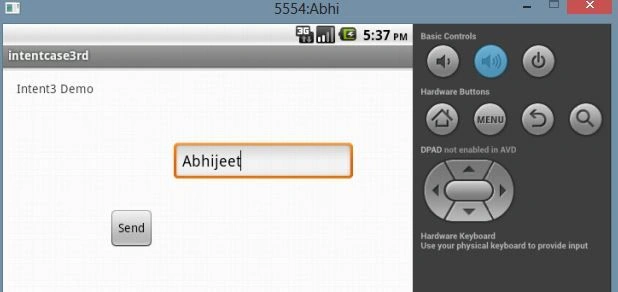
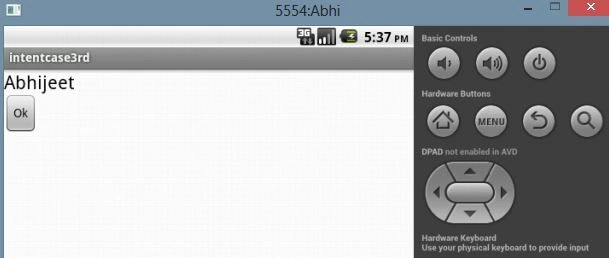
By clicking on the Send button it is intended to another activity as in the following:
Gowtham RajamanickamPosted Apr 12, 2016, 2:07 AM
Good One, Thanks for sharing
Abhijeet SinghPosted Jul 2, 2014, 3:24 AM
thanks..
RAVINDER SINGH NEGIPosted Jul 2, 2014, 3:22 AM
This article is really usefull