

Thread Pooling
Thread pooling is the process of creating a collection of threads during the initialization of a multithreaded application, and then reusing those threads for new tasks as and when required, instead of creating new threads. Then every process has some fixed number of threads depending on the amount of memory available, those threads are the need of the application but we have freedom to increase the number of threads. Every thread in the pool has a specific given task. The thread returns to the pool and waits for the next assignment when the given task is completed.
Usually, the thread pool is required when we have number of threads are created to perform a number of tasks, in this organized in a queue. Typically, we have more tasks than threads. As soon as a thread completes its task, it will request the next task from the queue until all tasks have been completed. The thread can then terminate, or sleep until there are new tasks available.
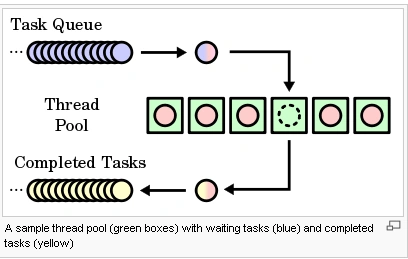
Creating thread pooling
The .Net framework library included the "System.Threading.ThreadPool" class. it was so easy to use.You need not create the pool of threads, nor do you have to specify how many consuming threads you require in the pool. The ThreadPool class handles the creation of new threads and the distribution of the wares to consume amongst those threads.
There are a number of ways to create the thread pool:
Via the Task Parallel Library (from Framework 4.0).
By calling ThreadPool.QueueUserWorkItem.
Via asynchronous delegates.
Via BackgroundWorker.
Entering the Thread Pool via TPL
The task parallel library provide the task class for enter the thread pool easy. The task class is the part of .Net Framework 4.0 .if you're familiar with the older constructs, consider the nongeneric Task class a replacement for ThreadPool.QueueUserWorkItem, and the generic Task<TResult> a replacement for asynchronous delegates. The newer constructs are faster, more convenient, and more flexible than the old.
To use the nongeneric Task class, call Task.Factory.StartNew, ing in a delegate of the target method:
using
System.Threading.Tasks;
using
System.Threading;
using
System.Diagnostics;
using
System;
class
Akshay
{
static void
Run()
{
Console.WriteLine("Welcome
to the C# corner thread pool!");
}
static void
Main() // The Task class is in System.Threading.Tasks
{
Task.Factory.StartNew(Run);
Console.Read();
}
}
Output :
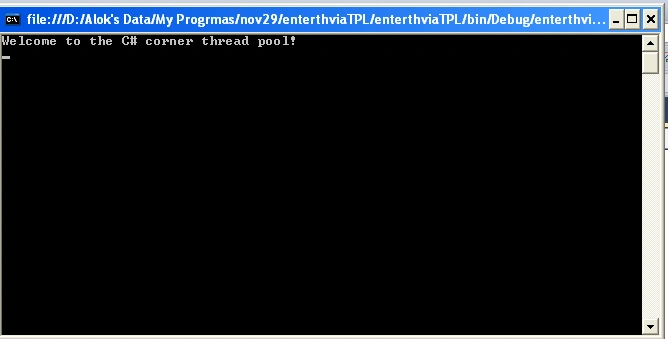
Task.Factory.StartNew returns a Task object, which you can then use to monitor the task-for instance, you can wait for it to complete by calling its Wait method.
The generic Task<TResult> class is a subclass of the nongeneric Task. It lets you get a return value back from the task after it finishes executing. In the following example, we download a web page using Task<TResult>:
class
Akshay
{
static void
Main()
{
// Start the task executing:
Task<string>
task = Task.Factory.StartNew<string>
(() => DownloadString("http://www.c-sharpcorner.com/"));
// We can do other work here and it will
execute in parallel:
//RunSomeOtherMethod();
// When we need the task's return
value, we query its Result property:
// If it's still executing, the
current thread will now block (wait)
// until the task finishes:
string result = task.Result;
}
static string
DownloadString(string uri)
{
using (var
wc = new System.Net.WebClient())
return wc.DownloadString(uri);
Console.Read();
}
}
Entering the Thread Pool Without TPL using ThreadPool.QueueUserWorkItem
You can't use the Task Parallel Library if you're targeting an earlier version of the .NET Framework (prior to 4.0). Instead, you must use one of the older constructs for entering the thread pool: ThreadPool.QueueUserWorkItem and asynchronous delegates.
Varsha VinodPosted Feb 18, 2020, 3:30 AM
Well explained, thanks.
Gowtham RajamanickamPosted Apr 8, 2016, 9:58 AM
Good one..
Andi DriehausPosted Jul 1, 2015, 7:57 AM
Hi, I could follow the first part. The second part of your code does not work. Wait is never called and most likely does not belong into class Akshay. Update on Main is missing. Regards Andi
Vithal WadjePosted Oct 11, 2014, 1:59 AM
Wel explained keep it up
jayesh bhanderiPosted Jun 24, 2014, 9:59 AM
c# 4.0 in Nutshell 4th edition page no:800
Yusuf KaratoprakPosted Dec 25, 2012, 2:14 AM
Good job!