

I am again here to continue the discussion around Threading. Today we will explain types of threads related concepts.
In case you haven't looked at the previous articles, you can go through the following.
- Threading Simplified: Part 1 (Threads Inception)
- Threading Simplified: Part 2 (Multithreading Concepts)
Let's begin the discussion with the types of threads we have in C#.
Foreground Threads
Foreground threads are those that live even after the main thread exits. The application will continue to run if a foreground thread is alive or executing.
By default a thread is created as a foreground thread.
Background Threads
Background threads die when the main thread exists and no foreground threads are alive. These are not created by default and we need to set the property to make a thread a background thread.
The difference can be visualized using the following diagram.
In the diagram we can see that at instance t1, when the main thread (in Red) exists, the background thread (in Blue) also dies.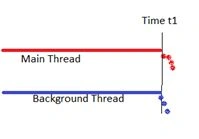
In another diagram below, we can see that even if main thread (in Red) exists and a foreground thread (in Green) is alive, the background thread (in Blue) can also be alive. This diagram also explains that a foreground thread can continue executing even when the main thread dies.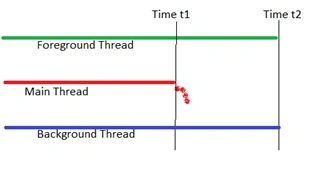
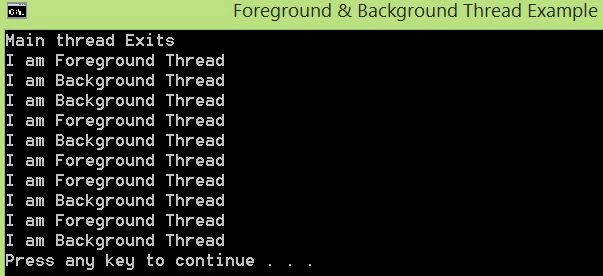
Now let's see the implementation using a simple example. We will go through the three possible cases here and analyze the behavior.
Case 1: Only with background thread
Here we can see that the moment the main thread quits, the background thread also quits since it is able to execute only one iteration out of five (see the Output 1).
- static void Main(string[] args)
- {
- Console.Title = "Foreground & Background Thread Example";
- Thread t2 = new Thread(PrintThread2);
- t2.Name = "Background";
- t2.IsBackground = true;
- t2.Start();
- Console.WriteLine("Main thread Exits");
- }
- static void PrintThread2()
- {
- for (int i = 0; i < 5; i++)
- {
- Console.WriteLine("I am {0} Thread", Thread.CurrentThread.Name);
- Thread.Sleep(1000);
- }
- }
Output 1
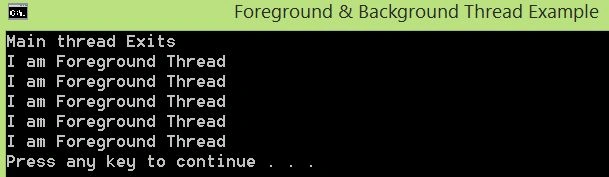
Case 2: Only with foreground thread
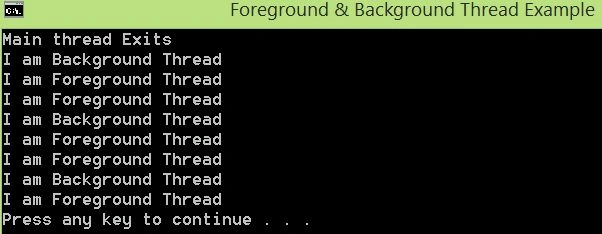
In this case, we can see that even if the main thread quits, the foreground thread continues to execute since it completes all five iterations (see the Output 2).
Prakash TripathiPosted Oct 9, 2016, 5:33 AM
@Cao Fangsheng...In Case 1: At t2.Start(), new background thread starts or spans while main thread still active, however since there is no code path available for main thread, it exits and at the same time background thread get the signal and it could execute just one iteration. Hope it clarifies.
Cao FangshengPosted Sep 22, 2016, 5:18 AM
Hi,@Prakash Tripathi,I wang to Konw in the case :"Case 1: Only with background thread",How the Main thread Exits,how to implement,thanks.
Prakash TripathiPosted Apr 21, 2016, 6:49 AM
Thnx Gowtham.
Gowtham RajamanickamPosted Apr 21, 2016, 6:39 AM
very good
Prakash TripathiPosted Mar 6, 2016, 10:42 PM
Thnx Kumaresh.
Prakash TripathiPosted Mar 6, 2016, 10:42 PM
Thnx Karthiga.
Prakash TripathiPosted Mar 6, 2016, 10:42 PM
Thnx Humayun.
Prakash TripathiPosted Mar 6, 2016, 10:41 PM
@Naredla, Also if you found the solution, would you like to share here so that others can also be benefited.
Prakash TripathiPosted Mar 6, 2016, 10:40 PM
@Naredla. Sorry to see your post so late. However did you give a try to some kind of signaling mechanism (i.e. Auto and Manual reset event)?
Kumaresh RajalingamPosted Mar 6, 2016, 8:27 PM
good one
Kumaresh RajalingamPosted Mar 6, 2016, 8:27 PM
Nice explanation
Sr KarthigaPosted Mar 6, 2016, 8:15 PM
good one
Sr KarthigaPosted Mar 6, 2016, 8:15 PM
Nice explanation
Humayun Kabir MamunPosted Dec 7, 2015, 4:25 AM
Nice...
Naredla NitheshPosted Aug 13, 2015, 5:53 AM
Here is my doubt ...I am planning to create simple media player I am using multi threading concept in this. But my problem is when I click on pause button the running thread should be paused. Here I can use sleep method but we don't know how much time the user wants to pause the playing .. so,How to do this..I tried suspend method but visual studio shows that this method is a deprecated one.. So how can I achieve this...Kindly suggest me a way. Thank you
Prakash TripathiPosted Jul 20, 2015, 5:02 AM
Thanks all for linking the article.
Sibeesh VenuPosted Jul 20, 2015, 4:49 AM
Nice Share.
Pankaj Kumar ChoudharyPosted Jul 19, 2015, 12:38 PM
nice share..........
Santhakumar MunuswamyPosted Jul 19, 2015, 7:44 AM
Thanks for nice article:)
Gopi ChandPosted Jul 18, 2015, 2:38 PM
Well explained
Narasimha Reddy ChennupalliPosted Jul 18, 2015, 2:34 PM
Thanks for sharing
SharadPosted Jul 18, 2015, 2:15 PM
nice series...