

Creating a Windows Service itself is a hassle that includes various aspects of it such as configuration, install-uninstall, recovery, start mode and so on. Managing this setting either can be done manually or by writing many batch/command files that help in deployment and management of Windows Services.
Recently, I came across an ultimate .NET OSS library that provides control of nearly everything related to a Windows Service. The library is known as “TOPSHELF”, the contribution credit for this library goes to Travis Smith, Charles Patterson and a few more awesome contributors. See the well-managed documentation of this project here.
How does this library tool make a difference creating a Windows Service? Let's try to create a Windows Service as in the following:
- public class TownCrier
- {
- readonly Timer _timer;
- public TownCrier()
- {
- _timer = new Timer(1000)
- {
- AutoReset = true
- };
- _timer.Elapsed += (sender, eventArgs) = > Console.WriteLine(
- "It is {0} and all is well", DateTime.Now);
- }
- public void Start()
- {
- _timer.Start();
- }
- public void Stop()
- {
- _timer.Stop();
- }
- }
Windows Services made easy
- public class Program
- {
- public static void Main()
- {
- HostFactory.Run(x = > //1
- {
- x.Service < TownCrier > (s = > //2
- {
- s.ConstructUsing(name = > new TownCrier()); //3
- s.WhenStarted(tc = > tc.Start()); //4
- s.WhenStopped(tc = > tc.Stop()); //5
- });
- x.RunAsLocalSystem(); //6
- x.SetDescription("Sample Topshelf Host"); //7
- x.SetDisplayName("Stuff"); //8
- x.SetServiceName("Stuff"); //9
- }); //10
- }
- }
Running as Console service
Let's simply press F5 in Visual Studio to run the preceding code.
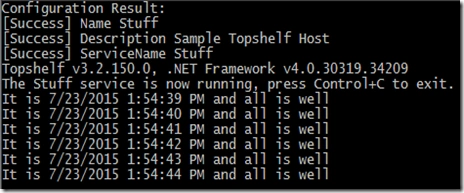
Installation of Windows Service
Simply call the generated .exe file with an argument.
SampleService.exe install
You will see some success log output on the command prompt:

Let's have a look at the Services window. Go to Run, then Services.msc.

And I can see my service has begun and is running. How cool, isn't it? I'm sure this kinda stuff will make the DevOPs guys happy. There are many configuration options that make use of this library easy. I can say that the OOS stack of .NET is coming into the picture and helping developers making software better and better everyday.
Rajeesh MenothPosted Jul 25, 2015, 6:56 AM
Nice article
Santhakumar MunuswamyPosted Jul 24, 2015, 2:19 PM
Nice article
Neeraj KumarPosted Jul 24, 2015, 1:07 PM
Nice
Shridhar SharmaPosted Jul 24, 2015, 12:17 PM
learnt something new. thanks for sharing sir.
Gopi ChandPosted Jul 24, 2015, 10:06 AM
Nice work :)