

Transaction Management
Transaction management is the process of ensuring multiple database operations execute as a single unit, where either all changes are committed or none are applied.
Transaction management in Entity Framework Core means ensuring that a group of database operations are treated as a single unit of work. Either: All operations succeed (Commit) OR all operations fail (Rollback).
This follows the ACID properties:
To understand transactions, we need to know the ACID rules that govern them:
Atomicity: The entire transaction is one "atom." It can't be split; it either happens fully or not at all.
Consistency: The database moves from one valid state to another, following all rules and constraints.
Isolation: Transactions happening at the same time don't interfere with each other.
Durability: Once the transaction is committed, it's permanent, even if the power goes out a second later.
Example: The ATM Transfer
Imagine we are transferring Rs. 500 from our Savings Account to our Current Account using a banking app.
Step A: The system subtracts Rs. 500 from Savings Account.
Step B: The system adds Rs. 500 to Current Account.
Without Transaction Management: If the system crashes after Step A but before Step B, our Rs. 500 vanishes into thin air. We lose money, and the bank has a major headache.
With Transaction Management: The system wraps both steps in a transaction. If the crash happens at Step B, the transaction "rolls back," and the Rs. 500 is put back into our Savings account as if nothing happened.
How transaction management works in .NET using Entity Framework Core
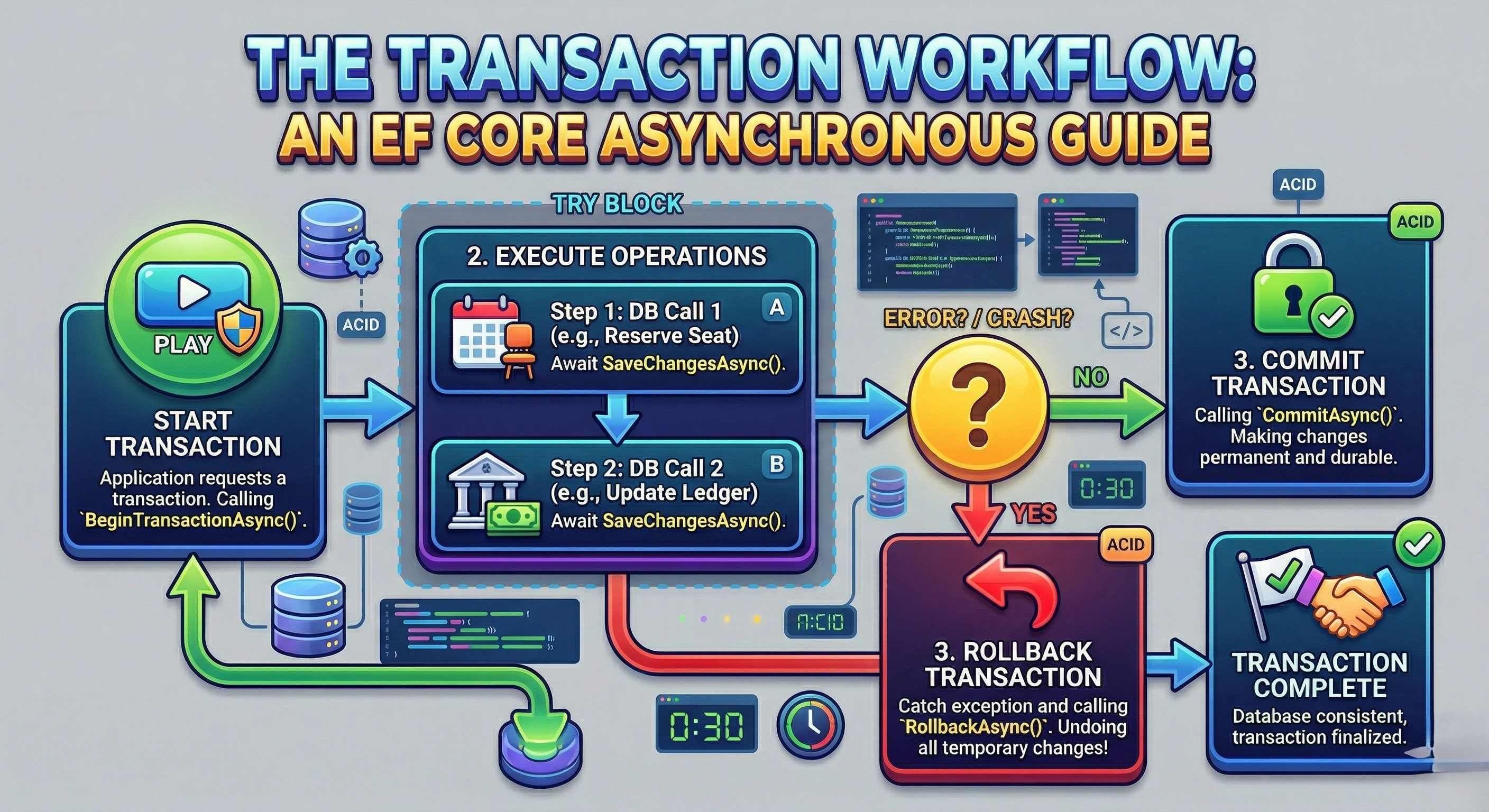
1. Start Transaction
EF Core opens a database connection and Begins a transaction using:
BeginTransaction()Database prepares to track all changes
2. Track Changes (Change Tracker)
EF Core tracks all entity changes in memory
Insert
Update
Delete
Nothing is saved yet
3. Convert to SQL
EF Core converts C# operations to SQL queries
Example:context.Orders.Add(order);becomes
INSERT INTO Orders
4. Execute Commands
SQL commands are executed inside the transaction and Database temporarily holds changes (not permanent yet)
5. Check for Errors
EF Core monitors:
SQL errors
Constraint violations
Exceptions
6. Commit (Success Case)
If everything is successful:
transaction.Commit();Database permanently saves all changes. Final result: Data is stored
7. Rollback (Failure Case)
If any step fails:
transaction.Rollback();Database removes all changes done in this transaction. Final result: No data is saved
Types of Transaction Management in .NET (EF Core)
1. Implicit Transactions (Automatic)
In EF Core, transactions are handled automatically whenever SaveChanges() is called. All pending operations such as insert, update, and delete are grouped into a single transaction.
If any operation fails, EF Core rolls back the entire set of changes, ensuring data consistency.
This approach works best when all operations are completed in a single save action, making it simple and efficient for basic scenarios.
Example
Updating user details in one save
var user = context.Users.Find(1);
user.Name = "Updated Name";
user.LastLogin = DateTime.Now;

context.SaveChanges(); // EF Core handles transaction automatically
2. Explicit Transactions (Manual Control)
Explicit transactions are used when multiple operations need to be combined into a single unit of work.
In this approach, we manually start a transaction using BeginTransaction(), execute multiple SaveChanges() calls, and then decide whether to commit or roll back.
This is useful in real-world workflows where multiple steps must succeed together, such as order creation and inventory updates. If any step fails, the entire transaction is reverted.
Example
Order + Inventory update
using var transaction = context.Database.BeginTransaction();

try
{
    context.Orders.Add(new Order());

    context.Inventory.Update(stock);
    context.SaveChanges();

    transaction.Commit();
}
catch
{
    transaction.Rollback();
}
3. Asynchronous Transactions (Modern Approach)
Asynchronous transactions are the async version of explicit transactions and are widely used in modern applications.
Instead of blocking the thread, operations are executed using async/await with methods like BeginTransactionAsync() and SaveChangesAsync().
This improves application scalability, especially in web APIs, because threads are freed while waiting for database operations to complete.
Example
Async order processing
await using var transaction = await context.Database.BeginTransactionAsync();

try
{
    context.Orders.Add(new Order());

    context.Inventory.Update(stock);
    await context.SaveChangesAsync();

    await transaction.CommitAsync();
}
catch
{
    await transaction.RollbackAsync();
}
4. Distributed Transactions
Distributed transactions are used when operations span multiple resources such as different databases or external systems.
They are implemented using .NET System.Transactions and ensure all systems either commit or roll back together.
While powerful, they are complex and can impact performance, so they are typically avoided unless absolutely necessary.
Example
Two databases
using (var scope = new TransactionScope())
{
    context1.SaveChanges(); // DB1
    context2.SaveChanges(); // DB2

    scope.Complete();
}
Why We Use Transaction Management in .NET
Transaction management in Entity Framework Core is used to ensure that database operations are safe, reliable, and consistent.
Maintain Data Integrity
Transaction management in Entity Framework Core ensures that related database operations remain consistent. All changes are applied together or not at all, preventing invalid data states.
Avoid Partial Updates
Without transactions, some operations may succeed while others fail, leading to incomplete data. Transactions ensure either all operations succeed or everything is rolled back.
Handle Errors Safely
Unexpected errors like database failures or constraints can occur during execution. Transactions help revert all changes, keeping the system stable and clean.
Ensure Business Logic Consistency
Many real-world processes involve multiple dependent steps. Transactions ensure all steps follow the intended business rules without mismatch.
Support Concurrent Users
In multi-user systems, multiple operations can happen at the same time. Transactions help manage conflicts and maintain correct data behavior.
Follow ACID Principles
Transactions follow ACID properties to guarantee reliability. They ensure atomicity, consistency, isolation, and durability of data.
Improve System Reliability
Applications become more robust when data operations are controlled and predictable. Transactions reduce risks of corruption and improve overall system trustworthiness.
Conclusion
Transaction management in Entity Framework Core plays a critical role in maintaining data integrity and consistency across applications. It ensures that multiple database operations are executed as a single unit of work, where all changes are either successfully committed or completely rolled back in case of failure. In practice, different approaches serve different needs. Implicit transactions provide simplicity for basic operations, explicit transactions offer control for multi-step processes, asynchronous transactions improve scalability in modern applications, and distributed transactions handle complex scenarios involving multiple systems.
Join the conversation! Your thoughts help the community grow.