

I am explaining the concept of transforming an XML Document using a well-defined XSLT incorporated with an Asp.Net XML Control.
W3C recommend two different style languages:
- CSS
- XLST
XSLT stands for EXtensible Stylesheet Language Transformations. The XSLT language transforms XML into a format interpreted by an internet browser. Generally we use XSLT when we want to do a transformation from an XML document into another XML document or convert an XML document into a HTML web page to create dynamic web pages.
Illustrate with an Example:
In our website we create an XML document. Here we will create a CollegeXML.xml document. It contains Student->Name and Branch like this:
<?xml version="1.0" encoding="utf-8" ?>
<College>
<Student>
<Name>Sandeep</Name>
<Branch>MCA</Branch>
</Student>
<Student>
<Name>Raviendra</Name>
<Branch>B.Tech</Branch>
</Student>
</College>
Now we create another document that is an XSLT document that transforms an XML document to a HTML document.
<xsl:stylesheet version="1.0" xmlns:xsl="http://www.w3.org/1999/XSL/Transform"
xmlns:msxsl="urn:schemas-microsoft-com:xslt" exclude-result-prefixes="msxsl">
<xsl:output method="xml" indent="yes"/>
<xsl:template match="College">
<h1>Student Detail</h1>
<table border="1" bgcolor="Green" width="250">
<xsl:for-each select="Student">
<tr>
<td> <xsl:value-of select="Name"/> </td>
<td><xsl:value-of select="Branch"/> </td>
</tr>
</xsl:for-each>
</table>
</xsl:template>
</xsl:stylesheet>
Elements in XSLT:
|
Element |
Description |
|
<xsl:stylesheet>
|
It is define root element of style sheet. |
|
<xsl:output> |
It is define format of output created by style sheet. It is top level element. |
|
<xsl:template> |
It contains rules to apply when a specified node is matched. |
|
<xsl:for-each> |
It allows us to loop through multiple nodes that match the selection criteria. |
|
<xsl:value-of> |
It can be used to select the value of an XML element and add it to the output. |
Table 1: Elements in XLST
Now we use an ASP.Net XML control to display this XLST information.
<asp:Xml ID="college" runat="server" DocumentSource="~/CollegeXML.xml" TransformSource="~/CollegeXLST.xslt"></asp:Xml>
Property of XML Control:
|
Property |
Description |
|
DocumentSource |
Source of XML Document |
|
TransformSource |
Source of XSLT Document |
Table 2: Property of XML Control
OUTPUT:
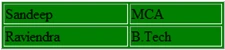
Note: Use CSS when you can, use XSL when you must.
Santhakumar MunuswamyPosted Jul 19, 2015, 8:06 AM
Good Article. Thanks for sharing