

As AI transitions from experimental prototypes to mission-critical enterprise infrastructure, the limitations of out-of-the-box frameworks become glaringly apparent. While LangChain’s built-in tools are fantastic for rapid prototyping, they frequently hit a wall when deployed in secure, complex corporate environments. To bridge this gap, developers must transition to LangGraph for stateful, multi-agent orchestration and build Custom Toolsets to handle enterprise-specific logic. Below is a deep dive into why custom tools are necessary, followed by an end-to-end implementation of an Enterprise IT Incident Resolution system using LangGraph, RAG, persistent memory, and complex state management.
Part 1: What Built-in Tools Cannot Handle in the Enterprise
Built-in LangChain tools (e.g., WikipediaQueryRun, ArxivSearch, basic VectorStoreRetriever) are designed for open, unstructured, and stateless interactions. In an enterprise context, they fail in four critical areas:
Role-Based Access Control (RBAC) & Security: Built-in vector retrievers do not natively filter search results based on a user's active directory group, security clearance, or department. If a junior employee asks a RAG system about "Executive Compensation," a standard tool might return the document, causing a severe data leak.
Stateful Internal API Orchestration: Built-in tools usually execute a single API call. Enterprise workflows require multi-step orchestration (e.g., authenticate via OAuth2 -> fetch ticket metadata -> query internal ERP -> format payload -> submit to ServiceNow).
Proprietary Data Transformations: Internal databases often use legacy schemas or proprietary encryption. Built-in tools expect standard JSON/Text and cannot parse proprietary binary formats or decrypt internal payloads on the fly.
Context-Aware Execution: Built-in tools are largely stateless. They don't know who is calling them or what the broader agent state is. Custom tools can inject the current
AgentState(likeuser_idorsession_context) directly into the tool execution to enforce guardrails.
The Solution: Custom toolsets encapsulate enterprise security, handle complex internal data transformations, enforce RBAC at the tool level, and manage stateful interactions with proprietary backend systems.
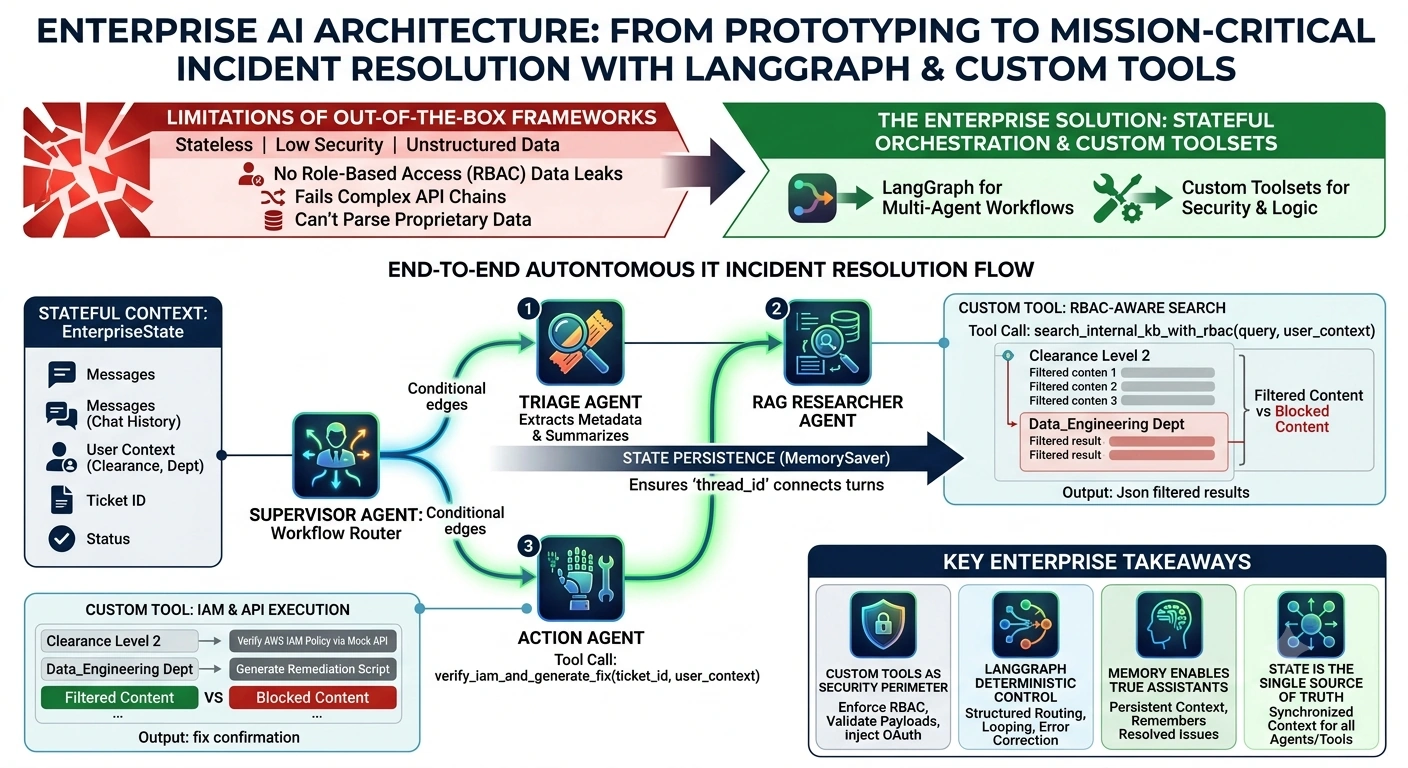
Part 2: Real-World Use Case – Autonomous IT Incident Resolution
The Scenario: An enterprise employee submits a complex IT ticket: "My AWS IAM role is failing to access the S3 bucket for the Q3 Financial Data pipeline, and I'm getting a 403 Forbidden error."
The Multi-Agent Solution:
Instead of a single LLM trying to do everything, we deploy a LangGraph multi-agent system:
Supervisor Agent: Routes the workflow.
Triage Agent: Extracts metadata (user, affected system, error codes).
RAG Researcher Agent: Uses a Custom RBAC-aware Tool to search internal Confluence and past resolved Jira tickets.
Action Agent: Uses a Custom Execution Tool to safely verify IAM policies and generate a remediation script.
Part 3: End-to-End Code Implementation
Below is the complete implementation using langgraph, langchain, and custom enterprise tools.
1. Setup and State Definition
First, we define the shared state. In LangGraph, the State is the single source of truth that passes between agents and tools.
import os
import json
from typing import TypedDict, Annotated, Sequence, Literal
from langchain_core.messages import BaseMessage, HumanMessage, AIMessage, ToolMessage
from langchain_core.tools import tool
from langchain_openai import ChatOpenAI
from langgraph.graph import StateGraph, END
from langgraph.checkpoint.memory import MemorySaver
from langgraph.prebuilt import ToolNode

# Set your API keys
# os.environ["OPENAI_API_KEY"] = "sk-..."

# --- 1. DEFINE ENTERPRISE STATE ---
class EnterpriseState(TypedDict):
    messages: Annotated[Sequence[BaseMessage], "The conversation history"]
    user_context: dict  # Contains user_id, department, clearance_level
    ticket_id: str
    resolution_status: Literal["pending", "researching", "resolved", "escalated"]
2. Building Custom Enterprise Tools
Here is where we solve the limitations of built-in tools. Notice how the custom RAG tool accepts user_context to enforce RBAC, and the Action tool interacts with a mock internal API.
# --- 2. CUSTOM ENTERPRISE TOOLS ---

@tool
def search_internal_kb_with_rbac(query: str, user_context: dict) -> str:
    """
    Searches the internal enterprise knowledge base (Confluence/Jira).
    CRITICAL: Filters results based on user department and security clearance.
    """
    # Simulating a Vector DB call with metadata filtering
    department = user_context.get("department", "unknown")
    clearance = user_context.get("clearance_level", 1)

    # Mock RAG retrieval logic
    mock_kb_results = [
        {"title": "AWS S3 403 Troubleshooting", "dept": "IT", "clearance_req": 2, "content": "Check if the IAM role has s3:GetObject..."},
        {"title": "Q3 Financial Pipeline Architecture", "dept": "Finance", "clearance_req": 4, "content": "Restricted financial data..."}
    ]

    # RBAC Filtering (What built-in tools CANNOT do natively)
    filtered_results = [
        doc for doc in mock_kb_results
        if doc["clearance_req"] <= clearance and doc["dept"] in [department, "IT"]
    ]

    if not filtered_results:
        return "No accessible documentation found for your clearance level."

    return json.dumps(filtered_results)

@tool
def verify_iam_and_generate_fix(ticket_id: str, user_context: dict) -> str:
    """
    Connects to the internal AWS IAM API to verify the user's role
    and generates a safe remediation script.
    """
    # Simulating internal API call with OAuth2 token injection
    user_id = user_context.get("user_id")

    # Mock API response
    api_response = {
        "status": "success",
        "current_policy": "arn:aws:iam::123456:role/DataPipelineRole",
        "missing_permission": "s3:GetObject",
        "remediation_script": f"aws iam attach-role-policy --role-name DataPipelineRole --policy-arn arn:aws:iam::aws:policy/AmazonS3ReadOnlyAccess"
    }

    return f"Verification complete for ticket {ticket_id}. Missing permission: {api_response['missing_permission']}. Suggested fix: {api_response['remediation_script']}"
Join the conversation! Your thoughts help the community grow.