

What are the triggers?
You may be familiar with triggers in RDBMS. It performs some action whenever an event takes place, like Updating a table or something. It's the same concept in WPF: It is a response to an action.
Triggers are applied on styles or directly on controls, so you first need to learn what styles are. You can have a sneak peek at my article on Styles.
And trigger can only be applied at runtime.
Basically, there are 3 types of triggers.
- Property Trigger: Applied based on control's property, such as IsMouseOver: value sets true is a mouse is over the control.
- Data Trigger: Applied based on binded data.
- Event Trigger: Applied based on an event, such as ButtonClick.
Let's learn about each of them.
- Property Trigger: One needs to use a Trigger tag to set the if condition.
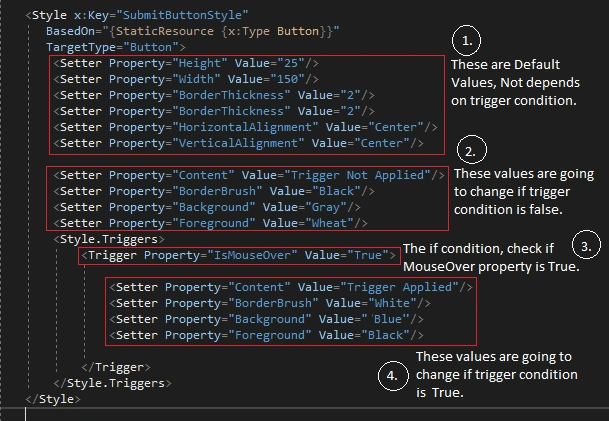
Have a look at the following image to understand 3 things.
- What is an if condition,
- What are the values that are going to change if, if condition satisfies,
- And what conditions are unaffected if conditions satisfy or not.
MainWindow.xaml
- <Window x:Class="A.MainWindow"
- xmlns="http://schemas.microsoft.com/winfx/2006/xaml/presentation"
- xmlns:x="http://schemas.microsoft.com/winfx/2006/xaml"
- xmlns:d="http://schemas.microsoft.com/expression/blend/2008"
- xmlns:mc="http://schemas.openxmlformats.org/markup-compatibility/2006"
- xmlns:local="clr-namespace:A"
- mc:Ignorable="d"
- Title="MainWindow" Height="180" Width="300">
- <Window.Resources>
- <Style x:Key="SubmitButtonStyle"
- BasedOn="{StaticResource {x:Type Button}}"
- TargetType="Button">
- <Setter Property="Height" Value="25"/>
- <Setter Property="Width" Value="150"/>
- <Setter Property="BorderThickness" Value="2"/>
- <Setter Property="BorderThickness" Value="2"/>
- <Setter Property="HorizontalAlignment" Value="Center"/>
- <Setter Property="VerticalAlignment" Value="Center"/>
- <Setter Property="Content" Value="Trigger Not Applied"/>
- <Setter Property="BorderBrush" Value="Black"/>
- <Setter Property="Background" Value="Gray"/>
- <Setter Property="Foreground" Value="Wheat"/>
- <Style.Triggers>
- <Trigger Property="IsMouseOver" Value="True">
- <Setter Property="Content" Value="Trigger Applied"/>
- <Setter Property="BorderBrush" Value="White"/>
- <Setter Property="Background" Value="Blue"/>
- <Setter Property="Foreground" Value="Black"/>
- </Trigger>
- </Style.Triggers>
- </Style>
- </Window.Resources>
- <Grid x:Name="MainGrid">
- <Button x:Name="ButtonStyleMe"
- Style="{StaticResource SubmitButtonStyle}"/>
- </Grid>
- </Window>
We are changing 4 properties: Content, BorderBrush, Background & Foreground of the Button. If IsMouseOver; i.e.. mouse is over the button, then properties defined inside a trigger will execute, else properties above the trigger will execute.
Note
The condition is only applied for these 4 properties; the rest are unaffected.

The following gif is the output of the above code. It will give you the idea of what is happening inside that xaml at runtime.
DataTrigger
One needs to use a DataTrigger tag to set an if condition.
Things we are updating in xaml,


- Add new checkbox: this will be bound with a property named as IsTriggerCheckBoxChecked & if checked it will set IsTriggerCheckBoxChecked's value to true.
- Let's change Button's behavior from PropertyTrigger to DataTrigger
- Add new string property named as TriggerChangeText, which will display the text after CheckBox is checked.
- Add a label to display if it is set by data trigger.
Updated MainWindow.xaml
- <Window x:Class="A.MainWindow"
- xmlns="http://schemas.microsoft.com/winfx/2006/xaml/presentation"
- xmlns:x="http://schemas.microsoft.com/winfx/2006/xaml"
- xmlns:d="http://schemas.microsoft.com/expression/blend/2008"
- xmlns:mc="http://schemas.openxmlformats.org/markup-compatibility/2006"
- xmlns:local="clr-namespace:A"
- mc:Ignorable="d"
- Title="MainWindow" Height="180" Width="300">
- <Window.Resources>
- <Thickness x:Key="MarginTop">0 5 0 0 </Thickness>
- <Style x:Key="SubmitButtonStyle"
- BasedOn="{StaticResource {x:Type Button}}"
- TargetType="Button">
- <Setter Property="Height" Value="25"/>
- <Setter Property="Width" Value="150"/>
- <Setter Property="BorderThickness" Value="2"/>
- <Setter Property="BorderThickness" Value="2"/>
- <Setter Property="HorizontalAlignment" Value="Center"/>
- <Setter Property="VerticalAlignment" Value="Center"/>
- <Setter Property="Content" Value="Trigger Not Applied"/>
- <Setter Property="BorderBrush" Value="Black"/>
- <Setter Property="Background" Value="Gray"/>
- <Setter Property="Foreground" Value="Wheat"/>
- <Style.Triggers>
- <DataTrigger Binding="{Binding IsTriggerCheckBoxChecked}" Value="True">
- <Setter Property="Content" Value="Trigger Applied"/>
- <Setter Property="BorderBrush" Value="Black"/>
- <Setter Property="Background" Value="LightBlue"/>
- <Setter Property="Foreground" Value="Black"/>
- </DataTrigger>
- </Style.Triggers>
- </Style>
- </Window.Resources>
- <Grid x:Name="MainGrid">
- <Grid.RowDefinitions>
- <RowDefinition Height="Auto"/>
- <RowDefinition Height="Auto"/>
- <RowDefinition Height="Auto"/>
- </Grid.RowDefinitions>
- <CheckBox x:Name="CheckBoxTrigger"
- IsChecked="{Binding IsTriggerCheckBoxChecked}"
- HorizontalAlignment="Center"
- Content="Apply Data Trigger?"/>
- <Button x:Name="ButtonStyleMe"
- Style="{StaticResource SubmitButtonStyle}"
- Margin="{StaticResource MarginTop}"
- Grid.Row="1"/>
- <Label x:Name="LabelTrigger"
- Content="{Binding TriggerChangeText}"
- Margin="{StaticResource MarginTop}"
- HorizontalAlignment="Center"
- Grid.Row="2">
- <Label.Style>
- <Style BasedOn="{StaticResource {x:Type Label}}"
- TargetType="Label">
- <Setter Property="Content" Value="Default value from XAML."/>
- <Style.Triggers>
- <DataTrigger Binding="{Binding IsTriggerCheckBoxChecked}" Value="True">
- <Setter Property="Content" Value="{Binding TriggerChangeText}"/>
- </DataTrigger>
- </Style.Triggers>
- </Style>
- </Label.Style>
- </Label>
- </Grid>
- </Window>
MVVM: MainWindowViewModel.cs
- using A.Entities;
- using Prism.Mvvm;
- using System;
- using System.Collections.Generic;
- using System.Linq;
- using System.Text;
- using System.Threading.Tasks;
- namespace A
- {
- class MainWindowViewModel : BindableBase
- {
- #region Properties
- private bool _isTriggerCheckBoxChecked;
- public bool IsTriggerCheckBoxChecked
- {
- get { return _isTriggerCheckBoxChecked; }
- set
- {
- if (value)
- {
- TriggerChangeText = "Applied with data trigger!";
- }
- SetProperty(ref _isTriggerCheckBoxChecked, value);
- }
- }
- private string _triggerChangeText;
- public string TriggerChangeText
- {
- get { return _triggerChangeText; }
- set { SetProperty(ref _triggerChangeText, value); }
- }
- #endregion
- }
- }
Kishorekumar PooruliPosted Oct 28, 2020, 11:52 AM
Crystal clear Explanation