

Repeater Control
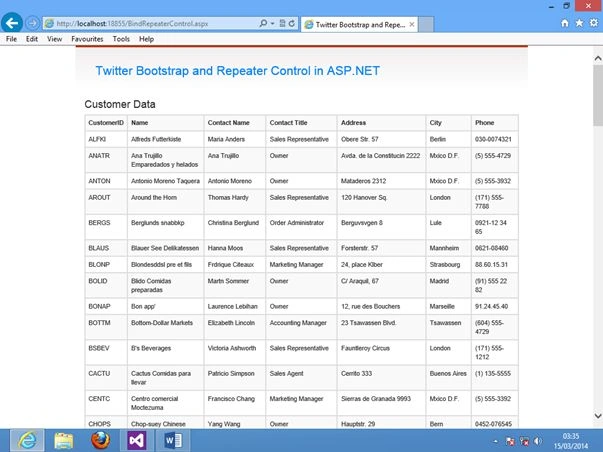
A Repeater control is a lightweight control and faster to display data compared to a grid view and data grid.
So, let's proceed with the following procedure:
- Repeater Control and Data Binding
- Twitter Bootstrap tables (table table-striped table-bordered) and MySQL Database
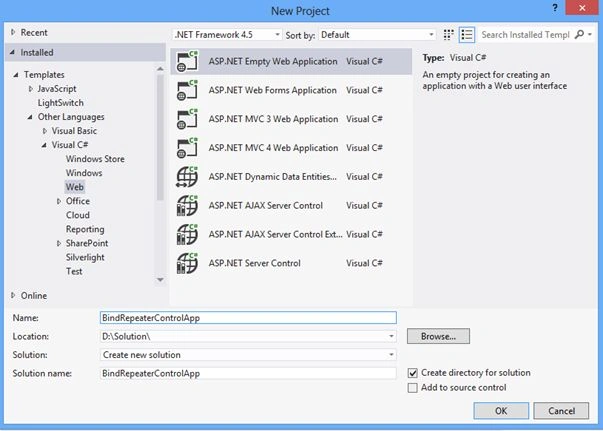
Open your instance of Visual Studio 2012 and create a new ASP.NET Web application. Name the project “BindRepeaterControlApp", as shown in the following figure:
In the Design Source (BindRepeaterControl.aspx) write the code as in the following.
Twitter Bootstrap tables CSS (table table-striped table-bordered)
BindRepeaterControl.aspx
- <%@ Page Title="" Language="C#" MasterPageFile="~/Site.Master" AutoEventWireup="true"
- CodeBehind="BindRepeaterControl.aspx.cs" Inherits="BindRepeaterControlApp.BindRepeaterControl" %>
- <asp:Content ID="Content1" ContentPlaceHolderID="titleContent"
- runat="server">Twitter Bootstrap and Repeater Control in ASP.NET
- </asp:Content>
- <asp:Content ID="Content2" ContentPlaceHolderID="head" runat="server">
- </asp:Content>
- <asp:Content ID="Content3" ContentPlaceHolderID="MainContent" runat="server">
- <div>
- <h3>Customer Data</h3>
- <p>
- <asp:Repeater ID="Repeater1" runat="server" >
- <HeaderTemplate>
- <table class="table table-striped table-bordered">
- <tr>
- <td><b>CustomerID</b></td>
- <td><b>Name</b></td>
- <td><b>Contact Name</b></td>
- <td><b>Contact Title</b></td>
- <td><b>Address</b></td>
- <td><b>City</b></td>
- <td><b>Phone</b></td>
- </tr>
- </HeaderTemplate>
- <ItemTemplate>
- <tr>
- <td>
- <%# DataBinder.Eval(Container.DataItem, "CustomerID") %>
- </td>
- <td>
- <%# DataBinder.Eval(Container.DataItem, "CompanyName") %>
- </td>
- <td>
- <%# DataBinder.Eval(Container.DataItem, "ContactName") %>
- </td>
- <td>
- <%# DataBinder.Eval(Container.DataItem, "ContactTitle") %>
- </td>
- <td>
- <%# DataBinder.Eval(Container.DataItem, "Address") %>
- </td>
- <td>
- <%# DataBinder.Eval(Container.DataItem, "City") %>
- </td>
- <td>
- <%# DataBinder.Eval(Container.DataItem, "Phone") %>
- </td>
- </tr>
- </ItemTemplate>
- <FooterTemplate>
- </table>
- </FooterTemplate>
- </asp:Repeater>
- </p>
- </div>
- </asp:Content>
PANKAJ KUMARPosted Sep 24, 2019, 12:14 PM
Where is bootstrap??
Prashant BariPosted Aug 17, 2015, 8:18 AM
ssfsdfs