

Introduction
TypeScript adds optional static types to JavaScript. Types are used to place static constraints on program entities such as functions, variables, and properties so that compilers and development tools can offer better verification and assistance during software development. TypeScript's static compile-time type system closely models the dynamic run-time type system of JavaScript, allowing programmers to accurately express the type relationships that are expected to exist when their programs run and have those assumptions pre-validated by the TypeScript compiler.
All types in TypeScript are subtypes of a single top type called the Any type. Any keyword references this type.
All other types are divided into two categories.
Primitive types
The primitive types are the Number, Boolean, String, Null, and Undefined types. The number, bool, and string keywords reference the Number, Boolean, and String primitive types, respectively. It is not possible to explicitly reference the Null and Undefined types. Only values of those types can be referenced using the null and undefined literals.
Object types
The object types are all class, module, interface, and literal types. Class, module, and interface types are introduced through class, module, and interface declarations and are referenced by the name given to them in their declarations. Literal types are written as object, array, function, or constructor type literals and are used to compose new types from other types.
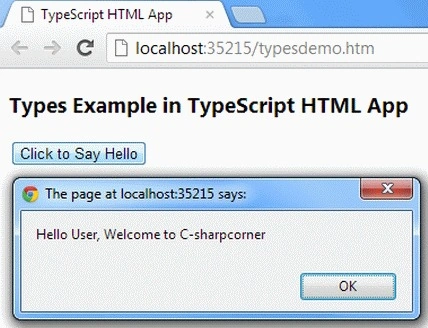
The following example shows how Types can be used in TypeScript. The example prints "Hello User, Welcome to C-sharpcorner".
Let's use the following steps.
Step 1. Open Visual Studio 2012 and click "File" -> "New" -> "Project...". A window is shown as.
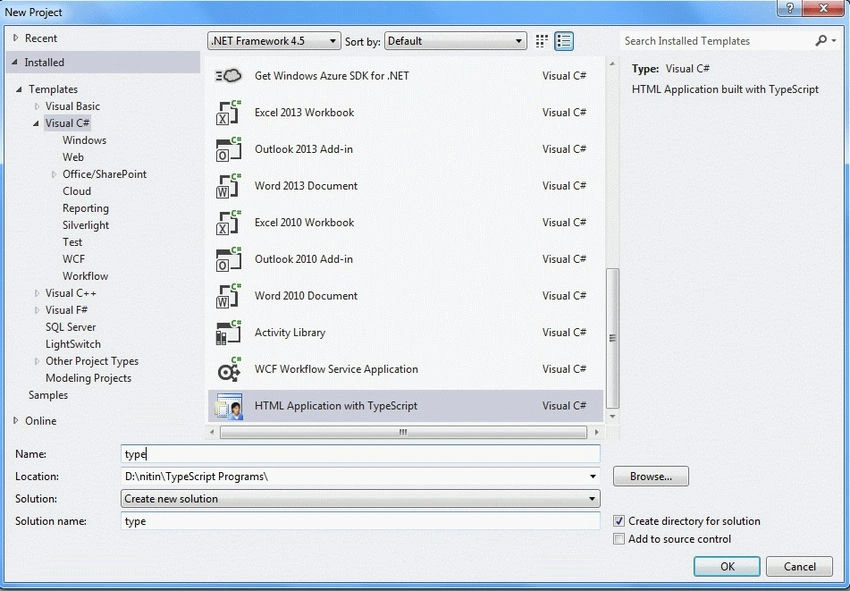
Give the name of your application as "type" and then click ok.
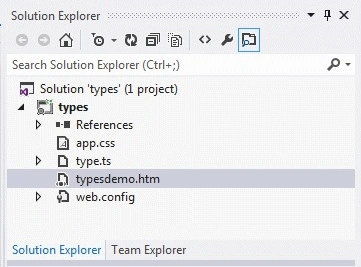
Step 2. After this session, the project has been created; your new project should look like this.
Coding
type.ts
function Greeter(greeting: string) {
    this.greeting = greeting;
}
Greeter.prototype.greet = function() {
    return "Hello User, " + this.greeting;
}
var greeter = new Greeter("Welcome to C-sharpcorner");
var button = document.createElement('button');
button.innerText = "Click to Say Hello";
button.onclick = function() {
    alert(greeter.greet());
}
document.body.appendChild(button);
typedemo.html
<!DOCTYPE html>
<html lang="en" xmlns="http://www.w3.org/1999/xhtml">
<head>
    <meta charset="utf-8" />
    <title>TypeScript HTML App</title>
    <link rel="stylesheet" href="app.css" type="text/css" />
    <script src="app.js"></script>
</head>
<body>
    <h3>Types Example in TypeScript HTML App</h3>
    <script>
        function Greeter(greeting) {
            this.greeting = greeting;
        }
        Greeter.prototype.greet = function () {
            return "Hello User, " + this.greeting;
        };
        var greeter = new Greeter("Welcome to C-sharpcorner");
        var button = document.createElement('button');
        button.innerText = "Click to Say Hello";
        button.onclick = function () {
            alert(greeter.greet());
        };
        document.body.appendChild(button);
    </script>
    <div id="content"></div>
</body>
</html>
app.js
function Greeter(greeting) {
    this.greeting = greeting;
}

Greeter.prototype.greet = function() {
    return "Hello User, " + this.greeting;
};
var greeter = new Greeter("Welcome to C-sharpcorner");
var button = document.createElement('button');
button.innerText = "Click to Say Hello";
button.onclick = function() {
    alert(greeter.greet());
};
document.body.appendChild(button);
Output
Sourav Kumar DasPosted Oct 14, 2019, 11:46 PM
Nice Article.
Pankajkumar PatelPosted Sep 9, 2019, 1:25 AM
Good one ...
Richa GargeditedPosted Oct 14, 2012, 11:16 PMEdited Oct 14, 2012, 11:16 PM
ok thanks for explain me......@Nitin
Nitin BhardwajPosted Oct 12, 2012, 7:13 AM
Thanks Anil
Nitin BhardwajeditedPosted Oct 12, 2012, 7:06 AMEdited Oct 12, 2012, 7:12 AM
Hello Richa, You are write but In this article I want to explain that it is another way to write the html file. Basically js file is created by ts file. and i write both ts and js file in article because i want to explain difference between javascript and typescript. Now I hope you understand
Richa GargPosted Oct 12, 2012, 1:25 AM
Hi nitin, you write the javascript code seperatly but their is no need of it if you are already mention that code in your html file. Is I am wrong ?
Anil SaxenaPosted Oct 11, 2012, 11:23 PM
This is grate feature for helps those who not much familiar with JavaScript.. Thanks for Sharing... Keep posting..