Introduction
In this article, we will learn how to implement an ajax method in jQuery. There is no need to explain that ajax is one of the strong pillars of the future of web development. Since ajax is a concept or technique we can implement ajax with any web development platform. It is possible to implement ajax with PHP or with JSP or with ASP.NET or with many other technologies. Since we are learning .NET, in this article we will explain ajax in the context of C# .NET.
The experienced developer will say that there are two possible ways to implement ajax in an ASP.NET web application. The first one and the worst one is using an update panel. And the best one is using a jQuery ajax function.
Hmm...Many developers will not agree with my straight-forward conclusion. But if you search a little in the WWW and talk about .NET savvy then you may agree with me.
The reason why an update panel is not feasible is, when we add more than a few update panels on the same page, the performance of the page will decrease automatically. So, people don't like update panels much. It's cool for small ajax implementations.
And the next one is using an ajax method of jQuery. In this article, we will implement that. Using the jQuery ajax method we can call nearly any function (code behind) and various services, like a traditional Web service, WCF, WEB-API, and so on. In this article, we will learn each of them one by one.
Call function in Code-behind
Sometimes, the situation exists where we need to call a C# function defined in code-behind on the same page using a jQuery ajax method. Let's see how to do that.
Step 1: Create an ajax function in an .aspx page.
Use one .aspx page with the following code.
- <%@ Page Language="C#" AutoEventWireup="true" CodeBehind="JavaScript.aspx.cs" Inherits="WebApplication.JavaScript" %>
- <!DOCTYPE html>
- <html xmlns="http://www.w3.org/1999/xhtml">
- <head runat="server">
- <title></title>
- <script src="http://ajax.googleapis.com/ajax/libs/jquery/1.10.2/jquery.min.js"></script>
- <script>
- $(document).ready(function () {
- $.ajax({
- type: "POST",
- url: "JavaScript.aspx/GetData",
- contentType: "application/json; charset=utf-8",
- dataType: "json",
- success: function (response) {
- $("#Content").text(response.d);
- },
- failure: function (response) {
- alert(response.d);
- }
- });
- });
- </script>
- </head>
- <body>
- <form id="frm" method="post">
- <div id="Content">
- </div>
- </form>
- </body>
- </html>
The code is very simple. Within the head section we are loading the jQuery pulgin from Google's CDN. There is a little advantage in loading the jQuery plug-in from the CDN, we will explain them later. Then we have defined the ajax function to call the C# function asynchroniously. The ajax function has a few properties, let's explain a few of them.
- type: This is nothing but a request type. Here we are making a POST request type. We will explain various types in the following articles.
- URL: This is nothing but the location of a C# function. Here we have provided a page name/path at first and then the method name followed by '/'. We can provide the URL of the remote server.
- data-type: This defines in which form the data will pass. In other words, what the encoding scheme is for the data passed in. For example, we can send data in JSON or XML format.
- Success and failure: Both are callback functions, after a successful ajax request the success function will execute and after failure, the failure function will execute.
Within the success function, we are getting data and pushing it to the DIV tag that was defined in the body portion of the HTML page.
Step 2: Define C# function in code-behind
Now we need to define the GetData() method in code-behind. Go to the code-behind portion of the same page and define the following method.
- using System;
- using System.Collections.Generic;
- using System.Linq;
- using System.Web;
- using System.Web.UI;
- using System.Web.UI.WebControls;
- using System.Web.Services;
- namespace WebApplication
- {
- public partial class JavaScript : System.Web.UI.Page
- {
- protected void Page_Load(object sender, EventArgs e)
- {
- }
- [WebMethod]
- public static string GetData()
- {
- return "This string is from Code behind";
- }
- }
- }
The concept is, we need to specify the method as WebMethod by the same attribute, otherwise the ajax function cannot call it and for that we need to include the "Sysyem.Web.Services" namespace.
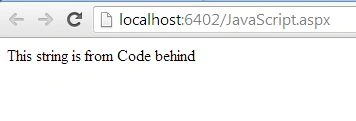
One more point to be explained. When we call a C# function in code-behind, the function must be defined as a static function, otherwise, the ajax function cannot call it. Here is a sample output.
Return JSON data to ajax function
If you observe the preceding example closely, you will find that we are working with JSON data (as we specified in the jQuery ajax method) but we are returning a string? The concept is, the JSON data is nothing but a simple string. So we can treat the string as JSON data (let's not consider the format and rule of JSON data). So, in this example, we will create one List in the C# method and we will convert it to serializable JSON format and then we will return it to the jQuery ajax method. Have a look at the following example.
Step 1: Create code-behind method in .aspx page
Here is the modified version of our existing Web Method.
- [WebMethod]
- public static string GetData()
- {
- Dictionary<string, string> name = new Dictionary<string, string>();
- name.Add("1", "Sourav Kayal");
- name.Add("2", "Ram mishra");
- string myJsonString = (new JavaScriptSerializer()).Serialize(name);
- return myJsonString;
- }
The body is very simple, We have just defined the Dictionary with both a key and value as a string. The reason is, the key and value must be a string or an object type when we serialize the Dictionary using the JavaScriptSerializer class, otherwise it will throw an error. Then we are returning a simple JSON string to our jQuery ajax function.
Step 2: Define JQuey ajax function
Here is the definition of the jQuery ajax function. The code is very similar to the example above.
- <%@ Page Language="C#" AutoEventWireup="true" CodeBehind="JavaScript.aspx.cs" Inherits="WebApplication.JavaScript" %>
- <!DOCTYPE html>
- <html xmlns="http://www.w3.org/1999/xhtml">
- <head runat="server">
- <title></title>
- <script src="http://ajax.googleapis.com/ajax/libs/jquery/1.10.2/jquery.min.js"></script>
- <script>
- $(document).ready(function () {
- $.ajax({
- type: "POST",
- url: "JavaScript.aspx/GetData",
- contentType: "application/json; charset=utf-8",
- dataType: "json",
- success: function (response) {
- var names = response.d;
- alert(names);
- },
- failure: function (response) {
- alert(response.d);
- }
- });
- });
- </script>
- </head>
- <body>
- <form id="frm" method="post">
- <div id="Content">
- </div>
- </form>
- </body>
- </html>
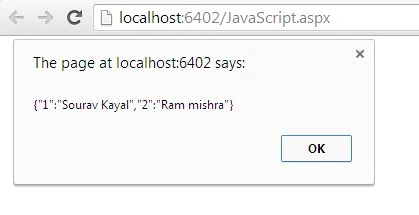
For the sake of simplicity we have just shown the data in an alert box, anyway we can show it in a formatted style. In a future article we will learn various ways to process JSON data.
Here is the sample example.
Conclusion
In this article, we saw how to implement a simple jQuery ajax method to call a code-behind C# method. In a future article, we will learn to call any service method from the jQuery ajax method.


Manoj KumarPosted Mar 25, 2022, 4:32 AM
Very Much Helpful For a Basic Understanding !! Thank You
Ahsan AliPosted Feb 21, 2020, 4:55 AM
Any one can tell me code is not working i used the same code as in example one and step by step but there is no result its giving me empty page. Is there any need of web configuration?
Bidyasagar MishraPosted Sep 15, 2019, 8:53 PM
How to call without using jquery , only pure JavaScript calling
Mahesh PrajapatiPosted Jul 1, 2019, 3:43 AM
Thank You very nice
Ramzanali MominPosted Sep 28, 2018, 5:14 AM
Thanks a lot. very nice
Willians RodriguezPosted Aug 23, 2018, 3:23 PM
That look nice, but if i want access every property (field) of the returned json object, how do i do it?
Anil CmPosted Jun 11, 2018, 6:58 AM
Well explained
Nilofers ShaikhPosted Oct 30, 2017, 2:09 AM
Good One............
Jose FidalgoPosted Mar 23, 2017, 6:57 AM
In this example give undefined why?
neo javanPosted Feb 27, 2017, 4:10 PM
It is a great example, thanks for sharing
Aleena SaviourPosted Dec 8, 2016, 12:39 AM
Super one...simple and helpful.
Peter LeePosted Aug 5, 2016, 1:49 PM
Nice
kalu singh raoPosted Jul 8, 2016, 1:25 AM
Nice...
Vignesh ManiPosted Jun 17, 2016, 9:30 AM
Nice one
Amatya AgyeyPosted May 13, 2016, 3:19 AM
Nice 1
Manas MohapatraPosted Jul 24, 2015, 6:05 AM
Good one..
Vithal WadjePosted Sep 24, 2014, 11:23 AM
great one