Introduction
LINQ is a great technology provided by Microsoft to manage data in .Net languages. Grouping is a very powerful feature provided by LINQ that transforms a collection in groups where each group has a key associated with it.
Note: GroupBy performs a deferred execution which means the query is only executed when the records are processed using a foreach loop.
To understand the concept completely, I have created some examples and divided them into the following sections.
Group By: Single key
- SQL like syntax
- Lambda syntax
- SQL like syntax with sorting the elements of the group
- Lambda syntax with sorting the elements of the group
Group By: Multiple keys
- SQL like syntax
- Lambda syntax
- SQL like syntax with sorting the elements of the group
- Lambda syntax with sorting the elements of the group
Sample ClassI have create one sample class student that I will use to demonstrate the examples.
- class student
- {
- public int id;
- public string name;
- public int standard;
- public int age;
-
- public static List<student> getstudents()
- {
- List<student> Students = new List<student>()
- {
- new student{id = 1, name ="ram", age = 20, standard =12},
- new student{id = 2, name ="zip", age = 18, standard =10},
- new student{id = 3, name ="any", age = 19, standard =12},
- new student{id = 4, name ="Ian", age = 18, standard =10},
- new student{id = 5, name ="john", age = 17, standard =10},
- new student{id = 6, name ="bob", age = 19, standard =12},
- new student{id = 7, name ="moni", age = 18, standard =10},
- new student{id = 8, name ="sri", age = 19, standard =12},
- new student{id = 9, name ="dummy" , age = 17, standard =10},
- new student{id = 10, name ="hon" , age = 17, standard =10},
- };
- return Students;
- }
- }
ExamplesGroup By: Single key
This example will group students by standard (class) and display all the grouped records.
- List<student> studentlist = student.getstudents();
- var result = from stu in studentlist
- group stu by stu.standard
- into egroup
- orderby egroup.Key
- select egroup;
- foreach (var group in result)
- {
- Console.WriteLine("class - {0} ", group.Key);
- Console.WriteLine("{0} -- {1} -- {2} -- {3}", "ID", "NAME", "AGE", "CLASS");
- foreach (var _student in group)
- {
- Console.WriteLine("{0} -- {1} -- {2} -- {3}", _student.id, _student.name, _student.age, _student.standard);
- }
- Console.WriteLine("---------------------------------------------");
- }
- Console.ReadKey();
Output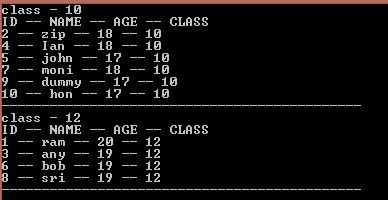
This example works similar to example 1 but uses a lambda expression to do the job.
- List<student> studentlist = student.getstudents();
-
- var resultlamba = studentlist.GroupBy(stu => stu.standard).OrderBy(stu => stu.Key);
- foreach (var group in resultlamba)
- {
- Console.WriteLine("class - {0} ", group.Key);
- Console.WriteLine("{0} -- {1} -- {2} -- {3}", "ID", "NAME", "AGE", "CLASS");
- foreach (var _student in group)
- {
- Console.WriteLine("{0} -- {1} -- {2} -- {3}", _student.id, _student.name, _student.age, _student.standard);
- }
- Console.WriteLine("---------------------------------------------");
- }
- Console.ReadKey();
Output: The output will be the same as in Example 1.
- SQL like syntax with sorting the elements of the group by student name
We need to use anonymous types to sort the elements within the group. The following example will show how to do that:
- List<student> studentlist = student.getstudents();
-
- var resultorderbyelement = from stu in studentlist
- group stu by stu.standard
- into egroup
- orderby egroup.Key
- select new
- {
- Key = egroup.Key,
- studentobj = egroup.OrderBy(g => g.name)
- };
-
- foreach (var group in resultorderbyelement)
- {
- Console.WriteLine("class - {0} ", group.Key);
- Console.WriteLine("{0} -- {1} -- {2} -- {3}", "ID", "NAME", "AGE", "CLASS");
- foreach (var _student in group.studentobj)
- {
- Console.WriteLine("{0} -- {1} -- {2} -- {3}", _student.id, _student.name, _student.age, _student.standard);
- }
- Console.WriteLine("---------------------------------------------");
- }
- Console.ReadKey();
Output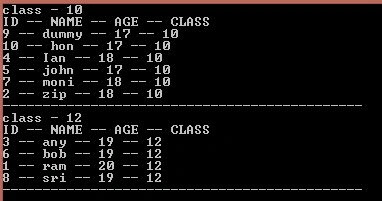
- Lambda syntax with sorting the elements of the group by student name
This example works the same as Example 3 but uses a lambda to do the job.
- List<student> studentlist = student.getstudents();
-
- var resultlambaorderbyelement = studentlist
- .GroupBy(stu => stu.standard)
- .OrderBy(stu => stu.Key)
- .Select(g => new { Key = g.Key, studentobj = g.OrderBy(y => y.name) });
-
- foreach (var group in resultlambaorderbyelement)
- {
- Console.WriteLine("class - {0} ", group.Key);
- Console.WriteLine("{0} -- {1} -- {2} -- {3}", "ID", "NAME", "AGE", "CLASS");
- foreach (var _student in group.studentobj)
- {
- Console.WriteLine("{0} -- {1} -- {2} -- {3}", _student.id, _student.name, _student.age, _student.standard);
- }
- Console.WriteLine("---------------------------------------------");
- }
- Console.ReadKey();
Output: The output will be the same as Example 3.
Group By: Multiple keys
This example will group students first by standard (class) and then by their age.
- var resultmultiplekey = from stu in studentlist
- group stu by new { stu.standard, stu.age }
- into egroup
- orderby egroup.Key.standard, egroup.Key.age
- select egroup;
-
- foreach (var group in resultmultiplekey)
- {
- Console.WriteLine("class - {0} -- age - {1} -- Count of items - {2}", group.Key.standard, group.Key.age, group.Count());
- Console.WriteLine("{0} -- {1} -- {2} -- {3}", "ID", "NAME", "AGE", "CLASS");
- foreach (var _student in group)
- {
- Console.WriteLine("{0} -- {1} -- {2} -- {3}", _student.id, _student.name, _student.age, _student.standard);
- }
- Console.WriteLine("---------------------------------------------");
- }
- Console.ReadKey();
Output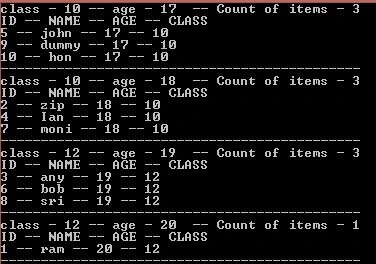
- This example is same as example 1 but uses lambda syntax to do the job
-
- var resultmultiplekeylamba = studentlist
- .GroupBy(stu => new{stu.standard, stu.age})
- .OrderBy(g=> g.Key.standard).ThenBy(y=> y.Key.age);
-
- foreach (var group in resultmultiplekeylamba)
- {
- Console.WriteLine("class - {0} -- age - {1} -- Count of items - {2}", group.Key.standard, group.Key.age, group.Count());
- Console.WriteLine("{0} -- {1} -- {2} -- {3}", "ID", "NAME", "AGE", "CLASS");
- foreach (var _student in group)
- {
- Console.WriteLine("{0} -- {1} -- {2} -- {3}", _student.id, _student.name, _student.age, _student.standard);
- }
- Console.WriteLine("---------------------------------------------");
- }
- Console.ReadKey();
Output: The output will be the same as Example 1.
- SQL like syntax with sorting the elements of the group by student name
Again, in this example we will use anonymous types to sort the results of Examples 1 and 2 by the student's name.
- var resultmutiplekeyorderbyelement = from stu in studentlist
- group stu by new { stu.standard, stu.age }
- into egroup
- orderby egroup.Key.standard, egroup.Key.age
- select new
- {
- standardkey = egroup.Key.standard,
- agekey = egroup.Key.age,
- studentobj = egroup.OrderBy(y => y.standard).ThenBy(y => y.name)
- };
-
- foreach (var group in resultmutiplekeyorderbyelement)
- {
- Console.WriteLine("class - {0} -- age - {1} -- Count of items - {2}", group.standardkey, group.agekey, group.studentobj.Count());
- Console.WriteLine("{0} -- {1} -- {2} -- {3}", "ID", "NAME", "AGE", "CLASS");
- foreach (var _student in group.studentobj)
- {
- Console.WriteLine("{0} -- {1} -- {2} -- {3}", _student.id, _student.name, _student.age, _student.standard);
- }
- Console.WriteLine("---------------------------------------------");
- }
- Console.ReadKey();
Output
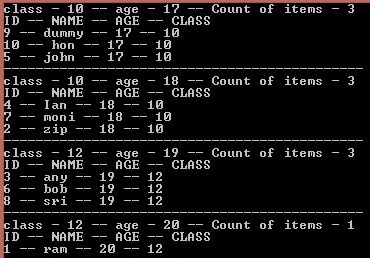
- Lambda syntax with sorting the elements of the group by student name
This example does the same as Example 3 but uses a lambda to do the job.
//result using lamba with multiple key and sort elements by name.
- var resultmutiplekeylambaorderbyelement = studentlist
- .GroupBy(stu => new{stu.standard, stu.age})
- .OrderBy(g => g.Key.standard).ThenBy(y=> y.Key.age)
- .Select(g => new { standardkey = g.Key.standard, agekey = g.Key.age, studentobj = g.OrderBy(y => y.name) });
-
- foreach (var group in resultmutiplekeylambaorderbyelement)
- {
- Console.WriteLine("class - {0} -- age - {1} -- Count of items - {2}", group.standardkey, group.agekey, group.studentobj.Count());
- Console.WriteLine("{0} -- {1} -- {2} -- {3}", "ID", "NAME", "AGE", "CLASS");
- foreach (var _student in group.studentobj)
- {
- Console.WriteLine("{0} -- {1} -- {2} -- {3}", _student.id, _student.name, _student.age, _student.standard);
- }
- Console.WriteLine("---------------------------------------------");
- }
- Console.ReadKey();
Output: the Output will be the same as in Example 3.


Hamid KhanPosted Sep 4, 2020, 5:26 AM
Anil Kumar You explain well.....................
Martin OkelloPosted Mar 2, 2019, 6:46 AM
Class Person { internal int PersonID; internal string car ; internal string FirstName; internal string LastName; internal string CarSeries; } Person[] persons = new Person[3]; persons[0] = new Person { PersonID = 2, car = "Ferrari", FirstName="Martin", LastName="James", CarSeries="Series A" }; persons[0] = new Person { PersonID = 2, car = "Ferrari", FirstName="Martin", LastName="James" , CarSeries="Series B" }; persons[0] = new Person { PersonID = 2, car = "Ferrari", FirstName="Martin", LastName="James" , CarSeries="Series C" }; persons[1] = new Person { PersonID = 1, car = "BMW", FirstName="Joanne", LastName="James" , CarSeries="Series 1" }; persons[1] = new Person { PersonID = 1, car = "BMW", FirstName="Joanne", LastName="James" , CarSeries="Series 3" }; persons[2] = new Person { PersonID = 2, car = "Audi", FirstName="Martin", LastName="James" , CarSeries="A3" }; persons[2] = new Person { PersonID = 1, car = "Porche", FirstName="Joanne", LastName="James" , CarSeries="Series Carrera" }; persons[2] = new Person { PersonID = 3, car = "Lexus", FirstName="Leon", LastName="James" , CarSeries="S Class"}; Console.Out.WriteLine("--------------------------------------------"); var results7 = from p in persons group p by new {p.car, p.FirstName, p.LastName, p.CarSeries} into gp from g in gp select new {Name=g.FirstName+" "+g.LastName, Car=g.car, CarSeries = g.CarSeries, Count=gp.Count()}; foreach(var p in results7){ Console.Out.WriteLine(p.Name+", "+p.Car+", "+p.CarSeries+" Count "+p.Count); }
Martin OkelloPosted Mar 2, 2019, 6:46 AM
Hey Anil, this is all brilliant. I have a problem and need your help: why aren't all the gourps showing using this example:
Gowtham RajamanickamPosted Mar 14, 2015, 4:42 AM
nice...
Anil KumarPosted Mar 9, 2015, 7:39 AM
Thanks Tom
Tom MohanPosted Mar 9, 2015, 5:47 AM
Nice :)