

Introduction
SharePoint is a powerful platform for managing and organizing digital content within an organization. One of the key features that SharePoint offers is the ability to define and use content types. Content types are reusable templates that allow you to define the columns and behaviors for items in a list or library. They provide a consistent experience for users when they create, edit, or view an item. Content types can also include settings for workflow, information management policies, and document templates.
What are SharePoint content types?
SharePoint content types are a way to categorize and organize different types of content within SharePoint. They act as reusable templates that define the metadata, columns, and settings for items in a list or library. By using content types, you can ensure consistency in how content is managed and accessed across your organization.
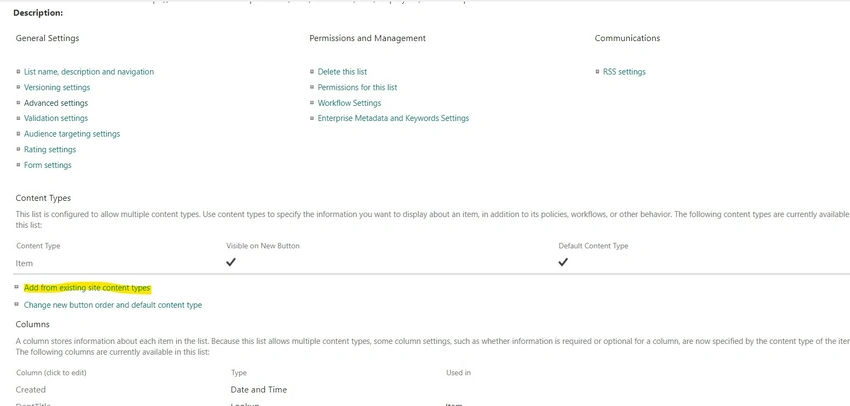
Content types can be created at the site level or at the list or library level. Site content types can be used across multiple sites within a site collection, while list or library content types are specific to a particular list or library.
The benefits of using SharePoint content types
Using SharePoint content types offers several benefits for organizations. First and foremost, content types provide a standardized way to manage and organize content. By defining content types with specific columns and settings, you can ensure that information is captured consistently across different items.
Content types also promote reusability and efficiency. Once a content type is created, it can be applied to multiple lists or libraries, saving time and effort in setting up each one individually. Additionally, content types can be customized with workflows, information management policies, and document templates, further enhancing the functionality of your SharePoint environment.
Another advantage of using content types is improved searchability. By associating metadata and columns with content types, you can enable more accurate and targeted search results. Users can easily filter and find the content they need based on specific criteria.
Creating and managing SharePoint content types
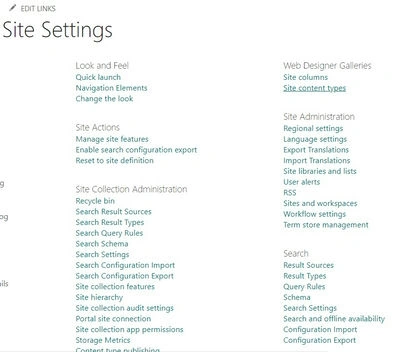
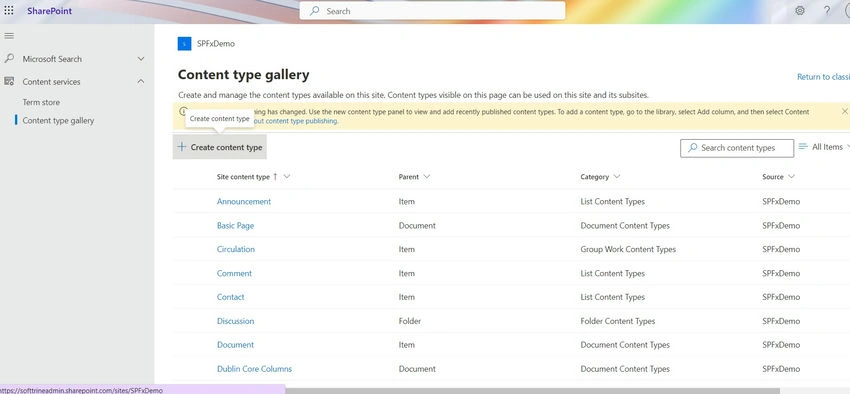
Creating and managing SharePoint content types is a straightforward process. To create a content type, you need to access the Site Settings page in SharePoint and select the "Content Types" option. From there, you can create a new content type by clicking "New" and entering a name for the content type. You can then add the relevant metadata and properties to the content type and specify which types of content it applies to.
To manage existing content types, you can edit their properties, add or remove columns, and adjust settings as needed. SharePoint also provides the ability to use content type templates, which allow you to create content types with pre-defined metadata and properties. This ensures consistency across your organization and makes it easier to manage content types.
Creating a content type in SharePoint Online involves a few steps. Here is a step-by-step guide to help you through the process.
Navigate to site settings
- Go to your SharePoint Online site.
- Click on the gear icon in the upper-right corner to access the Settings menu.
- Select "Site settings" from the drop-down menu.


Join the conversation! Your thoughts help the community grow.