In this article, I am going to show how we can update a key value in app.config file in WPF. For this add reference of System.Configuration in your application.
Suppose we have a key in our app.config file like this:
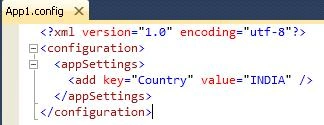
Image 1.
At run time we will change "Country" Key Value.
This is my XAML code
<Window x:Class="UpdateAppConfigValueInWPF.MainWindow"
xmlns="http://schemas.microsoft.com/winfx/2006/xaml/presentation"
xmlns:x="http://schemas.microsoft.com/winfx/2006/xaml"
Height="350" Width="525" Title="Update App.config value in WPF">
<Grid>
<Button Content="Update" Click="Button_Click" Height="20" Width="70" Margin="205,77,228,214"></Button>
<TextBox Height="23" HorizontalAlignment="Left" Margin="184,34,0,0" Name="textBoxCountry" VerticalAlignment="Top" Width="120" />
<TextBlock Height="23" HorizontalAlignment="Left" Margin="79,34,0,0" Name="textBlock1" Text="New Value for Key" VerticalAlignment="Top" Width="99" />
</Grid>
</Window>
This is my XAML.CS code
using System;
using System.Collections.Generic;
using System.Linq;
using System.Text;
using System.Windows;
using System.Windows.Controls;
using System.Windows.Data;
using System.Windows.Documents;
using System.Windows.Input;
using System.Windows.Media;
using System.Windows.Media.Imaging;
using System.Windows.Navigation;
using System.Windows.Shapes;
using System.Configuration;
using System.Xml;
namespace UpdateAppConfigValueInWPF
{
/// <summary>
/// Interaction logic for MainWindow.xaml
/// </summary>
public partial class MainWindow : Window
{
public MainWindow()
{
InitializeComponent();
}
private void Button_Click(object sender, RoutedEventArgs e)
{
if (!string.IsNullOrEmpty(textBoxCountry.Text))
{
UpdateConfigKey("Country", textBoxCountry.Text);
textBoxCountry.Text = string.Empty;
}
else
MessageBox.Show("Please type some value.");
}
public void UpdateConfigKey(string strKey, string newValue)
{
XmlDocument xmlDoc = new XmlDocument();
xmlDoc.Load(AppDomain.CurrentDomain.BaseDirectory + "..\\..\\App1.config");
if (!ConfigKeyExists(strKey))
{
throw new ArgumentNullException("Key", "<" + strKey + "> not find in the configuration.");
}
XmlNode appSettingsNode = xmlDoc.SelectSingleNode("configuration/appSettings");
foreach (XmlNode childNode in appSettingsNode)
{
if (childNode.Attributes["key"].Value == strKey)
childNode.Attributes["value"].Value = newValue;
}
xmlDoc.Save(AppDomain.CurrentDomain.BaseDirectory + "..\\..\\App1.config");
xmlDoc.Save(AppDomain.CurrentDomain.SetupInformation.ConfigurationFile);
MessageBox.Show("Key Upated Successfullly");
}
public bool ConfigKeyExists(string strKey)
{
XmlDocument xmlDoc = new XmlDocument();
xmlDoc.Load(AppDomain.CurrentDomain.BaseDirectory + "..\\..\\App1.config");
XmlNode appSettingsNode = xmlDoc.SelectSingleNode("configuration/appSettings");
foreach (XmlNode childNode in appSettingsNode)
{
if (childNode.Attributes["key"].Value == strKey)
return true;
}
return false;
}
}
}
When I run the application it will ask for new value of key as shown below:

Image 2.
Now if we see App.config key then it is already been updated.
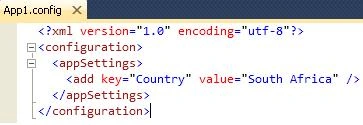
Image 3.


Join the conversation! Your thoughts help the community grow.