

Introduction
This is a very simple article to upload and view documents using MVC and Ajax. Sometimes a user needs to upload file(s) to the server and view. For example, if you want to upload photos, PDF documents, text files and so on. This article shall help you to upload and view documents in a browser at the same time. Here I have created an Area (right-click on ProjectName (projStudentInfo) > add > Area) > Enter Area Name (DocumentViewAndUpload).
Then right-click on controller of that area and add controller with the name DocViewUpload.
So here we have Areas -> DocumentViewAndUpload and controller DocViewUpload and View Index.cshtml.

Figure 1: Solution Explorer
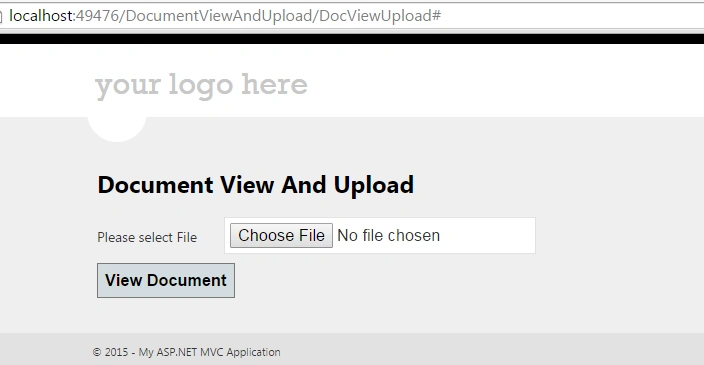
Now in the controller we have an Index Action for which we have Index.cshtml in which we have a file upload control and a button.
Controller Code
- public ActionResult Index()
- {
- return View();
- }
- [HttpPost]
- public ActionResult Index(HttpPostedFileBase file)
- {
- if (file != null && file.ContentLength > 0) try
- {
- string path = Path.Combine(Server.MapPath("~/Files"),
- Path.GetFileName(file.FileName));
- file.SaveAs(path);
- return Json(new {
- Error = false, Message = "File Uploaded Successfully..!!!", FilePath = file.FileName
- }, JsonRequestBehavior.AllowGet);
- }
- catch (Exception ex)
- {
- return Json(new {
- Error = false, Message = "File Not Uploaded"
- }, JsonRequestBehavior.AllowGet);
- }
- else
- {
- ViewBag.Message = "You have not specified a file.";
- }
- return View();
- }
- public FileResult ShowDocument(string FilePath)
- {
- return File(Server.MapPath("~/Files/") + FilePath, GetMimeType(FilePath));
- }
- private string GetMimeType(string fileName)
- {
- string mimeType = "application/unknown";
- string ext = System.IO.Path.GetExtension(fileName).ToLower();
- Microsoft.Win32.RegistryKey regKey = Microsoft.Win32.Registry.ClassesRoot.OpenSubKey(ext);
- if (regKey != null && regKey.GetValue("Content Type") != null)
- mimeType = regKey.GetValue("Content Type").ToString();
- return mimeType;
- }
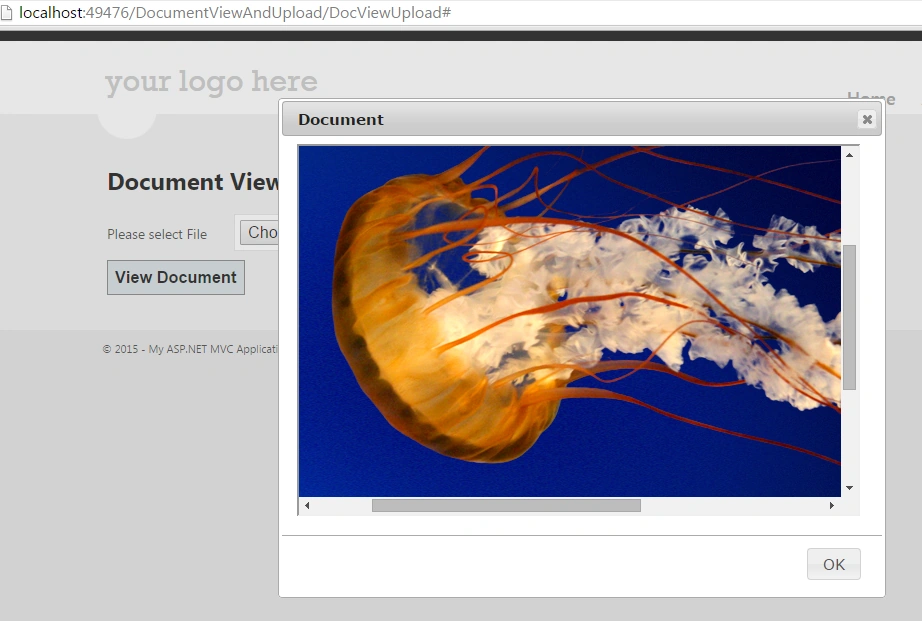
In the preceding code we have an Index action and Index action with a HttpPostedFileBase parameter. On the click of the button a parameterized Index will be called. The code will copy a file to the “File” folder and the JSON result is returned to view the jQuery. JSON returns the filename to jQuery that then calls ShowDocument with file name as parameter. We have the GetMimeType function that returns ContentType as a string.
Index.cshtml
- @{
- ViewBag.Title = "Index";
- Layout = "~/Views/Shared/_Layout.cshtml";
- }
- <h2>Document View And Upload</h2>
- @using (Html.BeginForm("Index", "DocViewUpload", FormMethod.Post, new { @enctype = "multipart/form-data", @id = "MyForm" }))
- {
- <table border="0" cellpadding="0" cellspacing="0">
- <tr>
- <td>Please select File
- </td>
- <td>
- <input type="file" name="file" value="" id="myFile" />
- </td>
- <td></td>
- </tr>
- </table>
- }
- <button id="btnUpload">View Document</button>
- <div id="DOC1"></div>
- <script>
- $(document).ready(function () {
- $("#btnUpload").click(function () {
- if($("#myFile").val()=="")
- {
- alert("Please select a file");
- return false;
- }
- $('#MyForm').ajaxForm({
- complete: function (xhr) {
- var ret = $.parseJSON(xhr.responseText);
- if (ret.Error == false) {
- $("#DOC1").empty();
- $("#DOC1").html('
- <iframe src="@Url.Action("ShowDocument", "DocViewUpload", new { FilePath = "_FilePath" }) "'.replace("_FilePath", ret.FilePath) + ' style="width: 98%; height: 98%" ></iframe>');
- // $("#DOC1").show();
- $("#DOC1").dialog({
- autoOpen: true,
- modal: true,
- height:500,
- width:600,
- buttons: {
- OK: function () { $(this).dialog("close"); }
- },
- title: "Document",
- });
- }
- },
- error: function () {
- window.location.reload();
- }
- }).submit();
- });
- });
- </script>
NOTE: Add the following reference code to _Layout.cshtml (master page).
For the ajaxForm function we need form.js in the script folder.
- <link rel="stylesheet" href="//code.jquery.com/ui/1.11.4/themes/smoothness/jquery-ui.css">
- <script src="//code.jquery.com/jquery-1.10.2.js"></script>
- <script src="//code.jquery.com/ui/1.11.4/jquery-ui.js"></script>
- <script src="../../Scripts/form.js" type="text/javascript"></script>
Remove @Scripts.Render("~/bundles/jquery") if you see in _Layout.cshtml.
Uploading Image file
Kevin MoraPosted May 8, 2018, 12:24 PM
Hi, is there a maximum file size to upload ? I am asking because whenever try with pdf bigger tha 1 MB it doesn't display
Gorakh ShindePosted Jul 12, 2017, 2:29 AM
Hi, Hemant it is very good for implement, but i am not able to resolved the problem of Uncaught TypeError: $(...).ajaxForm is not a function. Please any suggestions to fix this?
JennyPosted Nov 14, 2016, 5:05 PM
Great tutorial. When the pop-up appears, it displays a mini-version of the web app, not the uploaded file. Any suggestions to fix this? Thanks
bestin SebastianPosted Mar 2, 2016, 6:20 AM
any one help me to view word docs??
Hemant PanchalPosted Dec 15, 2015, 7:09 AM
https://github.com/malsup/form try this jquery.form.js
Ramesh KandulaPosted Oct 16, 2015, 2:12 AM
please anyone tell me where i have to find form.js?????
Shubham KumarPosted May 25, 2015, 2:10 AM
nice
Santhakumar MunuswamyPosted May 24, 2015, 12:54 PM
Thanks for nice one
Hanumantha Reddy G SPosted May 24, 2015, 12:35 PM
Thanks a lot. I was looking for Mime type
NitinPosted May 24, 2015, 12:27 PM
good one
Manoj BhoirPosted May 24, 2015, 11:32 AM
Simple and nice.
Vivek TripathiPosted May 24, 2015, 10:11 AM
Good approach