

Introduction
This article shall describe an approach that may be used to upload any sort of a
file through a web service from a Windows Forms application. The approach
demonstrated does not rely on the ASP.NET file uploader control and allows the
developer the opportunity to upload files programmatically and without user
intervention. Such an approach may be useful for doing something like processing
out the contents of a local message queue when internet service is available (if
the user base were mobile and had only intermittent connectivity). The article
also addresses the use of a file size check as a precursor to allowing a file to
upload through the service.
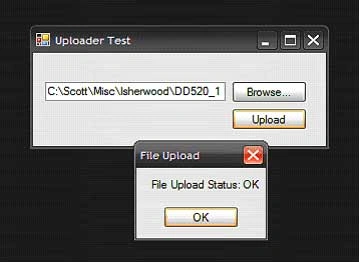
Figure 1: Test Application Shown Uploading a File.
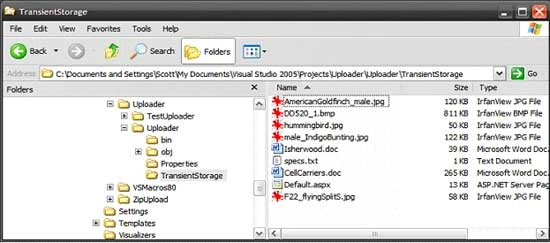
Figure 2: Mixed bag of different file types in transient storage folder.
Getting Started
The solution contains two projects; one is a ASP.NET Web Service project (Uploader) and the other is a Win Forms test application (TestUploader) used to demonstrate uploading files through the web method provided in the web service project.
The web service project contains only a single web service (FileUploader)
which in turn contains only a single Web Method (UploadFile).
The Win Forms application contains only a single form which contains the
controls (one textbox and two buttons used in conjunction with an OpenFileDialogcontrol)
and code necessary to select and upload files through the web service.
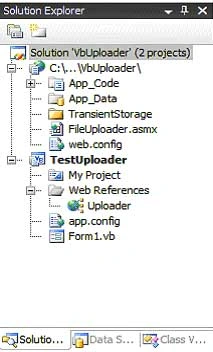
Figure 3:Solution Explorer with the both Projects Visible.
Code: Uploader Web Service Project
The Uploader web service project is an ASP.NET web service project containing a single web service called, "FileUploader"; this web service exposes a single web method called, "UploadFile".
The code for this web service begins with the following:
Imports System.Web
Imports System.Web.Services
Imports System.Web.Services.Protocols
Imports System.IO
''' <summary>
''' This web method will provide an web method to load any
''' file onto the server; the UploadFile web method
''' will accept the report and store it in the local file system.
''' </summary>
''' <remarks></remarks>
<WebService(Namespace:="http://tempuri.org/")>
_
<WebServiceBinding(ConformsTo:=WsiProfiles.BasicProfile1_1)> _
<Global.Microsoft.VisualBasic.CompilerServices.DesignerGenerated()>
_
Public Class FileUploader
Inherits System.Web.Services.WebService
The class starts out with the default imports; I added System.IO to the defaults to support the use of file and memory streams. The web service namespace is left as the defaulthttp://tempuri.org/ which of course will have to updated if the service were deployed.
The remainder of the code supplied in this class is used to define the web method used to upload the file; the code is annotated. The essential process is that, files converted to byte arrays are passed along with the full name of the file (not the path) including the extention as arguments to the UploadFile web method. The byte array is passed to a memory stream, and a file stream is opened pointing to a newly created file (named the name of the original file) within the target folder used to store the files. Once the file stream has been created, the memory stream is written into the file stream and then the memory stream and file stream are disposed of.
The web method is setup to return a string; if all goes well, the string returned will read, "OK", if not, the error message encountered will be returned to the caller.
<WebMethod()> _
Public Function UploadFile(ByVal f As Byte(), ByVal fileName As String) As String
'
the byte array argument containst the content of the file
'
the string argument contains the name and extension of the
'
file pass in through the byte array
Try
'
instance a memory stream and pass the byte array
'
to its constructor
Dim ms As New MemoryStream(f)
'
instance a filestream pointing to the
'
storatge folder, use the original file name
'
to name the resulting file
Dim fs As NewFileStream(System.Web.Hosting.HostingEnvironment.MapPath("~/TransientStorage/")
& fileName, FileMode.Create)
ms.WriteTo(fs)
'
clean up
ms.Close()
fs.Close()
fs.Dispose()
'
return OK if we made it to here
Return "OK"
Catch ex As Exception
Return ex.Message.ToString()
End Try
End Function
Code: Test Uploader Win Forms Application
The test application contains a single Windows Form class; this form contains a text box used to display the name of the file selected for upload, a browse button used to launch an open file dialog box which is used to navigate to and select a file for upload, and an upload button which is used to pass the file to web service so that the selected file may be stored on the server.
The code for this class begins with the following:
Imports System.IO
Public Class Form1
Aside from the default imports, I have added only System.IO to the list. This being necessary to support working with files. The namespace and class declarations are in the default configuration. In addition to System.IO, the project also adds in a web reference pointing to the File Uploader web service, the reference is given the alias of Uploader.
The next bit of code in the class is private method used to prepare the file for submittal to the web service and to actually make that submittal. The code below is annotated to describe the activity but the essential parts of the operation are to check the file size to see if the web service will accept the file (by default, the web server will accept uploads smaller than 4 MB in size, the web config file must be updated in order to support larger uploads), and to convert the file to a byte array. When everything is ready, the byte array and the name of the file including the extension is passed to an instance of the web service web method.
Note that, when setting up the demo, you will have remove and add the web reference back into the project in order for it to work for you.
Public Sub UploadFile(ByVal filename As String)
Join the conversation! Your thoughts help the community grow.