In this article, I have explained how to upload multiple files as an attachment into a SharePoint list using PNP JS. Add the two script references- jQuery and Pnp Js from the CDN,
- <script src="https://code.jquery.com/jquery-3.3.1.min.js" type="text/javascript"></script>
- <script src="https://cdnjs.cloudflare.com/ajax/libs/sp-pnp-js/3.0.10/pnp.min.js" type="text/javascript"></script>
Create one array variable globally to store the multiple file content as Blob- (Binary Large Object Data).
Create Jquery onchage event to convert the upload files into blob using "blob()" function.
- //Pass the File Upload control id
- $(document).ready(function() {
- $('#exampleFormControlFile1').on('change', function() {
- blob();
- });
- });
Create Function blob() to convert the uploaded files to blog using javascript FileReader().
- function blob() {
- //Get the File Upload control id
- var input = document.getElementById("exampleFormControlFile1");
- var fileCount = input.files.length;
- console.log(fileCount);
- for (var i = 0; i < fileCount; i++) {
- var fileName = input.files[i].name;
- console.log(fileName);
- var file = input.files[i];
- var reader = new FileReader();
- reader.onload = (function(file) {
- return function(e) {
- console.log(file.name);
- //Push the converted file into array
- fileInfos.push({
- "name": file.name,
- "content": e.target.result
- });
- console.log(fileInfos);
- }
- })(file);
- reader.readAsArrayBuffer(file);
- }
-
-
-
- }
Then call the upload attachments function to attach files for the list item
For single upload calls you can use "attachmentFiles.add"
Here I am going to upload multiple files for the particular list item Id "attachmentFiles.addMultiple"
- function uploadListAttachments() {
- var item = $pnp.sp.web.lists.getByTitle("demopoc2").items.getById(1);
- item.attachmentFiles.addMultiple(fileInfos).then(v => {
- console.log(v);
- }).catch(function(err) {
- alert(err);
- });
- }
HTML Snippet
-
-
- <div id="fileUploader">
- <input type="file" id="exampleFormControlFile1" name="myfiles" multiple="multiple">
- <button type="button" onclick="uploadListAttachments();">Upload</button> //Call the upload function
- </div>
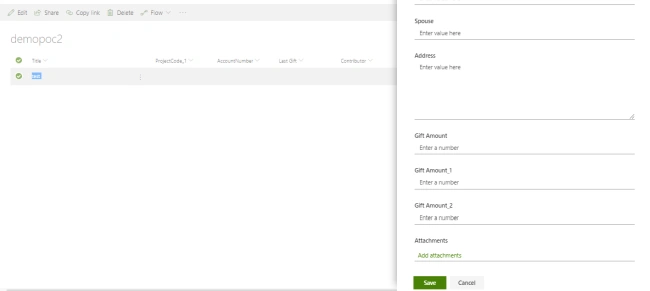
Now I am navigating to the Sharepoint list for that particular item. It has no attachment,
So upload the snippet into content editor webpart or script editor webpart
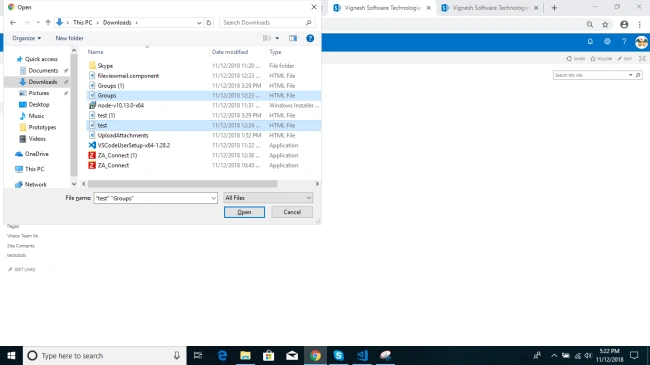
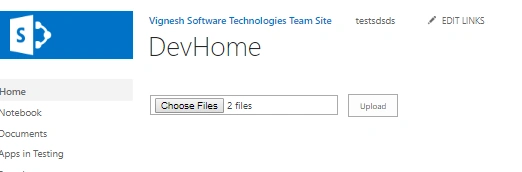
Click on the "Choose File" button to upload the file,
Click on the "Upload" button to add the attachment file for the Sharepoint list item
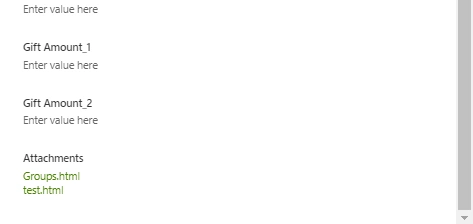
The attachment has been uploaded successfully.
Full Code
- <script src="https://code.jquery.com/jquery-3.3.1.min.js" type="text/javascript"></script>
- <script src="https://cdnjs.cloudflare.com/ajax/libs/sp-pnp-js/3.0.10/pnp.min.js" type="text/javascript"></script>
- <script type="text/javascript">
- var fileInfos = [];
-
- $(document).ready(function() {
- $('#exampleFormControlFile1').on('change', function() {
- blob();
- });
- });
-
-
- function uploadListAttachments() {
- var item = $pnp.sp.web.lists.getByTitle("demopoc2").items.getById(1);
- item.attachmentFiles.addMultiple(fileInfos).then(v => {
- console.log(v);
- }).catch(function(err) {
- alert(err);
- });
- }
-
-
- function blob() {
- var input = document.getElementById("exampleFormControlFile1");
- var fileCount = input.files.length;
- console.log(fileCount);
- for (var i = 0; i < fileCount; i++) {
- var fileName = input.files[i].name;
- console.log(fileName);
- var file = input.files[i];
- var reader = new FileReader();
- reader.onload = (function(file) {
- return function(e) {
- console.log(file.name);
- fileInfos.push({
- "name": file.name,
- "content": e.target.result
- });
- console.log(fileInfos);
- }
- })(file);
-
- reader.readAsArrayBuffer(file);
- }
-
-
-
- }
- </script>
- <!-- HTML Snippet-->
-
- <div id="fileUploader">
- <input type="file" id="exampleFormControlFile1" name="myfiles" multiple="multiple">
- <button type="button" onclick="uploadListAttachments();">Upload</button>
- </div>
Note
In a Sharepoint list you can only attach the file after the successful creation of a Sharepoint list -- it works as an update only.
Sharing is caring!...



bk yoPosted Dec 20, 2021, 4:24 AM
For this solution to work on SP2013 you should addfor this solution to work in SP2013 you should add the following snippet or install the OData on the server $pnp.setup({ sp: { headers: { Accept: 'application/json;odata=verbose' } } });
bk yoPosted Dec 20, 2021, 4:22 AM
For this solution to work on SP2013 you should add
Srikanthreddy kunireddyPosted Feb 24, 2020, 12:42 AM
Thank for shearing such a nice article.this is working chrome broswer, but in iE getting error as uploadListAttachments(); is not defined.Could you please provide any clue.
Srikanthreddy kunireddyPosted Feb 24, 2020, 12:40 AM
Hi vinodh,
Nagarajan ElumalaiPosted May 30, 2019, 1:39 AM
Am using SharePoint 2016 on premise
Nagarajan ElumalaiPosted May 30, 2019, 1:39 AM
Pnp.min.js:1 POST <site Name>/_api/web/lists/getByTitle('MedicalPolicy')/items(1)/AttachmentFiles/add(FileName='datatable.txt') 500 (Internal Server Error)t.fetch @ pnp.min.js:1 i @ pnp.min.js:1 (anonymous) @ pnp.min.js:1 e.fetchRaw @ pnp.min.js:1 (anonymous) @ pnp.min.js:1 Promise.then (async) e.fetch @ pnp.min.js:1 (anonymous) @ pnp.min.js:1 e.send @ pnp.min.js:1 n.value @ pnp.min.js:1 i @ pnp.min.js:1 (anonymous) @ pnp.min.js:1 Promise.then (async) n.value @ pnp.min.js:1 i @ pnp.min.js:1 (anonymous) @ pnp.min.js:1 Promise.then (async) n.value @ pnp.min.js:1 i @ pnp.min.js:1 a @ pnp.min.js:1 (anonymous) @ pnp.min.js:1 Promise.then (async) e.postCore @ pnp.min.js:1 (anonymous) @ pnp.min.js:1 Promise.then (async) (anonymous) @ pnp.min.js:1 t.addMultiple @ pnp.min.js:1 uploadListAttachments @ TestIE.aspx:751 (anonymous) @ TestIE.aspx:745 dispatch @ jquery-3.4.0.js:5233 elemData.handle @ jquery-3.4.0.js:5040 pnp.min.js:1 POST <sitename>/_api/web/lists/getByTitle('MedicalPolicy')/items(1)/AttachmentFiles/add(FileName='datatable.txt') 400 (Bad Request) t.fetch @ pnp.min.js:1 i @ pnp.min.js:1 (anonymous) @ pnp.min.js:1 e.fetchRaw @ pnp.min.js:1 (anonymous) @ pnp.min.js:1 Promise.then (async) e.fetch @ pnp.min.js:1 (anonymous) @ pnp.min.js:1 e.send @ pnp.min.js:1 n.value @ pnp.min.js:1 i @ pnp.min.js:1 (anonymous) @ pnp.min.js:1 Promise.then (async) n.value @ pnp.min.js:1 i @ pnp.min.js:1 (anonymous) @ pnp.min.js:1 Promise.then (async) n.value @ pnp.min.js:1 i @ pnp.min.js:1 a @ pnp.min.js:1 (anonymous) @ pnp.min.js:1 Promise.then (async) e.postCore @ pnp.min.js:1 (anonymous) @ pnp.min.js:1 Promise.then (async) (anonymous) @ pnp.min.js:1 t.addMultiple @ pnp.min.js:1 (anonymous) @ VM44774:1 uploadListAttachments @ TestIE.aspx:756 (anonymous) @ TestIE.aspx:745 dispatch @ jquery-3.4.0.js:5233 elemData.handle @ jquery-3.4.0.js:5040 pnp.min.js:1 Uncaught (in promise) ProcessHttpClientResponseException: Error making HttpClient request in queryable: [400] Bad Request at new t (<siteName>/SiteAssets/js/pnp.min.js:1:9369) at <siteName>/SiteAssets/js/pnp.min.js:1:52736 t @ pnp.min.js:1 (anonymous) @ pnp.min.js:1
Nagarajan ElumalaiPosted May 30, 2019, 1:39 AM
Hi When am trying to add am getting the below error.
venkat KotaiahPosted Nov 15, 2018, 4:17 AM
When i am trying its not working properly ...need your help...error been like ProcessHttpClientResponseException: Error making HttpClient request in queryable: [400] Bad Request