Introduction
I hope you all are fine. Today we will learn how to perform upload and download operations in MVC. Please refer to the
step-by-step approach in learning Model View Controller if you are new to MVC. Our MVC Master, Shivprasad koirala has explained the concepts in a perfect way.
Please see this article in my blog
here
This article has been selected as Article Of The Day for October 6th 2015 in
Asp.net Community
Please see this article in my blog
here
Download the source code
Background
Some days earlier, I got a requirement to develop a upload and download mechanism in my MVC application. After completing it perfectly, I decided to share it with you all.
Using the code
Before moving further into the details, let us first list the key points we will explain in this article:
- Create a MVC application.
- Create a controller.
- Create View depending on the controller.
- Change the RouteConfig as needed.
- Create ActionResult for the actions.
- Create a folder where we need to save the downloaded files.
Let us start with creating a controller called "myAction".
- using System;
- using System.Collections.Generic;
- using System.IO;
- using System.Linq;
- using System.Web;
- using System.Web.Mvc;
-
- namespace UploadDownloadInMVC.Controllers
- {
- public class myActionController : Controller
- {
-
-
- }
- }
As you can see that the controller is empty; we will be writing the action results next.
- public ActionResult Index()
- {
- foreach (string upload in Request.Files)
- {
- if (Request.Files[upload].FileName != "")
- {
- string path = AppDomain.CurrentDomain.BaseDirectory + "/App_Data/uploads/";
- string filename = Path.GetFileName(Request.Files[upload].FileName);
- Request.Files[upload].SaveAs(Path.Combine(path, filename));
- }
- }
- return View("Upload");
- }
The action result shown above is for index. So, whenever the application loads, the action result will be fired. For that, the following changes should be done for RouteCofig.
- public class RouteConfig
- {
- public static void RegisterRoutes(RouteCollection routes)
- {
- routes.IgnoreRoute("{resource}.axd/{*pathInfo}");
-
- routes.MapRoute(
- name: "Default",
- url: "{controller}/{action}/{id}",
- defaults: new { controller = "myAction", action = "Index", id = UrlParameter.Optional }
- );
- }
- }
As you can see in the Index Action, we are checking whether the request parameter contains the files. If it exists, we will save the selected file to the directory
/App_Data/uploads/ (that we need to manually create in our application). After returning to the view Upload, we need to set the Upload view.
Upload View
The following is the code for the Upload view.
- @{
- ViewBag.Title = "Upload";
- }
-
- <h2>Upload</h2>
- <script src="~/Scripts/jquery-1.11.1.min.js"></script>
- <script>
- $(document).ready(function () {
- $('#btnUploadFile').on('click', function () {
- var data = new FormData();
- var files = $("#fileUpload").get(0).files;
-
- if (files.length > 0) {
- data.append("UploadedImage", files[0]);
- }
-
- var ajaxRequest = $.ajax({
- type: "POST",
- url: "myAction/Index",
- contentType: false,
- processData: false,
- data: data
- });
-
- ajaxRequest.done(function (xhr, textStatus) {
-
- });
- });
- });
- </script>
- <input type="file" name="FileUpload1" id="fileUpload" /><br />
- <input id="btnUploadFile" type="button" value="Upload File" />
- @Html.ActionLink("Documents", "Downloads")
In the upload view, we have the following:
- File uploader
- Upload button
- Ajax call to the controller ( myAction/Index)
Here, we are adding the uploaded image content to the form data collection.
- var data = new FormData();
- var files = $("#fileUpload").get(0).files;
-
- if (files.length > 0) {
- data.append("UploadedImage", files[0]);
- }
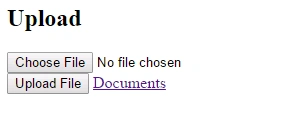
Once the data is added to the form data collection, we will pass the data to the controller via ajax call. Sounds cool, right? If the procedure goes well, we will see the output as follows.
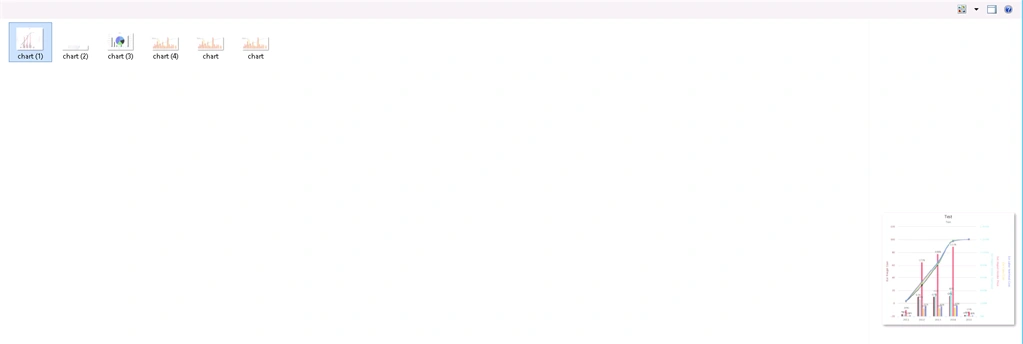
When you choose the file and click upload, your selected file will be uploaded to the folder "uploads" as we have set it in the controller.
We have finished the process of uploading files. We will now move to the downloading section. This is the right time to add the remaining actions to our controller. The following is the code.
- public ActionResult Downloads()
- {
- var dir = new System.IO.DirectoryInfo(Server.MapPath("~/App_Data/uploads/"));
- System.IO.FileInfo[] fileNames = dir.GetFiles("*.*"); List<string> items = new List<string>();
- foreach (var file in fileNames)
- {
- items.Add(file.Name);
- }
- return View(items);
- }
-
- public FileResult Download(string ImageName)
- {
- var FileVirtualPath = "~/App_Data/uploads/" + ImageName;
- return File(FileVirtualPath, "application/force-download", Path.GetFileName(FileVirtualPath));
- }
Do you remember that we have set an action link in the "Upload" View?
- @Html.ActionLink("Documents", "Downloads")
Next, if we click on the "Documents" link, our Action Result Downloads will be fired, right? Now, the following code will explain what is happening here.
- var dir = new System.IO.DirectoryInfo(Server.MapPath("~/App_Data/uploads/"));
- System.IO.FileInfo[] fileNames = dir.GetFiles("*.*"); List<string> items = new List<string>();
- foreach (var file in fileNames)
- {
- items.Add(file.Name);
- }
- return View(items);
We are considering all the attached files, adding the file information to a list and returning this list to the view "Download". Next, here's the need to set another view. The following code is for the Download View.
Download View
- @{
- ViewBag.Title = "Downloads";
- }
-
- <h2>Downloads</h2>
-
-
- @model List<string>
- <h2>Downloads</h2>
- <table>
- <tr>
- <th>File Name</th>
- <th>Link</th>
- </tr>
- @for (var i = 0; i <= Model.Count - 1; i++)
- {
- <tr>
- <td>@Model[i].ToString() </td>
- <td>@Html.ActionLink("Download", "Download", new { ImageName = @Model[i].ToString() }) </td>
- </tr>
- }
- </table>
Here, we are taking the information (that we are sending from the controller) about the uploaded files and creating the Html.ActionLinks dynamically.
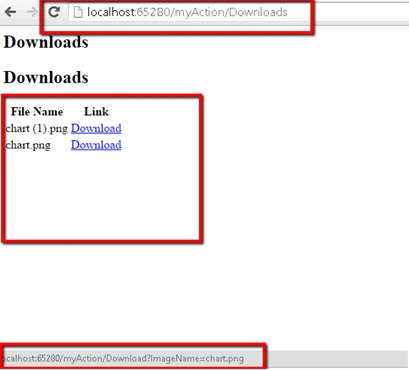
Please note that we are adding the Image name to the action. Here is the output after performing the operations.
As in the preceding image, when you mouse over the link, it will show the image name along with the controller URL. Click on the link to download the file. So simple, right?
Conclusion
I hope you liked the article. Please provide your valuable feedback; it matters a lot. You can download the source code to determine more.
Point of interest
MVC, MVC Upload, MVC Download, File Uploading Using MVC, File Downloading Using MVC


Mohamedasiq ShajahanPosted Feb 11, 2020, 3:39 AM
This Article doesn't have a complete Solution for Upload and Download. It has few bugs. For a beginner it is quite challenging to debug and run this code. Finally, I have fixed the code and it works perfectly. One change is replacing url: "myAction/Index", with url: '@Url.Action("Index", "<ControllerName>")' as mentioned by Marlin. Another Change is, have the Upload.cshtml and Download.cshtml in the same shared folder or same controller folder.
DomiPosted Aug 22, 2019, 8:14 AM
Link to download is broken !
Marlin XPosted May 19, 2018, 6:38 PM
Replace url: "myAction/Index", with url: '@Url.Action("Index", "myAction")', in Upload view it may help
shahnawaz shaikhPosted May 12, 2018, 3:12 AM
Nothing to achieve by wasting 1 hour
shahnawaz shaikhPosted May 12, 2018, 3:11 AM
Where is the post action controller where the data is passed as a parameter other member who like the tutorial can anyone tell me where the post action controller which is called in Ajax call
Kirankumar ShindePosted Jun 17, 2017, 5:21 AM
Nice one but data is download as i put already to that folder but i am facing problem for upload the files
Sibeesh VenuPosted Mar 15, 2016, 12:51 AM
Pawan Tiwari Thanks much
Sibeesh VenuPosted Mar 15, 2016, 12:51 AM
Sr Karthiga Thanks much
Pawan TiwariPosted Mar 15, 2016, 12:37 AM
Helpful. Nice explain (y)
Sr KarthigaPosted Feb 23, 2016, 7:53 PM
good one
Sr KarthigaPosted Feb 23, 2016, 7:53 PM
Nice explanation
Sibeesh VenuPosted Oct 14, 2015, 4:50 AM
Vinod TG Thanks a lot
Sibeesh VenuPosted Oct 14, 2015, 4:50 AM
Mukesh Kumar Thanks a lot
Sibeesh VenuPosted Oct 14, 2015, 4:49 AM
Harpreet Singh Thanks a lot
Sibeesh VenuPosted Oct 14, 2015, 4:49 AM
Shridhar Sharma Thanks a lot
Vinod TGPosted Oct 14, 2015, 1:41 AM
Good one
Mukesh KumarPosted Oct 6, 2015, 10:57 PM
Nice article
Harpreet SinghPosted Oct 6, 2015, 7:28 PM
Congrats for article of the day
Shridhar SharmaPosted Oct 6, 2015, 1:49 AM
Congratulations for article of the day.
Sibeesh VenuPosted May 13, 2015, 3:21 AM
Nitin Tyagi thanks buddy
Sibeesh VenuPosted May 13, 2015, 3:20 AM
vinod kumar thank you
Sibeesh VenuPosted May 13, 2015, 3:19 AM
Santhakumar Munuswamy thank you mate.
Sibeesh VenuPosted May 13, 2015, 3:18 AM
Gowtham Rajamanickam thank you buddy
Santhakumar MunuswamyPosted May 12, 2015, 3:20 PM
Thanks for good work
Gowtham RajamanickamPosted May 12, 2015, 1:16 PM
good
NitinPosted May 12, 2015, 12:51 PM
good one
vinod kumarPosted May 12, 2015, 8:46 AM
nice
Sibeesh VenuPosted May 12, 2015, 6:25 AM
Abhishek :) Jaiswal Thank you buddy
Abhishek JaiswalPosted May 12, 2015, 5:23 AM
Nice article, keep sharing! :)