

Introduction
In the article given below, we are going to learn what Azure Blobs are and the concept of uploading the Blobs into Azure Blob storage account. To make use of the Azure Blobs, you need to create a storage account in Azure first. These Blobs are a part of Azure storage account in which some small data can be stored. We will be discussing the methods of creating a container in Azure but prior to it, we need to have a storage account in Azure. The method to create a storage account in the azure portal is shown in the link.
Before you get into Azure Blobs, first make sure what is meant by Azure Blobs. Study the explanation below first and then get into the container creation process in the Blobs.
Azure Blob
Azure Blob storage is a Service to store large amounts of unstructured object data, such as text or binary data, which can be accessed from anywhere in the world via HTTP or HTTPS. You can use Blob storage to expose the data publicly to the world or to store an Application data privately. This is a simple explanation to make you to get a small idea about the Blobs. If you need to know more, please surf it in the official Microsoft forums.
Getting started
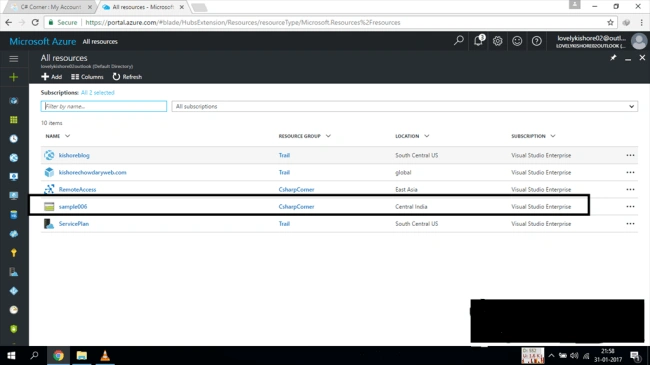
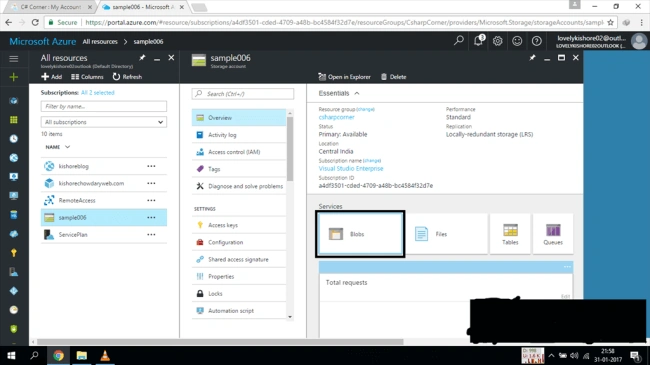
First, finish up the process of creating the storage account in the Azure portal. Once you finish it, click on the all resources option. You will see all the resources which you have configured in your portal. Find the name of the storage account, which you have created and then click it. You will be displayed with a Window in which lot of configuration options for your storage account can be found. In the middle, you can see three different squares namely Blobs, Files, Tables and Queues. Click Blobs option to open the Service.
Creating the container
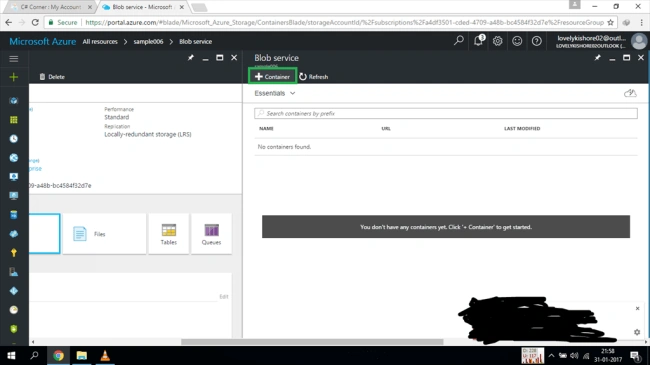
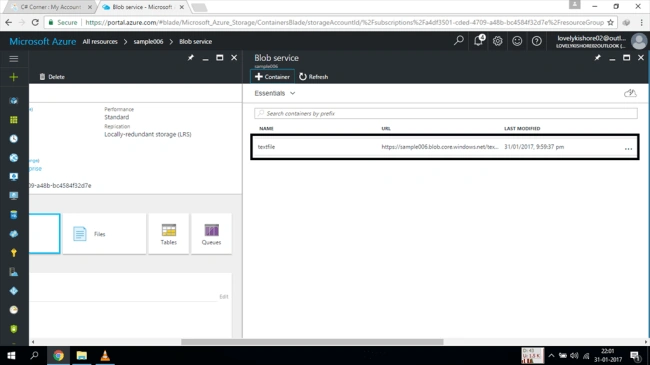
Now, you will be shown a Window with the name Blob Service. Click on the +Container option, which is found in the top of the Window. Once you click it, you will be shown a new window asking for the name of your container and the type of access policy your container should have. Give some cool name which you like to give for your container and then select some sort of access policy for your Blob , which is based on your need and then click on Create button.
Join the conversation! Your thoughts help the community grow.