

Let us start with uploading multiple files on a single button click.
Follow these 2 steps:
<%@ Page Language="C#" AutoEventWireup="true" CodeFile="Default.aspx.cs" Inherits="_Default" %>
<!DOCTYPE html PUBLIC "-//W3C//DTD XHTML 1.0 Transitional//EN" "http://www.w3.org/TR/xhtml1/DTD/xhtml1-transitional.dtd">
<html xmlns="http://www.w3.org/1999/xhtml">
<head runat="server">
<title>Make Multiple Upload Images</title>
<script type="text/javascript" language="javascript">
function DecreaseRow(rowNo)
{
var hid = document.getElementById('<%= hidCurRow.ClientID %>');
hid.value = rowNo;
}
function IncreseRows()
{
var hid = document.getElementById('<%= hidCurRow.ClientID %>');
hid.value = "";
}
function SetZero()
{
var hid = document.getElementById('<%= hidCurRow.ClientID %>');
hid.value = "0";
}
</script>
</head>
<body>
<form id="form1" runat="server">
<table cellpadding="0" cellspacing="0" width="80%" align="center">
<tr>
<td>
<asp:Table ID="tblMin" runat="server">
<asp:TableHeaderRow>
<asp:TableHeaderCell>
File
</asp:TableHeaderCell>
<asp:TableHeaderCell>
Remove
</asp:TableHeaderCell>
</asp:TableHeaderRow>
<asp:TableRow>
<asp:TableCell>
<asp:FileUpload ID="fu1" runat="server" />
</asp:TableCell>
<asp:TableHeaderCell>
<asp:Button ID="btn1" runat="server" Text="Remove" OnClientClick="return DecreaseRow('1');" />
</asp:TableHeaderCell>
</asp:TableRow>
</asp:Table>
<asp:Button ID="btnAdd" runat="server" OnClick="btnAdd_Click" Text="Add" OnClientClick="return IncreseRows();" />
<asp:Button ID="btnSubmit" runat="server" Text="Submit" OnClick="btnSubmit_Click"
OnClientClick="SetZero();" /><br />
<asp:HiddenField ID="hidMax" runat="server" Value="1" />
<asp:HiddenField ID="hidRow" runat="server" Value="1" />
<asp:HiddenField ID="hidCurRow" runat="server" />
</td>
</tr>
</table>
</form>
</body>
</html>
This is the cs code:
using System;
using System.Data;
using System.Configuration;
using System.Web;
using System.Web.Security;
using System.Web.UI;
using System.Web.UI.WebControls;
using System.Web.UI.WebControls.WebParts;
using System.Web.UI.HtmlControls;
using System.IO;
public partial class _Default : System.Web.UI.Page
{
protected void Page_Load(object sender, EventArgs e)
{
if (Page.IsPostBack == true)
{
AddRows();
}
}

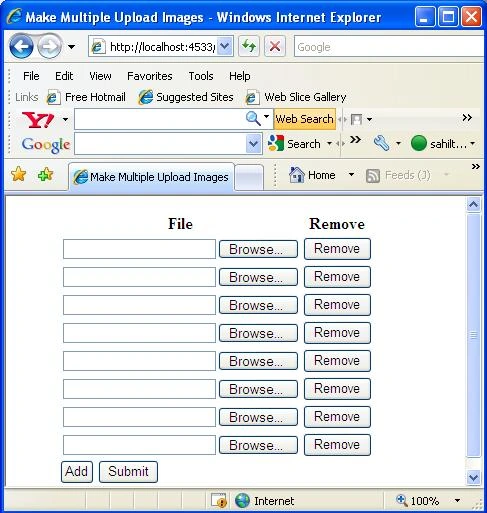
Former memberPosted Oct 10, 2013, 7:07 AM
http://www.dotnetpools.com/2012/09/fileupload-control-in-aspnet.html
NivethithaPosted Apr 4, 2013, 2:51 AM
very nice article
selvi subramanianPosted Mar 28, 2012, 1:10 AM
ya itz nice .i need to upload a image and a resume using asp.net c#
narendra reddyPosted Mar 7, 2012, 1:05 AM
nice tutorial bro
subhash jakharPosted Mar 2, 2012, 6:42 AM
How we can validate upload only 3 file
vasu dandamudiPosted Feb 13, 2011, 3:21 AM
Hi Rahul here i have one problem, if i select one file then i click on add to select one more file previous selected file is missing.any solution for that
haranath reddyPosted Feb 15, 2010, 2:28 AM
Thanks for this usefull one
Santhosha HPPosted Nov 14, 2009, 1:18 AM
hi
danny drorPosted Oct 16, 2009, 12:23 PM
very helpful article, thanks! --------------------------------- Danny, Los Angeles Locksmith
prachiPosted Apr 17, 2009, 8:48 AM
Hey, It worked absolutely fine but there is one problem that when i fill one textbox with browse button and THEN click add button ,then it deletes context of the previous feilds like earlier file filled is gone. Any solution for that?
HectorPosted Apr 7, 2009, 1:14 PM
Hi, i wrote the code in a page in my site, it works fine, but when I selected som file with one of the fileuploaders and try to delete or add a new item, the page stop working and show me an error "Internet Explorer can not display the page". Another question, why do you always delete the row #1? if I have something selected it will be lost. Thanks. Hector
hitesh motwaniPosted Apr 1, 2009, 9:49 AM
Hi, I m doing my last year project in visual studio using c#. its a website. I m unable to make it impressive pl help me with how to make more impressive and code also pl
kalpana reddyPosted Mar 31, 2009, 4:16 AM
I really like Ur article,its nice