

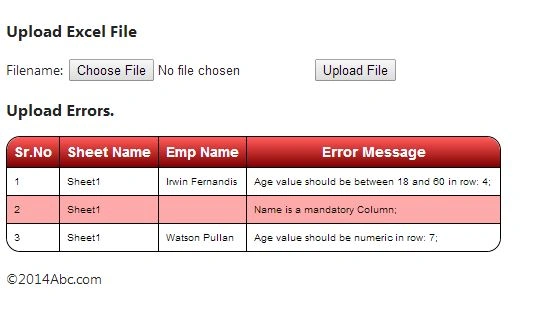
This article explains how to insert multiple records into a database using an Excel upload. When working on a project there was a requirement for me to upload an Excel file, let's say with the number of records up to 50000 per sheet. But while uploading the Excel file there were certain validations that needs to be done and if any of the records fail then the error message needs to be displayed for that respective row of the Excel on the page and none of the records needs to be saved inside the database table.
Validations could be in any sense, for example:
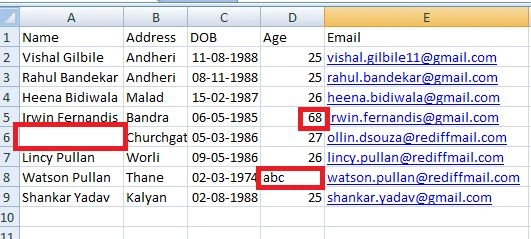
- The age of all employees needs to be >= 18 and <= 60
- The age column should not have a non-numeric value
- There were certain columns that were mandatory, if the value is not filled in that column of the Excel then the user should be notified of the error. Like name of the Employee should not be null.
- Checking thar a date value is in the format of DD/MM/YYYY
- and so on
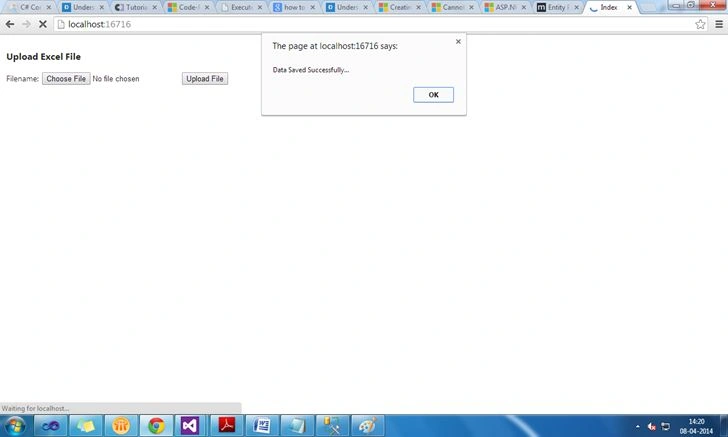
When uploading this Excel file, if the preceding validations are successfully satisfied then the data needs to be saved in the database against a specific batch id that is basically a unique number to identify the records inserted within that specific batch and when they all were inserted. Also a special attention needs to be provided on the Excel column headings that we provided to the user for data entry purposes. Let's say there are 10 columns in the Excel and if the user changes the order of the Excel column heading or if they delete some column or changes the name of the column, this validation also needs to be performed against the uploaded file. For performing this validation we have made use of an ExcelStructure Table that will have Excel fields/columns stored with their respective sizes, types, parameters and whether these fields/columns are mandatory or not. The following is the structure of the ExcelStructure Table. Remember we are using EntityFramework with the Code First Approach. But just for demo/looking purposes our SQL table will have the following query.
- CREATE TABLE [dbo].[ExcelStructure]
- (
- [Row_ID] INT IDENTITY (1, 1) NOT NULL,
- [File_ID] INT NOT NULL,
- [File_Name] NVARCHAR (MAX) NULL,
- [Field_Name] NVARCHAR (MAX) NULL,
- [Field_Data] NVARCHAR (MAX) NULL,
- [Active_Flag] INT NOT NULL,
- [Row_No] INT NOT NULL,
- [Field_Delimeter] NVARCHAR (MAX) NULL,
- CONSTRAINT [PK_dbo.ExcelStructure] PRIMARY KEY CLUSTERED ([Row_ID] ASC)
- );
Now let's move to the code. Here the technology that we are using is ASP.NET MVC4 and EntityFramework 6.0. I'm naming my solution name ImportFromExcel that will have two projects, one would be of type Class Library with the name ImportFromExcel.Domain and the other would be our MVC4 project with the name ImportFromExcel.WebUI with basic as its type. Our ImportFromExcel.Domain project will have the entire model and DbContext classes we are following here the separation of concerns between model and WebApplication. Install the EntityFramework Package inside the ImportFromExcel.Domain and ImportFromExcel.WebUI Project using the Package Manager Console by typing the command as:
Install-package EntityFramework
Note: Make sure you install it in both the projects otherwise a version issue might occur.
We need to add the reference to System.ComponentModel.DataAnnotations namespace. We have added creation folders to our Domain class library project and these folders contain several classes and interface that we'll require to query our database or manipulate the database. Here is the hierarchy of the ImportFromExcel.Domain project application:

Here are the definitions of the files.
Employee.cs
- using System;
- using System.Collections.Generic;
- using System.ComponentModel.DataAnnotations;
- using System.ComponentModel.DataAnnotations.Schema;
- namespace ImportFromExcel.Domain.Entities
- {
- [Table("Employee")]
- public class Employee
- {
- [Key]
- public int EmployeeID { get; set; }//mvc convention by default it will make it as primary key with autogenerated feature turned on
- [Required(ErrorMessage = "Name is Required")]
- public string Name { get; set; }
- [Required(ErrorMessage = "Address is Required")]
- public string Address { get; set; }
- public string DOB { get; set; }
- public int Age { get; set; }
- public string Email { get; set; }
- }
- }
ExcelStructure.cs
- using System;
- using System.ComponentModel.DataAnnotations;
- using System.ComponentModel.DataAnnotations.Schema;
- namespace ImportFromExcel.Domain.Entities
- {
- [Table("ExcelStructure")]
- public class ExcelStructure
- {
- [Key]
- [DatabaseGenerated(DatabaseGeneratedOption.Identity)]
- public int Row_ID { get; set; }
- public int File_ID { get; set; }
- public string File_Name { get; set; }
- public string Field_Name { get; set; }
- public string Field_Data { get; set; }
- public int Active_Flag { get; set; }
- public int Row_No { get; set; }
- public string Field_Delimeter { get; set; }
- }
- }
In order to reduce the dependency between higher end modules and lower end modules we implemented an interface that will help us to do loose coupling between the various components.
IEmployeeRepository.cs
- using System;
- using System.Collections.Generic;
- using System.Linq;
- using System.Text;
- using ImportFromExcel.Domain.Entities;
- namespace ImportFromExcel.Domain.Abstract
- {
- public interface IEmployeeRepository
- {
- IQueryable<Employee> Employee { get; }
- IQueryable<ExcelStructure> ExcelStructure { get; }
- void SaveEmployee(IList<Employee> lstEmployees);
- }
- }
EFDBContext.cs: This is our DbContext class
- using System;
- using System.Collections.Generic;
- using System.Linq;
- using System.Text;
- using ImportFromExcel.Domain.Entities;
- namespace ImportFromExcel.Domain.Abstract
- {
- public interface IEmployeeRepository
- {
- IQueryable<Employee> Employee { get; }
- IQueryable<ExcelStructure> ExcelStructure { get; }
- void SaveEmployee(IList<Employee> lstEmployees);
- }
- }
EmployeeRepository.cs
- using System;
- using System.Collections.Generic;
- using System.Linq;
- using ImportFromExcel.Domain.Abstract;
- namespace ImportFromExcel.Domain.Concrete
- {
- public class EmployeeRepository : IEmployeeRepository
- {
- EFDbContext context = new EFDbContext();
- public IQueryable<Entities.Employee> Emp
- {
- get { return context.Employee; }
- }
- public IQueryable<Entities.ExcelStructure> ExcelStructure
- {
- get { return context.ExcelStructure; }
- }
- public void SaveEmployee(IList<Entities.Employee> lstEmployees)
- {
- try
- {
- context.Employee.AddRange(lstEmployees);
- context.SaveChanges();
- }
- catch (Exception ex)
- {
- throw ex;
- }
- }
- }
- }
Inside the Concrete folder we have a class named ExcelStructureInitializer.cs that basically contains the code for the records that needs to be stored in the Database ExcelStructure Table when we run the application for the first time or even when the model changes or the database is dropped and recreated by the entityFramework. This class inherits from DropCreateDatabaseIfModelChanges class in order to maintain the synchronization between the Model and the EntityFramework Database. The following is the definition of the class.
- using System;
- using System.Collections.Generic;
- using System.Linq;
- using System.Text;
- using System.Threading.Tasks;
- using ImportFromExcel.Domain.Entities;
- using System.Data.Entity;
- namespace ImportFromExcel.Domain.Concrete
- {
- public class ExcelStructureInitializer : DropCreateDatabaseIfModelChanges<EFDbContext>
- {
- protected override void Seed(EFDbContext context)
- {
- //base.Seed(context);
- var excelStructure = new List<ExcelStructure>()
- {
- new ExcelStructure(){ File_ID=1, Field_Name="Name", Field_Data="Name|Address|DOB|Age|Email", Active_Flag=1, Row_No=1, File_Name="EmployeeExcel", Field_Delimeter="|"},
- new ExcelStructure(){ File_ID=1, Field_Name="DataType", Field_Data="S|S|D|I|S", Active_Flag=1, Row_No=2, File_Name="EmployeeExcel", Field_Delimeter="|"},
- new ExcelStructure(){ File_ID=1, Field_Name="Size", Field_Data="50|100|20|10|100", Active_Flag=1, Row_No=3, File_Name="EmployeeExcel", Field_Delimeter="|"},
- new ExcelStructure(){ File_ID=1, Field_Name="Mandatory", Field_Data="Y|Y|N|N|N", Active_Flag=1, Row_No=4, File_Name="EmployeeExcel", Field_Delimeter="|"},
- new ExcelStructure(){ File_ID=1, Field_Name="Param", Field_Data="@name|@add|@dob|@age|@email", Active_Flag=1, Row_No=5, File_Name="EmployeeExcel", Field_Delimeter="|"},
- };
- context.ExcelStructure.AddRange(excelStructure);
- context.SaveChanges();
- }
- }
- }
The one highlighted in the yellow color in the code above will be the Excel Column heading with their Type, size, and mandatory or not. And the one highlighted in the light blue color are the name through that we can refer to these fields in the code file. Every value is separated using the “|” character.
All these records will be added to your Excel structure table when you run the application. Here in this table we specified the Excel column hierarchy and the maximum value that the column can contain, also whether they are mandatory or not and their datatype. For Datatype here I'm using the convention of S for String, I for integers, D for DateTime, DO for Double and so on but you can follow your own conventions.
And we are setting the reference of this class inside the Global.asax file that is within the ImportFromExcel.WebUI application. Here is the line that we set up in the Global.asax file.
- using System;
- using System.Collections.Generic;
- using System.Data.Entity;
- using System.Linq;
- using System.Web;
- using System.Web.Http;
- using System.Web.Mvc;
- using System.Web.Optimization;
- using System.Web.Routing;
- using ImportFromExcel.Domain.Concrete;
- using ImportFromExcel.WebUI.Infrastructure;
- namespace ImportFromExcel.WebUI
- {
- // Note: For instructions on enabling IIS6 or IIS7 classic mode,
- // visit http://go.microsoft.com/?LinkId=9394801
- public class MvcApplication : System.Web.HttpApplication
- {
- protected void Application_Start()
- {
- AreaRegistration.RegisterAllAreas();
- Database.SetInitializer<EFDbContext>(new ImportFromExcel.Domain.Concrete.ExcelStructureInitializer());
- WebApiConfig.Register(GlobalConfiguration.Configuration);
- FilterConfig.RegisterGlobalFilters(GlobalFilters.Filters);
- RouteConfig.RegisterRoutes(RouteTable.Routes);
- ControllerBuilder.Current.SetControllerFactory(new NinjectControllerFactory());
- BundleConfig.RegisterBundles(BundleTable.Bundles);
- }
- }
- }
For the code of the preceding files kindly download the article.
Now we'll be moving towards creating our front end, in other words the ImportFromExcel.WebUI application where we'll create a view and controllers that will communicate with the preceding domain model that we created above.
Note:
- Here for Dependency Injection we used Ninject. Also for the full explanation of Dependency Injection you can refer to the following URL:
ASP.NET MVC 4 Dependency Injection
We injected the Ninject controller using the Global.asax file. The one marked with light blue as background in the Global.asax file.
- For Excel reading and writing I'm using Bytescout.Spreadsheet.dll
- Also add the reference of the ImportFromExcel.Domain.dll to the ImportFromExcel.WebUI project. So that we can refer to the classes.
Here is the hierarchy of the ImportFromExcel.WebUI
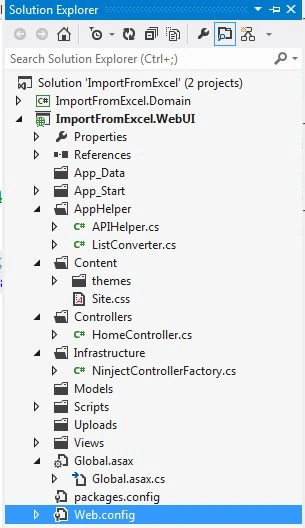
Add a connection string to the Web.Config file of the ImportFromExcel.WebUI like the following:
- <connectionStrings>
- <!--<add name="DefaultConnection" providerName="System.Data.SqlClient" connectionString="Data Source=(LocalDb)\v11.0;Initial Catalog=aspnet-ImportFromExcel.WebUI-20140408112057;Integrated Security=SSPI;AttachDBFilename=|DataDirectory|\aspnet-ImportFromExcel.WebUI- 20140408112057.mdf" />-->
- <add name="EFDbContext" providerName="System.Data.SqlClient" connectionString="Data Source=(localDb)\v11.0;Initial Catalog=MemberUpload;Integrated Security=true;"/>
- </connectionStrings>
Now to create a helper file that will allow us to validate and upload the Excel content. We'll specify our validation rules inside this file. Create a class with the name of APIHelper.cs inside the AppHelper folder of your WebUI project.
Prudhvi ChantiPosted Nov 6, 2018, 1:25 AM
Hello Sir your post is awesome. But my request can you provide same code using asp.net and c#
gayatri thurangiPosted Jun 29, 2018, 9:33 PM
Hello...Sir....Your post is very much helpful for me....where can i find the zip file
Jashpal ChauhanPosted Sep 14, 2017, 1:57 AM
Hey!! Can i use this code for angular & c# ?
Abhishek KrishnaPosted Jun 14, 2016, 2:05 PM
Hey!!! Thanks for this wonderful post.. what is use of NinjectControllerFactory and ListConverter classs?
jay gholapPosted May 26, 2016, 5:05 AM
Could you please share the zip file to download so that application can smooth functioning
eugene hemenPosted Feb 5, 2016, 12:45 PM
Where can I find the Zip file. thank you.
Tahar CherifPosted Jan 29, 2015, 6:14 AM
Where is the zip file please?
amin sahraPosted Nov 18, 2014, 10:59 AM
Where is your example link for download
Bhavin DarjiPosted Jul 24, 2014, 2:02 AM
Where is sample Example