

A URL Routing is very important when you are running a community website where user posts articles, forum messages and so on. URL Routing is the process of intercepting an incoming Web request and automatically redirecting it to a different URL. This article discusses the various techniques for implementing URL Routing.
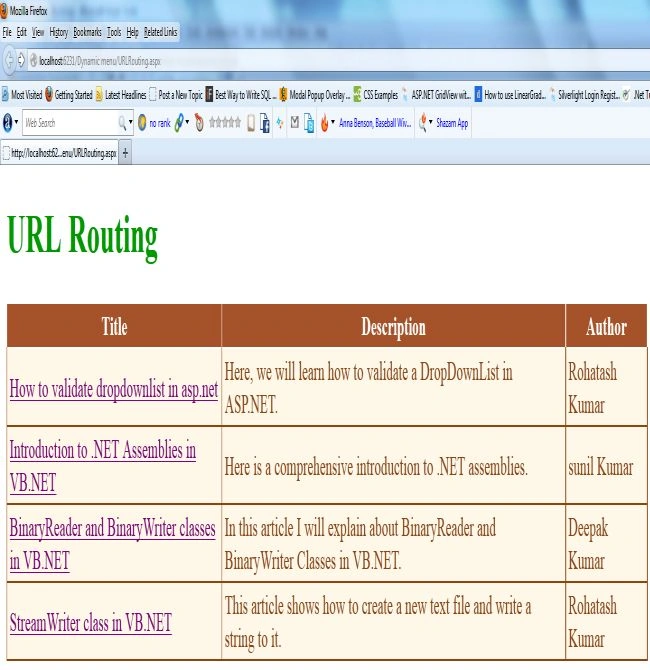
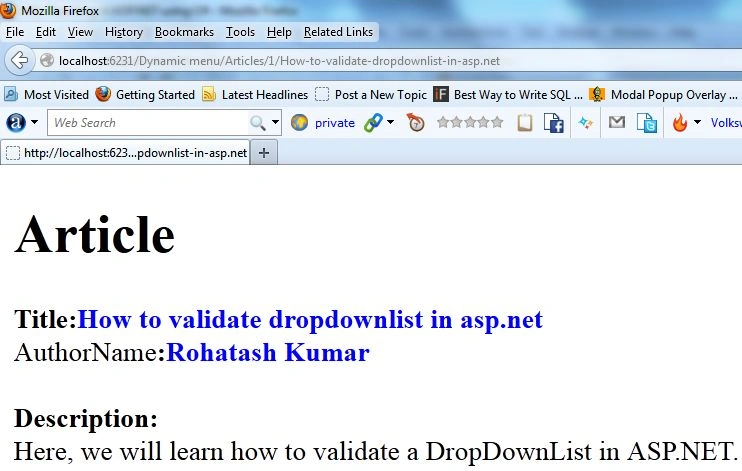
For exampleIn this example we create a database table with title, description and author name. The title link will be created in the ASP .Net GridView control. when we click on the title link it will be redirected to the dynamic page.
Create a table in the database named Articletable. The table looks like this:
- CREATE TABLE [dbo].[Articletable](
- [ID] [int] NOT NULL,
- [Title] [varchar](200) NULL,
- [Description] [varchar](400) NULL,
- [Author] [varchar](50) NULL
- )
To insert data into the articletable:
- INSERT INTO Articletable VALUES(1,'How to validate dropdownlist in asp.net','Here, we will learn how to validate a DropDownList in ASP.NET.','Rohatash Kumar');
- GO
- INSERT INTO Articletable VALUES(2,'Introduction to .NET Assemblies in VB.NET',' Here is a comprehensive introduction to .NET assemblies.','sunil Kumar');
- go
- INSERT INTO Articletable VALUES(3,'BinaryReader and BinaryWriter classes in VB.NET','In this article I will explain about BinaryReader and BinaryWriter Classes in VB.NET.','Deepak Kumar');
- go
- INSERT INTO Articletable VALUES(4,'StreamWriter class in VB.NET','This article shows how to create a new text file and write a string to it.','Rohatash Kumar');
- go
- select * from articletable;
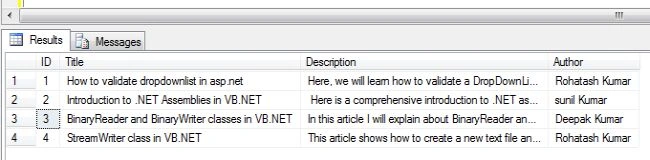
- Open Visual Studio.
- Add two webForms to your website, name them URLRouting.aspx and DetailPage.aspx.
Now drag and drop a GridView control from the Toolbox on the URLRouting.aspx page.
Step 1
Define the Route in "Application_Start" of "Global.asax". Also include the namespace "System.Web.Routing".
- <%@ Import Namespace="System.Web.Routing" %>
- <%@ Application Language="C#" %>
- <script runat="server">
- void Application_Start(object sender, EventArgs e)
- {
- // Code that runs on application startup
- RegisterRoutes(RouteTable.Routes);
- }
- public static void RegisterRoutes(RouteCollection routeCollection)
- {
- routeCollection.MapPageRoute("RouteForArticle", "Articles/{id}/{Title}", "~/DetailPage.aspx");
- }
Now drag and drop a GridView control from the Toolbox on the URLRouting.aspx page.
Gridview.aspx
- <%@ Page Language="C#" AutoEventWireup="true" CodeFile="URLReRouting.aspx.cs" Inherits="URL_ReRouting" %>
- <!DOCTYPE html PUBLIC "-//W3C//DTD XHTML 1.0 Transitional//EN" "http://www.w3.org/TR/xhtml1/DTD/xhtml1-transitional.dtd">
- <html xmlns="http://www.w3.org/1999/xhtml">
- <head runat="server">
- <title></title>
- </head>
- <body>
- <form id="form1" runat="server">
- <div>
- <h1>
- <span style="color: #009900">URL Routing</span></h1>
- <asp:GridView ID="GridView1" runat="server" AutoGenerateColumns="False" BackColor="#DEBA84"
- BorderColor="#DEBA84" BorderStyle="None" BorderWidth="1px" CellPadding="3" CellSpacing="2"
- Width="788px" Height="80px">
- <FooterStyle BackColor="#F7DFB5" ForeColor="#8C4510" />
- <Columns>
- <asp:TemplateField HeaderText="Title">
- <ItemTemplate>
- <asp:HyperLink ID="HyperLink1" runat="server" CssClass="ArticleTitle" href='<%# GetRouteUrl("RouteForArticle", new {id = Eval("id"), Title= GetTitle(Eval("Title"))})%>'
- Text='<%# Eval("Title") %>'>
- </asp:HyperLink>
- </ItemTemplate>
- </asp:TemplateField>
- <asp:TemplateField HeaderText="Description">
- <ItemTemplate>
- <asp:Label ID="lblDesc" runat="server" Text='<%#DataBinder.Eval(Container.DataItem,"Description")%>'></asp:Label>
- </ItemTemplate>
- </asp:TemplateField>
- <asp:TemplateField HeaderText="Author">
- <ItemTemplate>
- <asp:Label ID="lblauthor" runat="server" Text='<%#DataBinder.Eval(Container.DataItem,"Author")%>'></asp:Label>
- </ItemTemplate>
- </asp:TemplateField>
- </Columns>
- <RowStyle BackColor="#FFF7E7" ForeColor="#8C4510" />
- <SelectedRowStyle BackColor="#738A9C" Font-Bold="True" ForeColor="White" />
- <PagerStyle ForeColor="#8C4510" HorizontalAlign="Center" />
- <HeaderStyle BackColor="#A55129" Font-Bold="True" ForeColor="White" />
- </asp:GridView>
- </div>
- </form>
- </div> </form>
- </body>
- </html>
มือซ้ายถือนม มือขวาถือผ้าอ้อมPosted Apr 30, 2020, 7:54 AM
This is Great thank you so much
Lokesh RavindraPosted May 25, 2018, 1:35 AM
Getting "The resource you are looking for (or one of its dependencies) could have been removed, had its name changed, or is temporarily unavailable. Please review the following URL and make sure that it is spelled correctly. " While if the title having /,&,% etc symbols. May i know why ?
Ankur VermaPosted Aug 24, 2017, 6:17 AM
Hello i need to understand more about url routing. i have a page where blogs are populating through gridview and i redirect it to read more for a particular blog by using <a href='read_blog.aspx?id=<%# Eval("title")%>'>Read Post> now query string is passing to read_blog where i fetch data from database/// so how can i achieve url routing in the format localhost/blogs/my-first-blog like this
Manvendra PatelPosted Feb 12, 2015, 5:15 AM
Finally I figured out that I had some stuff missing in my web.config to get this to work, ie making sure the routing module runs.<system.webServer> <modules> <remove name="UrlRoutingModule-4.0" /> <add name="UrlRoutingModule-4.0" type="System.Web.Routing.UrlRoutingModule" preCondition="" /> </modules> </system.webServer>
Manvendra PatelPosted Feb 12, 2015, 3:00 AM
I am getting error when run "The resource you are looking for has been removed, had its name changed, or is temporarily unavailable."
AMEER ABU-LAWIPosted Sep 14, 2014, 6:54 AM
This is Great :) thank you so much Dear! :D
Reba QadirPosted Feb 26, 2014, 6:37 AM
Awesome thank you