Introduction
Angular UI Grid is a data grid for AngularJS without JQuery that can perform with large data, which is part of the Angular UI suite.
Background
Recently, I was searching for a data table that have components like sorting, filtering, pagination, inline editor, responsive and other advanced facilities. I have tried to integrate & use Jquery datatable(Angular), but the problem arose while I was trying to pass entire row passing while row click/row selected button click.
It fails to pass angular object (only can pass int, string, boolean) while rendering, this was a big issue to me as I was using angularJS in the application's frontend.
I decided to change the entire table, I found Angular UI Grid.
Let’s Get Into It
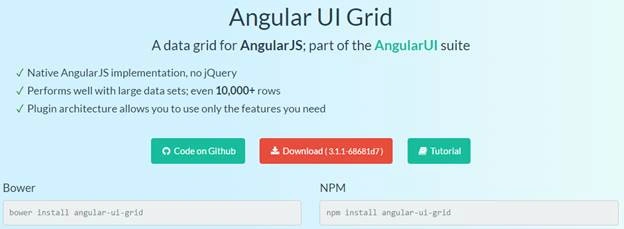
As we know Angular UI Grid is a part of Angular UI, so we have some facilities. We need to download/install package before we are going to use in our application.
To download the package, go to URL,
SQL Database
Let’s Create a SQL database, using the new database execute the table script to create new table in the new database.
- CREATE TABLE [dbo].[tblProducts](
- [ProductID] [int] NOT NULL,
- [ProductTitle] [nvarchar](256) NULL,
- [Type] [nvarchar](50) NULL,
- [Price] [numeric](18, 2) NULL,
- [CreatedOn] [datetime] NULL,
- CONSTRAINT [PK_tblProducts] PRIMARY KEY CLUSTERED
- (
- [ProductID] ASC
- )WITH (PAD_INDEX = OFF, STATISTICS_NORECOMPUTE = OFF, IGNORE_DUP_KEY = OFF, ALLOW_ROW_LOCKS = ON, ALLOW_PAGE_LOCKS = ON) ON [PRIMARY]
- ) ON [PRIMARY]
-
- GO
Demo Data
- INSERT INTO [tblProducts]
- SELECT 1,'Ape Lifestyle Cotton Casual T-Shirt - Gray','Clothing',270.00,getdate()
- Union All
- SELECT 2,'Cotton Casual Short Sleeve Polo - White','Clothing',790.50,getdate()
- Union All
- SELECT 3,'Cotton Casual Shirt - Sky Blue and White Stripe','Clothing',1555.00,getdate()
- Union All
- SELECT 4,'Cotton Mix Casual Panjabi - Thistle and Gray Stripe','Clothing',2458.00,getdate()
- Union All
- SELECT 5,'Cotton Mix Casual Panjabi - Black and Purple Stripe','Clothing',2458.00,getdate()
- Union All
- SELECT 6,'Cotton Casual Shirt - Red and White Check','Clothing',1735.00,getdate()
- Union All
- SELECT 7,'Kingstar TITANS 1 i19 Smartphone 8GB - White','Smartphone',6300.00,getdate()
- Union All
- SELECT 8,'MyCell Spider A4 Smartphone 8GB – White','Smartphone',7770.00,getdate()
- Union All
- SELECT 9,'HTC One M9S Nano-SIM Smartphone 16GB - Silver','Smartphone',26900.00,getdate()
- Union All
- SELECT 10,'WE X1 Smartphone 16GB – Silver','Smartphone',18600.00,getdate()
- Union All
- SELECT 11,'Microsoft Lumia 540 Smartphone 8GB – Cyan','Smartphone',13999.00,getdate()
- Union All
- SELECT 12,'BlackBerry Z10 Smartphone 16GB - White','Smartphone',18000.00,getdate()
- Union All
- SELECT 13,'Ape Lifestyle Cotton Casual T-Shirt - Gray','Clothing',270.00,getdate()
- Union All
- SELECT 14,'Cotton Casual Short Sleeve Polo - White','Clothing',790.50,getdate()
- Union All
- SELECT 15,'Cotton Casual Shirt - Sky Blue and White Stripe','Clothing',1555.00,getdate()
- Union All
- SELECT 16,'Cotton Mix Casual Panjabi - Thistle and Gray Stripe','Clothing',2458.00,getdate()
- Union All
- SELECT 17,'Cotton Mix Casual Panjabi - Black and Purple Stripe','Clothing',2458.00,getdate()
- Union All
- SELECT 18,'Cotton Casual Shirt - Red and White Check','Clothing',1735.00,getdate()
- Union All
- SELECT 19,'Kingstar TITANS 1 i19 Smartphone 8GB - White','Smartphone',6300.00,getdate()
- Union All
- SELECT 20,'MyCell Spider A4 Smartphone 8GB – White','Smartphone',7770.00,getdate()
- Union All
- SELECT 21,'HTC One M9S Nano-SIM Smartphone 16GB - Silver','Smartphone',26900.00,getdate()
- Union All
- SELECT 22,'WE X1 Smartphone 16GB – Silver','Smartphone',18600.00,getdate()
- Union All
- SELECT 23,'Microsoft Lumia 540 Smartphone 8GB – Cyan','Smartphone',13999.00,getdate()
- Union All
- SELECT 24,'BlackBerry Z10 Smartphone 16GB - White','Smartphone',18000.00,getdate()
MVC Application
Let’s create a new demo application with visual studio 2015. Select MVC and Web API below. Click OK.
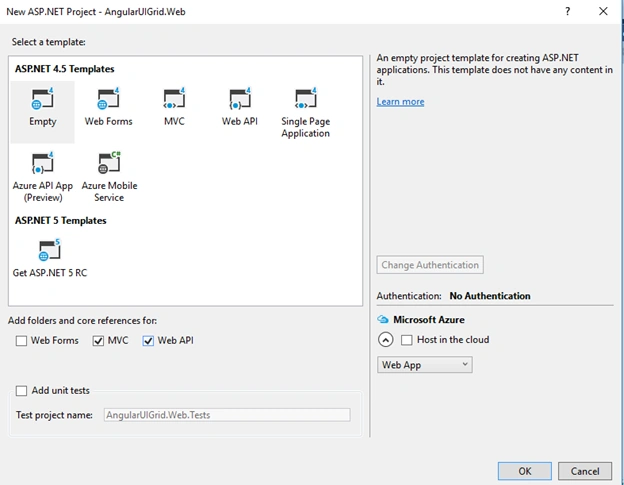
After loading the initial application template, we need to install the script packages. We need to install two packages using NuGet Package installer.
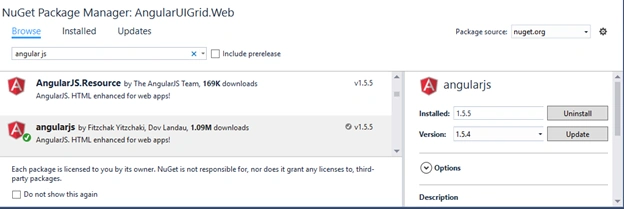
First we will install AngularJS and after that we need to add Angular-Ui-Grid. In package manager console write Install-Package angularjs. After successfully installation write Install-Package angular-ui-grid.

Or we can install packages using NuGet package manager,
angularJS
 angularJS-uigrid
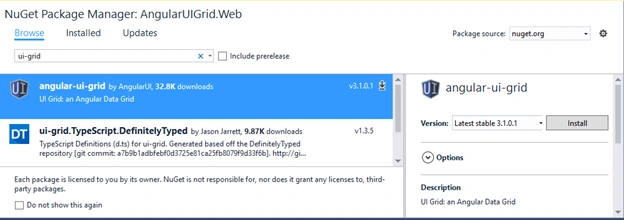
Our packages are installed, now we need to add a new controller and generate view to the application. In our master layout we need to add reference of script library.
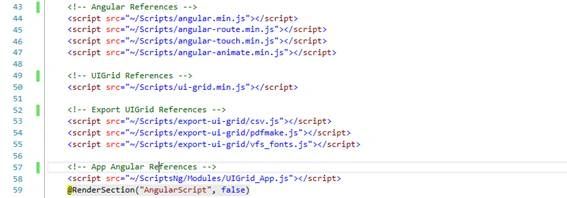
In the head section add the ui style reference.
 AngularJS
Let’s add folders to create angular script.
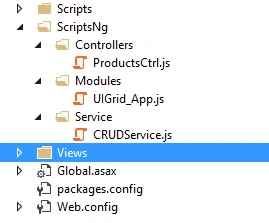 JS-Module
- var app;
- (function () {
- 'use strict';
- app = angular.module('UIGrid_App',
- [
- 'ngAnimate',
- 'ngTouch',
- 'ui.grid',
- 'ui.grid.pagination',
- 'ui.grid.resizeColumns',
- 'ui.grid.moveColumns',
- 'ui.grid.pinning',
- 'ui.grid.selection',
- 'ui.grid.autoResize',
- 'ui.grid.exporter'
- ]);
- })();
JS-Controller
- app.controller('ProductsCtrl', ['$scope', 'CRUDService', 'uiGridConstants',
- function ($scope, CRUDService, uiGridConstants) {
- $scope.gridOptions = [];
-
-
- $scope.pagination = {
- paginationPageSizes: [15, 25, 50, 75, 100, "All"],
- ddlpageSize: 15,
- pageNumber: 1,
- pageSize: 15,
- totalItems: 0,
-
- getTotalPages: function () {
- return Math.ceil(this.totalItems / this.pageSize);
- },
- pageSizeChange: function () {
- if (this.ddlpageSize == "All")
- this.pageSize = $scope.pagination.totalItems;
- else
- this.pageSize = this.ddlpageSize
-
- this.pageNumber = 1
- $scope.GetProducts();
- },
- firstPage: function () {
- if (this.pageNumber > 1) {
- this.pageNumber = 1
- $scope.GetProducts();
- }
- },
- nextPage: function () {
- if (this.pageNumber < this.getTotalPages()) {
- this.pageNumber++;
- $scope.GetProducts();
- }
- },
- previousPage: function () {
- if (this.pageNumber > 1) {
- this.pageNumber--;
- $scope.GetProducts();
- }
- },
- lastPage: function () {
- if (this.pageNumber >= 1) {
- this.pageNumber = this.getTotalPages();
- $scope.GetProducts();
- }
- }
- };
-
-
- $scope.GetProducts = function () {
- $scope.loaderMore = true;
- $scope.lblMessage = 'loading please wait....!';
- $scope.result = "color-green";
-
- $scope.highlightFilteredHeader = function (row, rowRenderIndex, col, colRenderIndex) {
- if (col.filters[0].term) {
- return 'header-filtered';
- } else {
- return '';
- }
- };
- $scope.gridOptions = {
- useExternalPagination: true,
- useExternalSorting: true,
- enableFiltering: true,
- enableSorting: true,
- enableRowSelection: true,
- enableSelectAll: true,
- enableGridMenu: true,
-
- columnDefs: [
- { name: "ProductID", displayName: "Product ID", width: '10%', headerCellClass: $scope.highlightFilteredHeader },
- { name: "ProductTitle", title: "Product Title", width: '40%', headerCellClass: $scope.highlightFilteredHeader },
- { name: "Type", title: "Type", headerCellClass: $scope.highlightFilteredHeader },
- {
- name: "Price", title: "Price", cellFilter: 'number',
- filters: [{ condition: uiGridConstants.filter.GREATER_THAN, placeholder: 'Minimum' }, { condition: uiGridConstants.filter.LESS_THAN, placeholder: 'Maximum' }],
- headerCellClass: $scope.highlightFilteredHeader
- },
- { name: "CreatedOn", displayName: "Created On", cellFilter: 'date:"short"', headerCellClass: $scope.highlightFilteredHeader },
- {
- name: 'Edit',
- enableFiltering: false,
- enableSorting: false,
- width: '5%',
- enableColumnResizing: false,
- cellTemplate: '<span class="label label-warning label-mini">' +
- '<a href="" style="color:white" title="Select" ng-click="grid.appScope.GetByID(row.entity)">' +
- '<i class="fa fa-check-square" aria-hidden="true"></i>' +
- '</a>' +
- '</span>'
- }
- ],
- exporterAllDataFn: function () {
- return getPage(1, $scope.gridOptions.totalItems, paginationOptions.sort)
- .then(function () {
- $scope.gridOptions.useExternalPagination = false;
- $scope.gridOptions.useExternalSorting = false;
- getPage = null;
- });
- },
- };
-
- var NextPage = (($scope.pagination.pageNumber - 1) * $scope.pagination.pageSize);
- var NextPageSize = $scope.pagination.pageSize;
- var apiRoute = 'api/Product/GetProducts/' + NextPage + '/' + NextPageSize;
- var result = CRUDService.getProducts(apiRoute);
- result.then(
- function (response) {
- $scope.pagination.totalItems = response.data.recordsTotal;
- $scope.gridOptions.data = response.data.productList;
- $scope.loaderMore = false;
- },
- function (error) {
- console.log("Error: " + error);
- });
- }
-
-
- $scope.GetProducts();
-
-
- $scope.GetByID = function (model) {
- $scope.SelectedRow = model;
- };
- }
- ]);
- JS-Service
- app.service('CRUDService', function ($http) {
-
- this.getProducts = function (apiRoute) {
- return $http.get(apiRoute);
- }
- });
Ui-Grid
In index.cshtml page add ui-grid directive

The loader which will show a loading messaging while data is loading from server.
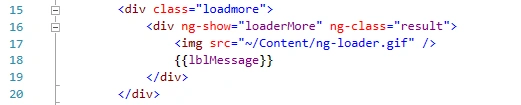
At bottom end, add angular reference to the page
 Complete Ui Code
- @{
- ViewBag.Title = "Products";
- }
-
- <h3>Products with UI Grid</h3>
-
- <div class="row">
- <div class="col-md-12" ng-controller="ProductsCtrl">
- <div ui-grid="gridOptions"
- ui-grid-resize-columns
- ui-grid-move-columns
- ui-grid-exporter
- ui-grid-selection
- ui-grid-pinning class="grid"></div>
-
- <div class="loadmore">
- <div ng-show="loaderMore" ng-class="result">
- <img src="~/Content/ng-loader.gif" />
- {{lblMessage}}
- </div>
- </div>
-
- <div role="contentinfo" class="ui-grid-pager-panel ng-scope">
- <div role="navigation" class="ui-grid-pager-container">
- <div role="menubar" class="ui-grid-pager-control">
- <!-- Start Page -->
- <button type="button" role="menuitem" class="ui-grid-pager-first" ui-grid-one-bind-title="aria.pageToFirst"
- ui-grid-one-bind-aria-label="aria.pageToFirst"
- ng-click="pagination.firstPage()"
- ng-disabled="cantPageBackward()" title="Page to first" aria-label="Page to first"
- disabled="disabled">
- <div class="first-triangle">
- <div class="first-bar"></div>
- </div>
- </button>
-
- <!-- Prev Page -->
- <button type="button" role="menuitem" class="ui-grid-pager-previous"
- ui-grid-one-bind-title="aria.pageBack" ui-grid-one-bind-aria-label="aria.pageBack"
- ng-click="pagination.previousPage()"
- ng-disabled="cantPageBackward()" title="Page back" aria-label="Page back" disabled="disabled">
- <div class="first-triangle prev-triangle"></div>
- </button>
-
- <input type="number" ui-grid-one-bind-title="aria.pageSelected" ui-grid-one-bind-aria-label="aria.pageSelected"
- class="ui-grid-pager-control-input ng-pristine ng-untouched ng-valid ng-not-empty ng-valid-min ng-valid-max ng-valid-required"
- ng-model="pagination.pageNumber"
- min="1" max="{{pagination.getTotalPages()}}" required="" title="Selected page"
- aria-label="Selected page" disabled>
-
- <span class="ui-grid-pager-max-pages-number ng-binding"
- ng-show="pagination.getTotalPages() > 0">
- <abbr ui-grid-one-bind-title="paginationOf" title="of"> /</abbr>{{pagination.getTotalPages()}}
- </span>
-
- <!-- Next Page -->
- <button type="button" role="menuitem" class="ui-grid-pager-next" ui-grid-one-bind-title="aria.pageForward"
- ui-grid-one-bind-aria-label="aria.pageForward"
- ng-click="pagination.nextPage()"
- ng-disabled="cantPageForward()"
- title="Page forward" aria-label="Page forward">
- <div class="last-triangle next-triangle"></div>
- </button>
-
- <!-- Last Page -->
- <button type="button" role="menuitem" class="ui-grid-pager-last"
- ui-grid-one-bind-title="aria.pageToLast" ui-grid-one-bind-aria-label="aria.pageToLast"
- ng-click="pagination.lastPage()" ng-disabled="cantPageToLast()" title="Page to last" aria-label="Page to last">
- <div class="last-triangle"><div class="last-bar"></div></div>
- </button>
- </div><!-- ngIf: grid.options.paginationPageSizes.length > 1 -->
-
- <div class="ui-grid-pager-row-count-picker ng-scope" @*ng-if="pagination.ddlpageSize.length > 1"*@>
- <select ng-model="pagination.ddlpageSize"
- ng-options="o as o for o in pagination.paginationPageSizes" ng-change="pagination.pageSizeChange()"
- class="ng-pristine ng-untouched ng-valid ng-not-empty"></select>
- <span class="ui-grid-pager-row-count-label ng-binding"> items per page</span>
- </div>
- <!-- end ngIf: grid.options.paginationPageSizes.length > 1 -->
- <!-- ngIf: grid.options.paginationPageSizes.length <= 1 -->
- </div>
- <div class="ui-grid-pager-count-container">
- <div class="ui-grid-pager-count">
- <span ng-show="pagination.totalItems > 0" class="ng-binding">
- {{pagination.pageNumber}}<abbr ui-grid-one-bind-title="paginationThrough" title="through"> - </abbr>{{pagination.ddlpageSize}} of {{pagination.totalItems}} items
- </span>
- </div>
- </div>
- </div>
-
- <p>{{SelectedRow}}</p>
- </div>
- </div>
- @section AngularScript{
- <script src="~/ScriptsNg/Controllers/ProductsCtrl.js"></script>
- <script src="~/ScriptsNg/Service/CRUDService.js"></script>
- }
Model - Our Ui is ready Let’s create a new model in our demo application.
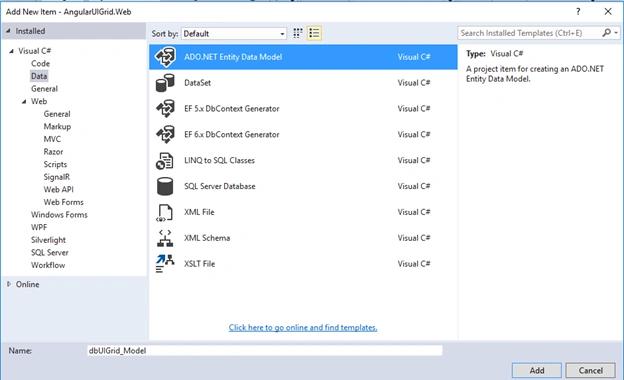
I have used api controller to get data from server, which will get called while pagination operates.
Api-Controller
- [RoutePrefix("api/Product")]
- public class ProductController : ApiController
- {
- private dbUIGrid_Entities _ctx = null;
-
- [HttpGet, ResponseType(typeof(tblProduct)), Route("GetProducts/{pageNumber:int}/{pageSize:int}")]
- public IHttpActionResult GetProducts(int pageNumber, int pageSize)
- {
- List<tblProduct> productList = null; int recordsTotal = 0;
- try
- {
- using (_ctx = new dbUIGrid_Entities())
- {
- recordsTotal = _ctx.tblProducts.Count();
- productList = _ctx.tblProducts.OrderBy(x => x.ProductID)
- .Skip(pageNumber)
- .Take(pageSize)
- .ToList();
- }
- }
- catch (Exception)
- {
- }
- return Json(new
- {
- recordsTotal,
- productList
- });
- }
- }
Final Output:
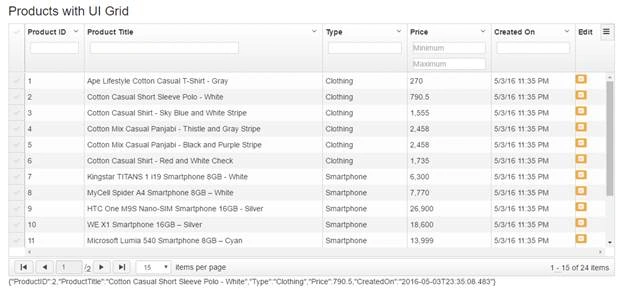
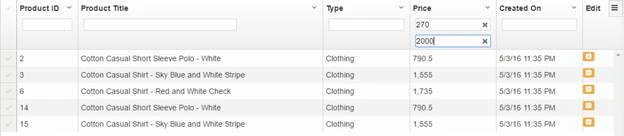
Filter Data
Hope this will help.


Rajiv SharmaPosted May 19, 2017, 2:24 AM
Https://code.msdn.microsoft.com/ASPNET-MVC-Angular-UIGrid-82e591f2
Santosh Kumar AdidawarpuPosted May 11, 2016, 5:28 AM
Nice share..
Neeraj KumarPosted May 6, 2016, 1:43 PM
Nice...
Sr KarthigaPosted May 6, 2016, 3:43 AM
good one
Kuppurasu NagarajPosted May 5, 2016, 1:06 PM
Nice Sharing..